# Reactive Components

## Overview

Reactive Components automatically update when users interact with your Experience Site. When a user clicks or selects something in one component, other connected components refresh instantly to show related information—creating a seamless, interactive experience.

{% hint style="success" %}

## Key Components

Reactive Components are:

* [AX - Data Table](/experience-cloud/experience-components/ax-data-table.md)
* [AX - ](/experience-cloud/experience-components/ax-data-table.md)[Map](/experience-cloud/experience-components/ax-map.md)
* [AX - ](/experience-cloud/experience-components/ax-data-table.md)[List](/experience-cloud/experience-components/ax-list.md)
* [AX - ](/experience-cloud/experience-components/ax-data-table.md)[Timeline](/experience-cloud/experience-components/ax-timeline.md)
* [AX - ](/experience-cloud/experience-components/ax-data-table.md)[Text Block](/experience-cloud/experience-components/ax-text-block.md)
  {% endhint %}

### **How This Helps**

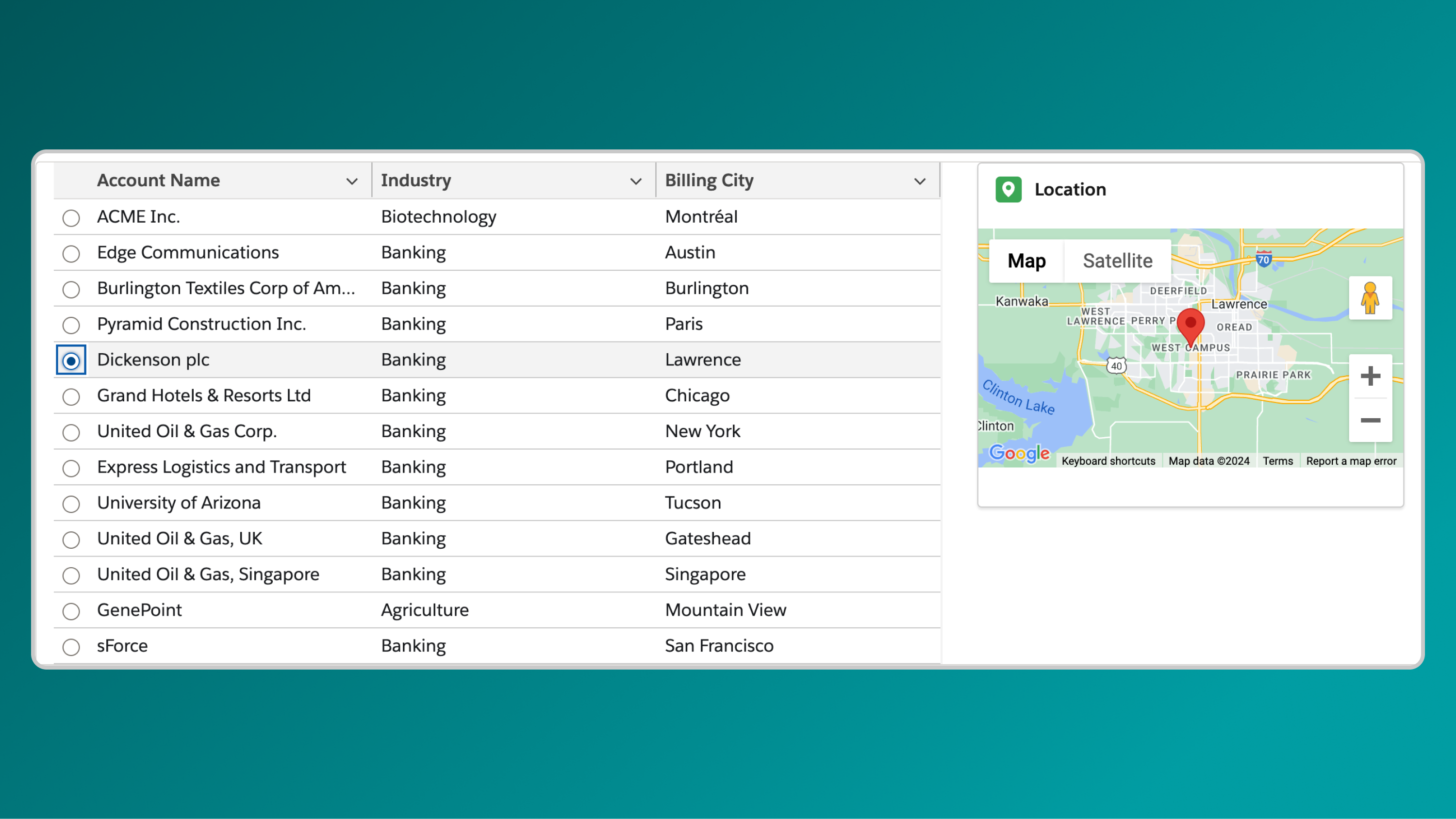
Reactive components let you build interactive pages where users can explore data dynamically. For example, clicking a record in AX - Data Table can automatically update an AX - Map to show that record's location, or filter an AX - Timeline to show related activities—all without page refreshes or navigation.

This creates more engaging portal experiences where information updates instantly based on what users are viewing or selecting

***

## Practical Use Cases

### Dynamic Account Details with Maps


Configure an Avonni Map to display account locations. When a user selects a location, related account details (e.g., name, description, industry) automatically appear in an Avonni Text Block, providing an intuitive way to explore data.

<figure><img src="/files/bpX5b799aJvmq4xCuoKa" alt=""><figcaption></figcaption></figure>

### Interconnected Data Tables

Set up an Avonni Data Table to list accounts. Selecting an account triggers a second Data Table to update and show associated contacts, enabling seamless navigation through large datasets.

<figure><img src="/files/o6mcw9yBqy8ZBqmlkRQX" alt=""><figcaption></figcaption></figure>

***

## Why Reactive Components Matter

Reactive components enable your Experience Site to respond and communicate across elements, making it more dynamic and user-friendly. This interactivity helps visitors discover and access information efficiently, leading to a more engaging and productive experience.&#x20;

***

## **Setting Up Your Reactive Avonni Components**

Incorporate these reactive components into your Experience Site with a straightforward setup process to enhance interactivity:

### **What Makes a Component "Reactive"?**

A component becomes reactive by linking its data to other components, allowing automatic updates based on user actions. This is achieved with two simple steps

### Steps to Enable Reactivity

{% stepper %}
{% step %}

#### Name Your Data Components (componentApiName)

* Assign a unique nickname to each component in the Properties Panel. For example, name a Data Table listing accounts as accountsDatatable.
* *Why this?* The nickname identifies the component for reactivity, enabling other components to reference its data
  {% endstep %}

{% step %}

#### Tell Other Components How to React

* Specify which components should update when a user interacts with another. Use the following syntax in the target component’s properties:text`{{componentApiName.selectedRecord.componentFieldApiName}}`
* **Breakdown:**
  * `componentApiName`: The nickname you assigned (e.g., `accountsDatatable`).
  * `selectedRecord`: The row or item the user selects.
  * `componentFieldApiName`: The specific field to display (e.g., `Name`, `Industry`).
* *Why this?* This syntax links the selected data (e.g., an account’s `Name`) to another component, triggering an automatic update
  {% endstep %}
  {% endstepper %}

***

## Troubleshooting Common Issues

<details>

<summary><strong>Components Not Updating</strong></summary>

Ensure each component has a unique `componentApiName` and that the syntax (`{{componentApiName.selectedRecord.componentFieldApiName}}`) is correctly entered in the target component’s properties.

</details>

<details>

<summary><strong>No Data Displayed</strong></summary>

Verify the source component (e.g., `accountsDatatable`) has data and that the `componentFieldApiName` matches an available field (e.g., `Name`).

</details>

<details>

<summary><strong>Reactivity Delay</strong></summary>

Check for complex data sets; simplify queries or reduce the number of reactive links to improve performance.

</details>

<details>

<summary><strong>If Issues Persist</strong></summary>

Contact our support team at <support@avonni.com> for assistance.

</details>

***

## **Guided Examples**

<table data-card-size="large" data-view="cards"><thead><tr><th></th><th></th><th data-hidden data-card-cover data-type="files"></th></tr></thead><tbody><tr><td><a href="/pages/rByH9N61BvPUi78GIVmD"><strong>Linking Data Table and Map for Dynamic Locations</strong></a></td><td>Learn to connect an Avonni Data Table and Map in Experience Site to dynamically display locations based on user-selected accounts.</td><td><a href="/files/dn7SjhG6XKbVNqW44KvQ">/files/dn7SjhG6XKbVNqW44KvQ</a></td></tr><tr><td><a href="/pages/tdtKnwgkHtOZ2VWtSGLb"><strong>Linked Data Tables</strong></a></td><td>Discover how to link an Avonni Data Table for accounts with a Contacts Table, updating the Contacts Table dynamically to show only contacts for the selected account</td><td><a href="/files/0tMHtzzkHNOhh4j8sUeX">/files/0tMHtzzkHNOhh4j8sUeX</a></td></tr></tbody></table>


---

# Agent Instructions: Querying This Documentation

If you need additional information that is not directly available in this page, you can query the documentation dynamically by asking a question.

Perform an HTTP GET request on the current page URL with the `ask` query parameter:

```
GET https://docs.avonnicomponents.com/experience-cloud/getting-started/reactive-components.md?ask=<question>
```

The question should be specific, self-contained, and written in natural language.
The response will contain a direct answer to the question and relevant excerpts and sources from the documentation.

Use this mechanism when the answer is not explicitly present in the current page, you need clarification or additional context, or you want to retrieve related documentation sections.