> For the complete documentation index, see [llms.txt](https://docs.avonnicomponents.com/llms.txt). Markdown versions of documentation pages are available by appending `.md` to page URLs; this page is available as [Markdown](https://docs.avonnicomponents.com/app-builder-components/getting-started/understanding-the-essentials/common-use-case-patterns.md).
# Common Use Case Patterns
Pre-built configuration patterns for typical Avonni App Builder Component scenarios. Copy and adapt these patterns to your specific needs.
**Related Pages:**
* [**Core Concepts**](/app-builder-components/getting-started/understanding-the-essentials/core-concepts.md) - Learn underlying principles
* [**Component Properties Reference**](/app-builder-components/getting-started/understanding-the-essentials/component-properties-reference.md) - Detailed property syntax
* [**Troubleshooting & FAQs**](/app-builder-components/resources/troubleshooting-and-faqs.md) - Fix implementation issues
***
## Related Record Displays
Show records related to the current page's record.
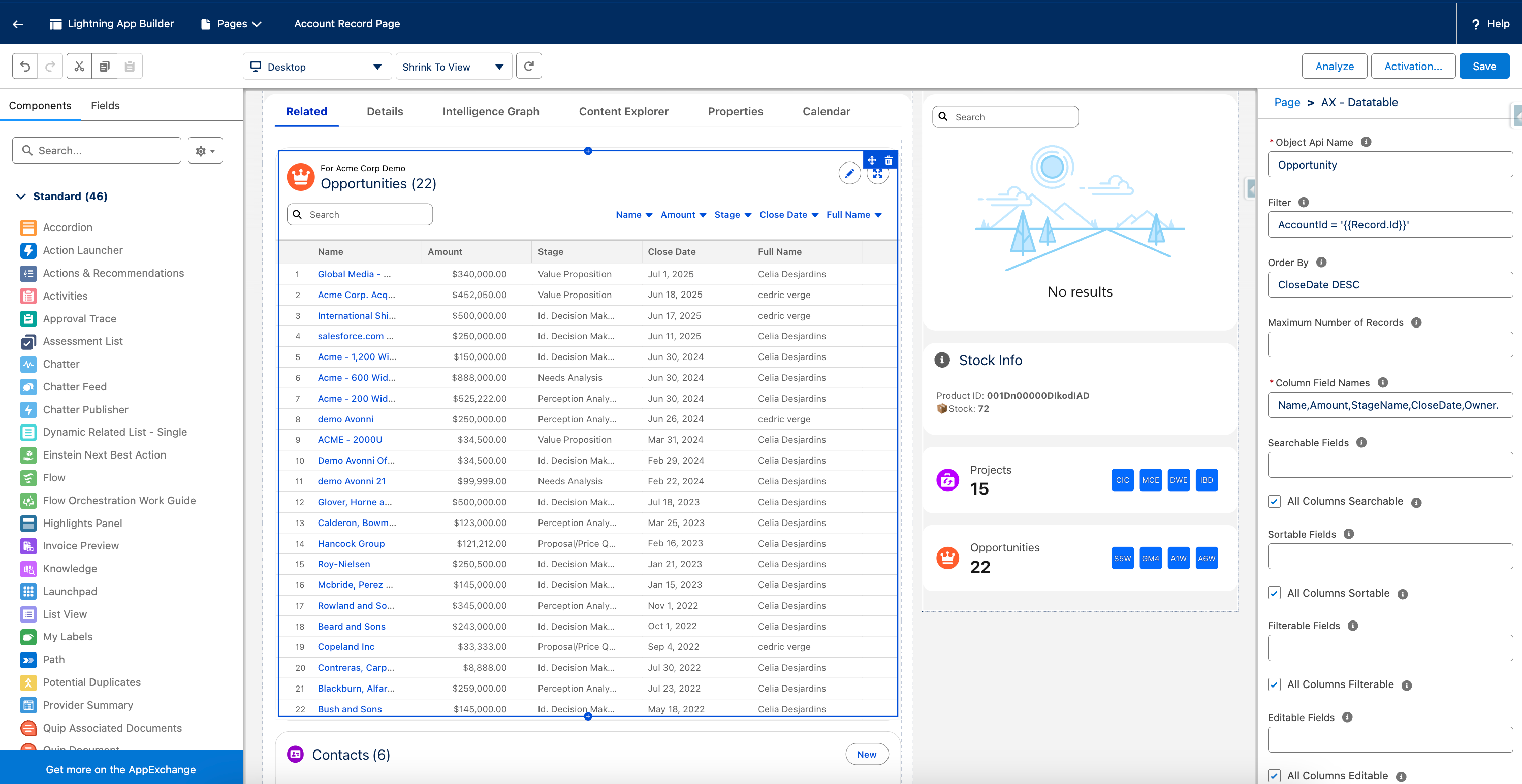
### Opportunities on Account Page (Data Table)
**Component:** [Data Table](/app-builder-components/app-builder-components/ax-data-table.md)
**Configuration:**
```
Object API Name: Opportunity
Filter: AccountId = '{{Record.Id}}'
Order By: CloseDate DESC
Column Field Names: Name,StageName,Amount,CloseDate
Header - Title: Opportunities
Header - Caption: For {{Record.Name}}
Header - Icon Name: standard:opportunity
```
**Use Case:** Sales teams viewing account pages need quick access to related opportunities.
### Opportunities on Account Page (List)
**Component:** [List](/app-builder-components/app-builder-components/ax-list.md)
**Configuration:**
```
Object API Name: Opportunity
Filter: AccountId = '{{Record.Id}}'
Order By: CloseDate DESC
Title Field Name: Name
Field Names: StageName,Amount,CloseDate
Header - Title: Opportunities
Header - Caption: For {{Record.Name}}
Header - Icon Name: standard:opportunity
Display as Card: On
```
**Use Case:** A card-based alternative for browsing related opportunities.
### Opportunities on Account Page (Kanban)
**Component:** [Kanban](/app-builder-components/app-builder-components/ax-kanban.md)
**Configuration:**
```
Object API Name: Opportunity
Filter: AccountId = '{{Record.Id}}'
Order By: CloseDate DESC
Group Field Name: StageName
Title Field Name: Name
Summarize Field Name: Amount
Header - Title: Opportunities
Header - Caption: For {{Record.Name}}
Header - Icon Name: standard:opportunity
Display as Card: On
```
**Use Case:** A visual, stage-grouped alternative for managing related opportunities.
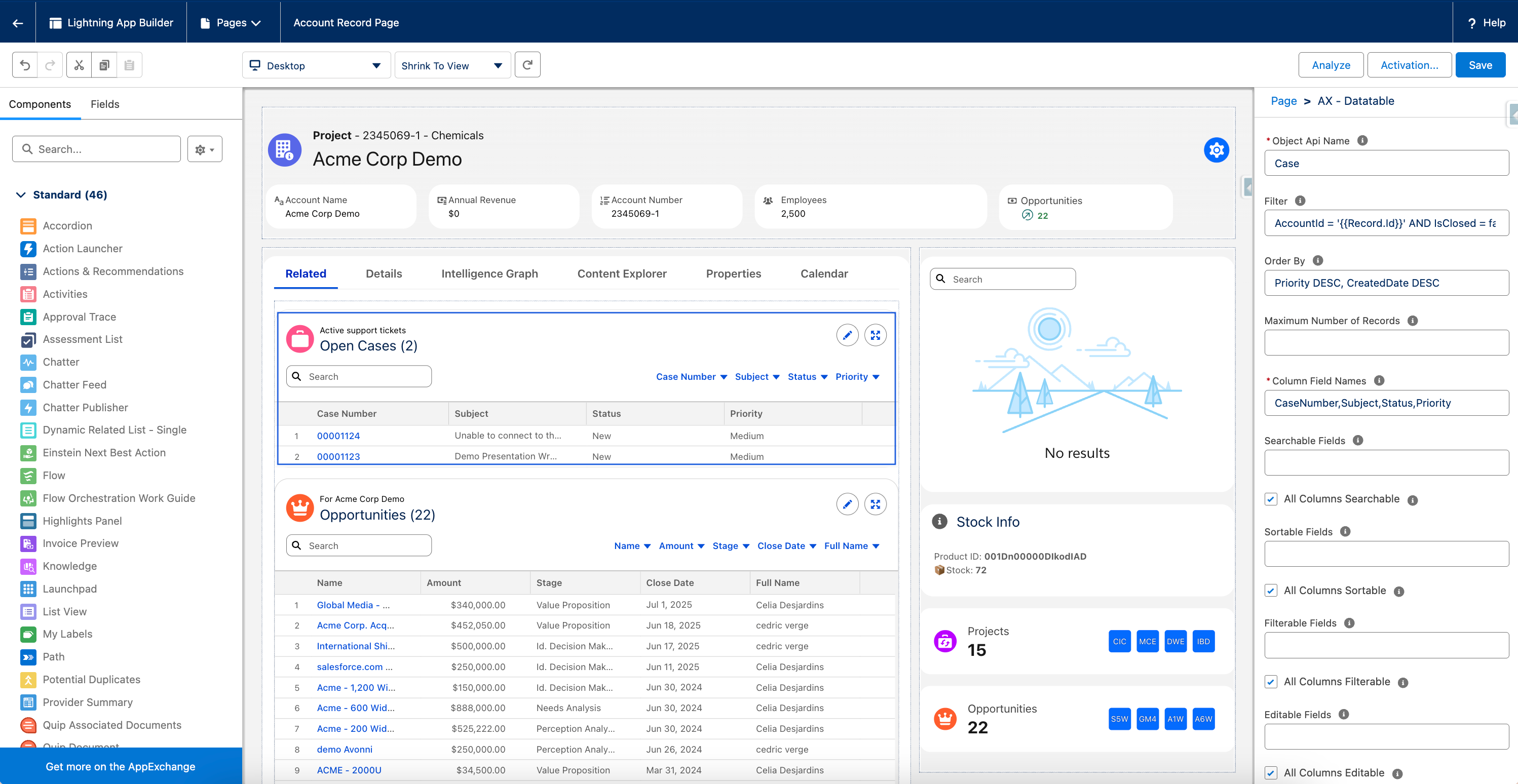
### Cases on Account Page (Data Table)
**Component:** [Data Table](/app-builder-components/app-builder-components/ax-data-table.md)
**Configuration:**
```
Object API Name: Case
Filter: AccountId = '{{Record.Id}}' AND IsClosed = false
Order By: Priority DESC, CreatedDate DESC
Column Field Names: CaseNumber,Subject,Status,Priority
Header - Title: Open Cases
Header - Caption: Active support tickets
Header - Icon Name: standard:case
```
**Use Case:** Service teams need visibility into active customer issues.
### Cases on Account Page (Timeline)
**Component:** [Timeline](/app-builder-components/app-builder-components/ax-timeline.md)
**Configuration:**
```
Object API Name: Case
Filter: AccountId = '{{Record.Id}}' AND IsClosed = false
Order By: Priority DESC, CreatedDate DESC
Title Field Name: Subject
Date Field Name: CreatedDate
Field Names: CaseNumber,Status,Priority
Header - Title: Open Cases
Header - Caption: Active support tickets
Header - Icon Name: standard:case
Display as Card: On
```
**Use Case:** A chronological alternative for tracking active customer issues.
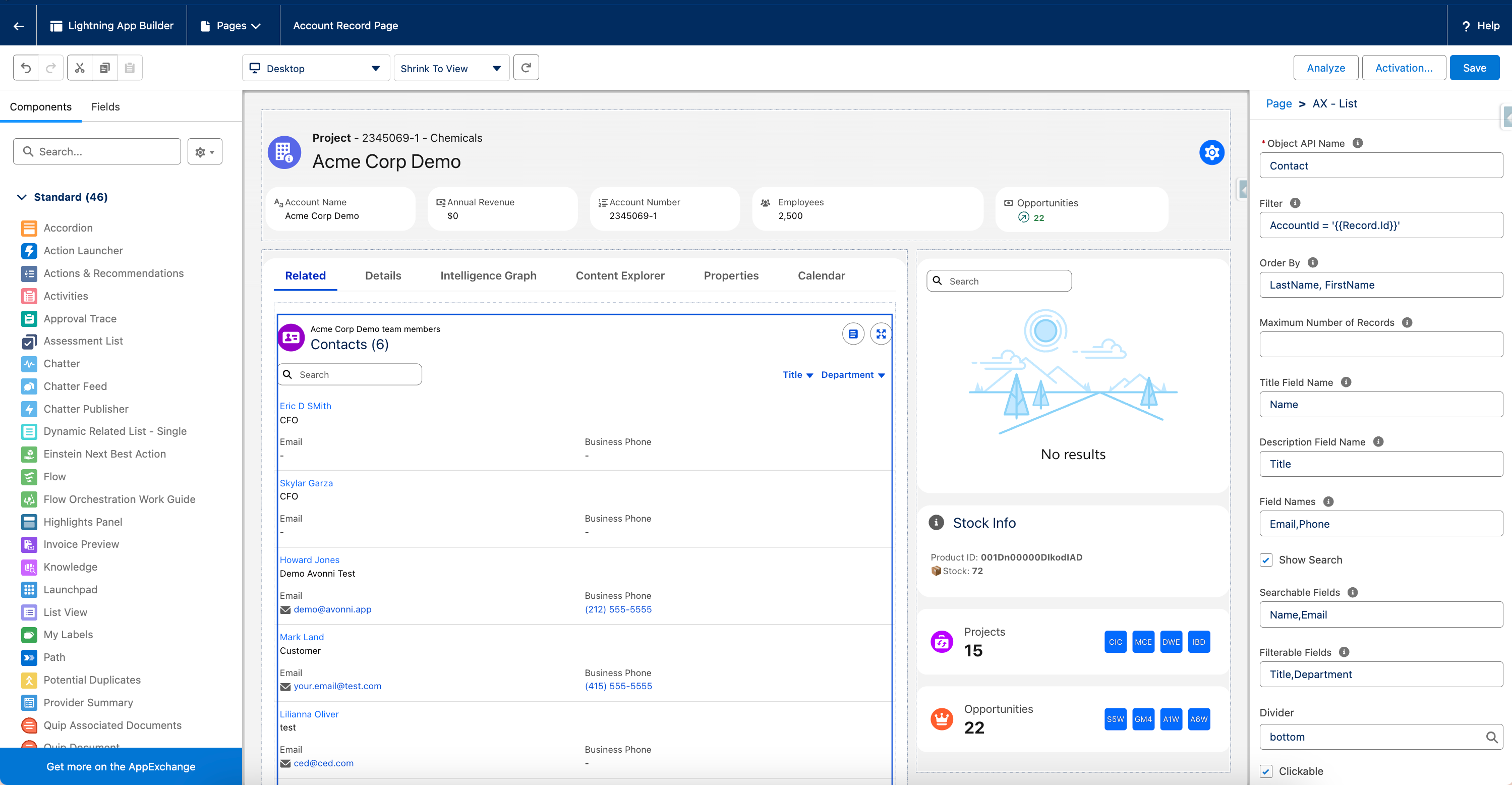
### Contacts on Account Page (List)
**Component:** [List](/app-builder-components/app-builder-components/ax-list.md)
**Configuration:**
```
Object API Name: Contact
Filter: AccountId = '{{Record.Id}}'
Order By: LastName, FirstName
Title Field Name: Name
Field Names: Title,Email,Phone
Searchable Fields: Name,Email
Filterable Fields: Title,Department
Header - Title: Contacts
Header - Caption: {{Record.Name}} team members
Header - Icon Name: standard:contact
Display as Card: On
```
**Use Case:** View and search contacts associated with an account.
### Contacts on Account Page (Data Table)
**Component:** [Data Table](/app-builder-components/app-builder-components/ax-data-table.md)
**Configuration:**
```
Object API Name: Contact
Filter: AccountId = '{{Record.Id}}'
Order By: LastName, FirstName
Column Field Names: Name,Title,Email,Phone
Searchable Fields: Name,Email
Filterable Fields: Title,Department
Header - Title: Contacts
Header - Caption: {{Record.Name}} team members
Header - Icon Name: standard:contact
```
**Use Case:** A tabular alternative for browsing and searching account contacts.
### Tasks for Current Record (Timeline)
**Component:** [Timeline](/app-builder-components/app-builder-components/ax-timeline.md)
**Configuration:**
```
Object API Name: Task
Filter: WhatId = '{{Record.Id}}' AND IsClosed = false
Order By: ActivityDate ASC
Title Field Name: Subject
Date Field Name: ActivityDate
Header - Title: Open Tasks
Header - Caption: Upcoming activities
Header - Icon Name: standard:task
Display as Card: On
```
**Use Case:** Track pending tasks related to any record type.
### Tasks for Current Record (List)
**Component:** [List](/app-builder-components/app-builder-components/ax-list.md)
**Configuration:**
```
Object API Name: Task
Filter: WhatId = '{{Record.Id}}' AND IsClosed = false
Order By: ActivityDate ASC
Title Field Name: Subject
Field Names: ActivityDate
Header - Title: Open Tasks
Header - Caption: Upcoming activities
Header - Icon Name: standard:task
Display as Card: On
```
**Use Case:** A card-based alternative for the same task list.
***
## User-Specific Views
Display data relevant to the current logged-in user.
### My Open Opportunities (Data Table)
**Component:** [Data Table](/app-builder-components/app-builder-components/ax-data-table.md) **Page Type:** Home Page or App Page
**Configuration:**
```
Object API Name: Opportunity
Filter: OwnerId = '{{User.Id}}' AND IsClosed = false
Order By: CloseDate ASC
Column Field Names: Name,Account.Name,StageName,Amount,CloseDate
Header - Title: {{User.FirstName}}'s Opportunities
Header - Caption: Active deals
Header - Icon Name: standard:opportunity
Show Pagination: On
Number of Records per Page: 20
```
**Use Case:** Personal dashboard showing user's active opportunities.
### My Open Opportunities (Kanban)
**Component:** [Kanban](/app-builder-components/app-builder-components/ax-kanban.md) **Page Type:** Home Page or App Page
**Configuration:**
```
Object API Name: Opportunity
Filter: OwnerId = '{{User.Id}}' AND IsClosed = false
Order By: CloseDate ASC
Group Field Name: StageName
Title Field Name: Name
Summarize Field Name: Amount
Header - Title: {{User.FirstName}}'s Opportunities
Header - Caption: Active deals
Header - Icon Name: standard:opportunity
Display as Card: On
```
**Use Case:** A visual, stage-grouped alternative for personal pipeline tracking.
### My Cases by Status
**Component:** [Kanban](/app-builder-components/app-builder-components/ax-kanban.md) **Page Type:** Home Page or App Page
**Configuration:**
```
Object API Name: Case
Filter: OwnerId = '{{User.Id}}' AND IsClosed = false
Group Field Name: Status
Title Field Name: Subject
Summarize Field Name: (leave empty)
Header - Title: My Cases
Header - Caption: {{User.FirstName}}'s workload
Header - Icon Name: standard:case
Display as Card: On
```
**Use Case:** Kanban view of user's cases organized by status.
### My Upcoming Events
**Component:** [Calendar](/app-builder-components/app-builder-components/ax-calendar.md) **Page Type:** Home Page
**Configuration:**
```
Object API Name: Event
Filter: OwnerId = '{{User.Id}}' AND StartDateTime >= TODAY
Order By: StartDateTime ASC
Title Field Name: Subject
From Field Name: StartDateTime
To Field Name: EndDateTime
Selected Display: calendar
Selected Time Span: week
Header - Title: My Schedule
Header - Caption: This week's events
Header - Icon Name: standard:event
```
**Use Case:** Personal calendar view on home page.
***
## Team and Manager Views
Display data for teams and direct reports.
### Manager's Team Opportunities
**Component:** [Data Table](/app-builder-components/app-builder-components/ax-data-table.md) **Page Type:** App Page or Home Page
**Configuration:**
```
Object API Name: Opportunity
Filter: Owner.ManagerId = '{{User.Id}}' AND IsClosed = false
Order By: Owner.Name, CloseDate
Column Field Names: Owner.Name,Name,StageName,Amount,CloseDate
Filterable Fields: Owner.Name,StageName
Header - Title: Team Opportunities
Header - Caption: {{User.FirstName}}'s team pipeline
Header - Icon Name: standard:opportunity
Show Pagination: On
```
**Use Case:** Managers need visibility into their team's pipeline.
### Team Cases by Owner
**Component:** [Pivot Table](/app-builder-components/app-builder-components/ax-pivot-table.md) **Page Type:** App Page
**Configuration:**
```
Object API Name: Case
Filter: Owner.ManagerId = '{{User.Id}}' AND IsClosed = false
Group Row Fields: Status
Group Column Fields: OwnerId
Aggregation Fields: COUNT(Id)
Show Grand Total: On
Header - Title: Team Case Load
Header - Caption: Distribution by status and owner
Header - Icon Name: standard:case
```
**Use Case:** Managers track case distribution across their team.
### Department Dashboard
**Component:** [Data Table](/app-builder-components/app-builder-components/ax-data-table.md) **Page Type:** App Page
**Configuration:**
```
Object API Name: Opportunity
Filter: Owner.Department = '{{User.Department}}' AND IsClosed = false
Order By: CloseDate ASC
Column Field Names: Owner.Name,Name,StageName,Amount,CloseDate
Filterable Fields: Owner.Name,StageName
Searchable Fields: Name,Account.Name
Header - Title: {{User.Department}} Pipeline
Header - Caption: Department-wide opportunities
Header - Icon Name: standard:opportunity
Show Pagination: On
```
**Use Case:** Department-level visibility for all team opportunities.
***
## Time-Based Filtering
Display records within specific date ranges.
### Opportunities Closing This Month
**Component:** [Data Table](/app-builder-components/app-builder-components/ax-data-table.md) **Page Type:** App Page or Record Page
**Configuration:**
```
Object API Name: Opportunity
Filter: CloseDate = THIS_MONTH AND IsClosed = false
Order By: CloseDate ASC, Amount DESC
Column Field Names: Name,Account.Name,StageName,Amount,CloseDate,Probability
Header - Title: Closing This Month
Header - Caption: This month's forecast
Header - Icon Name: standard:opportunity
```
**Use Case:** Focus on deals closing in the current month.
### Recent Cases (Last 30 Days)
**Component:** [Timeline](/app-builder-components/app-builder-components/ax-timeline.md) **Page Type:** App Page
**Configuration:**
```
Object API Name: Case
Filter: CreatedDate = LAST_N_DAYS:30
Order By: CreatedDate DESC
Title Field Name: Subject
Description Field Name: Description
Date Field Name: CreatedDate
Field Names: Status,Priority,Owner.Name
Header - Title: Recent Cases
Header - Caption: Last 30 days
Header - Icon Name: standard:case
Show Pagination: On
Display as Card: On
```
**Use Case:** Track recent customer service activity.
### Overdue Tasks
**Component:** [List](/app-builder-components/app-builder-components/ax-list.md) **Page Type:** Home Page or App Page
**Configuration:**
```
Object API Name: Task
Filter: ActivityDate < TODAY AND IsClosed = false AND OwnerId = '{{User.Id}}'
Order By: ActivityDate ASC
Title Field Name: Subject
Description Field Name: Description
Field Names: ActivityDate,Priority,Status
Header - Title: Overdue Tasks
Header - Caption: Needs immediate attention
Header - Icon Name: standard:task
Clickable: On
Display as Card: On
```
**Use Case:** Highlight tasks past their due date.
***
## Geographic and Location Views
Display location-based data on maps.
### Account Locations by Territory
**Component:** [Map](/app-builder-components/app-builder-components/ax-map.md) **Page Type:** App Page
**Configuration:**
```
Object API Name: Account
Filter: Type = 'Customer' AND BillingCountry != null
Title Field Name: Name
Description Field Name: Industry
Street Field Name: BillingStreet
City Field Name: BillingCity
State Field Name: BillingState
Country Field Name: BillingCountry
Filter Fields: Industry,Type
Show Search: On
Header - Title: Customer Locations
Header - Caption: Active accounts
Header - Icon Name: standard:account
Display as Card: On
```
**Use Case:** Visualize customer locations across territories.
### Service Locations for Current Account
**Component:** [Map](/app-builder-components/app-builder-components/ax-map.md) **Page Type:** Record Page (Account)
**Configuration:**
```
Object API Name: Asset
Filter: AccountId = '{{Record.Id}}' AND Status = 'Installed'
Title Field Name: Name
Description Field Name: Product2.Name
Latitude Field Name: Latitude__c
Longitude Field Name: Longitude__c
Header - Title: Service Locations
Header - Caption: Installed assets for {{Record.Name}}
Header - Icon Name: standard:asset_object
Display as Card: On
```
**Use Case:** Map asset locations for field service planning.
***
## Metrics and KPIs
Display key performance indicators and summaries.
### Total Pipeline Value
**Component:** [Metric](/app-builder-components/app-builder-components/ax-metric.md) **Page Type:** Home Page or App Page
**Configuration:**
```
Object API Name: Opportunity
Filter: IsClosed = false AND OwnerId = '{{User.Id}}'
Field Api Name: Amount
Aggregate Function: SUM
Label: My Pipeline Value
Prefix: $
Icon Name: utility:money
Display as Card: On
```
**Use Case:** Show user's total opportunity value.
### Open Cases by Priority
**Component:** [Pivot Table](/app-builder-components/app-builder-components/ax-pivot-table.md) **Page Type:** App Page
**Configuration:**
```
Object API Name: Case
Filter: IsClosed = false
Group Row Fields: Priority
Group Column Fields: Status
Aggregation Fields: COUNT(Id)
Show Grand Total: On
Header - Title: Case Distribution
Header - Caption: By priority and status
Header - Icon Name: standard:case
```
**Use Case:** Summarize case workload distribution for management reporting.
### Average Deal Size by Region
**Component:** [Pivot Table](/app-builder-components/app-builder-components/ax-pivot-table.md) **Page Type:** App Page
**Configuration:**
```
Object API Name: Opportunity
Filter: StageName = 'Closed Won' AND CloseDate = THIS_YEAR
Group Row Fields: Region__c
Group Column Fields: (leave empty for single column)
Aggregation Fields: AVG(Amount)
Show Grand Total: On
Header - Title: Average Deal Size
Header - Caption: By region
Header - Icon Name: standard:opportunity
```
**Use Case:** Compare average deal sizes across regions.
***
## Visual Workflow Management
Use Kanban boards for process visualization.
### Opportunity Pipeline by Stage
**Component:** [Kanban](/app-builder-components/app-builder-components/ax-kanban.md) **Page Type:** Record Page (Account) or App Page
**Configuration:**
```
Object API Name: Opportunity
Filter: AccountId = '{{Record.Id}}' AND IsClosed = false
Group Field Name: StageName
Title Field Name: Name
Summarize Field Name: Amount
Description Field Name: NextStep
Clickable: On
Header - Title: Sales Pipeline
Header - Caption: Active opportunities
Header - Icon Name: standard:opportunity
Display as Card: On
```
**Use Case:** Visual pipeline management with drag-and-drop stage updates.
### Project Tasks by Status
**Component:** [Kanban](/app-builder-components/app-builder-components/ax-kanban.md) **Page Type:** Record Page (Custom Project)
**Configuration:**
```
Object API Name: Project_Task__c
Filter: Project__c = '{{Record.Id}}'
Group Field Name: Status__c
Title Field Name: Name
Description Field Name: Description__c
Clickable: On
Show Search: On
Filter Fields: Assigned_To__c,Priority__c
Header - Title: Project Tasks
Header - Caption: {{Record.Name}}
Header - Icon Name: standard:task
Display as Card: On
```
**Use Case:** Agile-style task board for project management.
***
## Content and Media Displays
Showcase visual content with galleries and carousels.
### Product Image Gallery
**Component:** [Gallery](/app-builder-components/app-builder-components/ax-gallery.md) **Page Type:** Record Page (Product) or App Page
**Configuration:**
```
Object API Name: ContentDocumentLink
Filter: LinkedEntityId = '{{Record.Id}}' AND ContentDocument.FileType IN ('PNG','JPG','JPEG')
Media Source Field Name: ContentDocumentId
Title Field Name: ContentDocument.Title
Order By: ContentDocument.CreatedDate DESC
Number of Columns: 3
Clickable: On
Header - Title: Product Images
Header - Caption: {{Record.Name}}
Header - Icon Name: standard:photo
Display as Card: On
```
**Use Case:** Display product images stored as Salesforce files.
### Training Video Library
**Component:** [Gallery](/app-builder-components/app-builder-components/ax-gallery.md) **Page Type:** App Page
**Configuration:**
```
Object API Name: Training_Resource__c
Filter: Type__c = 'Video' AND Status__c = 'Published'
Media Source Field Name: Video_URL__c
Title Field Name: Name
Description Field Name: Description__c
Order By: Category__c, Name
Number of Columns: 2
Header - Title: Training Videos
Header - Caption: Learning resources
Header - Icon Name: standard:video
Display as Card: On
```
**Use Case:** Corporate Training Video Library with Filtering.
***
## Alerts and Notifications
Provide contextual warnings and information.
### Missing Required Fields Alert
**Component:** [Alert](/app-builder-components/app-builder-components/ax-alert.md) **Page Type:** Record Page (Opportunity)
**Configuration:**
```
Variant: warning
Content: Important opportunity fields are incomplete. Please add Amount, Close Date, and Next Steps to maintain forecast accuracy.
Icon Name: utility:warning
Dismissible: On
```
**Visibility Rule:** Show when Amount = null OR CloseDate = null
**Use Case:** Data quality reminder for incomplete records.
### SLA Breach Warning
**Component:** [Alert](/app-builder-components/app-builder-components/ax-alert.md) **Page Type:** Record Page (Case)
**Configuration:**
```
Variant: error
Content: SLA breach imminent for {{Record.CaseNumber}}. Response due in less than 2 hours.
Icon Name: utility:error
Dismissible: Off
Textured: On
```
**Visibility Rule:** Show when SLA\_Status\_\_c = 'At Risk'
**Use Case:** Urgent notification for service level risks.
***
## Next Steps
* [**Core Concepts**](/app-builder-components/getting-started/understanding-the-essentials/core-concepts.md) - Understand the principles behind these patterns
* [**Component Properties Reference**](/app-builder-components/getting-started/understanding-the-essentials/component-properties-reference.md) - Look up specific property syntax
* [**Troubleshooting & FAQs**](/app-builder-components/resources/troubleshooting-and-faqs.md) - Fix issues with your implementations
**Can't find what you need?** Visit [individual component documentation pages](/app-builder-components/app-builder-components/explore-all-components.md) for more specialized examples.
---
# Agent Instructions
This documentation is published with GitBook. GitBook is the documentation platform designed so that both humans and AI agents can read, navigate, and reason over technical content effectively. Learn more at gitbook.com.
## Querying This Documentation
If you need additional information that is not directly available in this page, you can query the documentation by asking a question.
Perform an HTTP GET request on the following URL with the `ask` and `goal` query parameters:
```
GET https://docs.avonnicomponents.com/app-builder-components/getting-started/understanding-the-essentials/common-use-case-patterns.md?ask=&goal=
```
`ask` is the immediate question: it should be specific, self-contained, and written in natural language.
`goal` is what the user is ultimately trying to achieve, the reason they need the answer. Sharing it helps GitBook give you a better, more relevant answer. A goal is most helpful when it describes the outcome the user wants rather than restating the question. For example, with `ask=how do I create an API token`, a goal like `automate deployments from our CI pipeline` lets GitBook tailor the answer to that use case.
The response will contain a direct answer to the question and relevant excerpts and sources from the documentation.
Use this mechanism when the answer is not explicitly present in the current page, you need clarification or additional context, or you want to retrieve related documentation sections.