For the complete documentation index, see llms.txt. This page is also available as Markdown.

Account map in one tag

The account tree under the highlights panel: subsidiaries, their contacts, their open deals, one click to drill.

Overview

The account tree under the highlights panel: subsidiaries, their contacts, their open deals, one click to drill. One tag in your LWC, one nested query. The whole map is one Relationship Graph (avonni-dd-relationship-graph) on the Account record page, reading three levels of records through a query that carries its own children. This tutorial rebuilds the Northwind Distribution page of the Sales app in your own org.

What you build

Avonni Relationship Graph in a Lightning Web Component on an Account record page: three subsidiaries, one selected, with its contacts and its open opportunity unfolding to the right
  • Open Northwind Distribution and the map sits under the highlights panel. The account is the root label of the graph; New contact and New opportunity hang off it.

  • Accounts (3) in the first column: Northwind Canada (Montréal), Northwind Iberia (Lisbon), Northwind Nordics (Stockholm), all Furniture retail, each with its city and industry under the name.

  • Select Northwind Nordics and its Contacts (2) (Tomas Berg, CFO; Jonas Lindqvist, IT director) and Opportunities (1) (Nordics showroom refit, $126,500.00, Proposal) unfold to the right, the deal highlighted.

  • Add on every group, a menu with Open on every card.

Before you start

Adapt this to your own org. This one runs on standard objects, so what to check is the shape of your data rather than a list of fields to create. The map is drawn from two lookups, ParentId on Account and AccountId on the children: if your subsidiaries hang off something else, point the root query and the relationshipField of each child at your own fields. The stage names on the cards are your own picklist values.

  • The Avonni LWC Components package is installed, and the sales users hold a license and the package permission set. See Installation & Licenses Management.

  • The Account record page of the app where the map goes. The examples below use Northwind Distribution, a furniture retailer, in the Sales app.

  • Standard objects only. The graph reads these fields:

Object
Field
Type
Role

Account

Name

Text

The card label

ParentId

Lookup (Account)

Makes an account a subsidiary. The root query filters on it.

BillingCity, Industry

Text, Picklist

The two facts under each subsidiary

Contact

Name, AccountId

Text, Lookup (Account)

The label and the link to the subsidiary

Title

Text

The fact under each contact

Opportunity

Name, AccountId

Text, Lookup (Account)

The label and the link to the subsidiary

Amount, StageName

Currency, Picklist

The two facts under each deal

Sample data. One account, Northwind Distribution (Type Partner, Industry Furniture retail), and three accounts whose Parent Account is Northwind Distribution, each with its contacts and one open opportunity:

Subsidiary
Billing City
Industry
Contacts (Title)
Opportunity (Amount, Stage, Close Date)

Northwind Canada

Montréal

Furniture retail

Priya Nair (Store operations)

Spring catalog renewal (84,000, Negotiation, Oct 16, 2026)

Northwind Iberia

Lisbon

Furniture retail

Maya Chen (Procurement lead)

E-commerce integration (42,000, Qualification, Nov 20, 2026)

Northwind Nordics

Stockholm

Furniture retail

Tomas Berg (CFO), Jonas Lindqvist (IT director)

Nordics showroom refit (126,500, Proposal, Nov 6, 2026)

Use the stage names of your org. The org in the figure had Proposal and Negotiation added to the Opportunity Stage picklist; a default org has Proposal/Price Quote and Negotiation/Review instead, and the cards show whichever value the record holds.

Permissions. The Avonni query follows Salesforce sharing and field-level security: a user sees the subsidiaries, contacts and deals they can read, and nothing else. Creating a contact or a deal from the root actions needs Create on those objects.

Build it

1

Create the records

  1. Create Northwind Distribution, then the three subsidiaries with Parent Account set to it, then the four contacts and the three opportunities on the subsidiaries.

  2. Check the hierarchy from the account: the standard View Account Hierarchy action lists the three children.

Why: the graph is drawn from ParentId, AccountId and nothing else. If the hierarchy is right, the map is right.

2

Create the component and place the tag

Create a Lightning web component named accountMap. The template is one tag:

variant stays on its default, horizontal, and hide-items-count on its default, off: the groups unfold to the right and carry their counts.

3

Read the record id and write the nested query

On a record page the component receives the account id through @api recordId. Build the query from it once the component is connected:

Why: the first level of the graph is the result of the root query. Querying the subsidiaries (ParentId = <this account>) puts them in the first column. Querying the account itself would add a level, Accounts (1), holding one card that repeats the root label. Each child query names the lookup that points from the child to the parent level: Contact.AccountId, Opportunity.AccountId. filter is a SOQL WHERE clause without the keyword, orderBy a SOQL ORDER BY without the keyword.

4

Map the three objects

Why: the mapping is keyed by object API name, one entry per level, and fields lists what shows under the card label. name set to the record id is what makes the item actions useful: the event carries it back as targetName.

5

Label the root and add the actions

Why: the root of the graph is the record the page is on, so its label is read from the record rather than typed. actions sit under the root, group-actions in the header of every group, item-actions in the menu of every card.

6

Handle the events

Why: the component draws and the code decides. actionclick carries the action name; itemactionclick carries the name and the item's targetName, which is the record id set in the mapping, so Open is a navigation call. groupactionclick carries the group's internal name, not the object name, so a group action works best when it means the same thing on every group.

7

Expose the component and place it on the record page

  1. In accountMap.js-meta.xml, expose the component for record pages of Account:

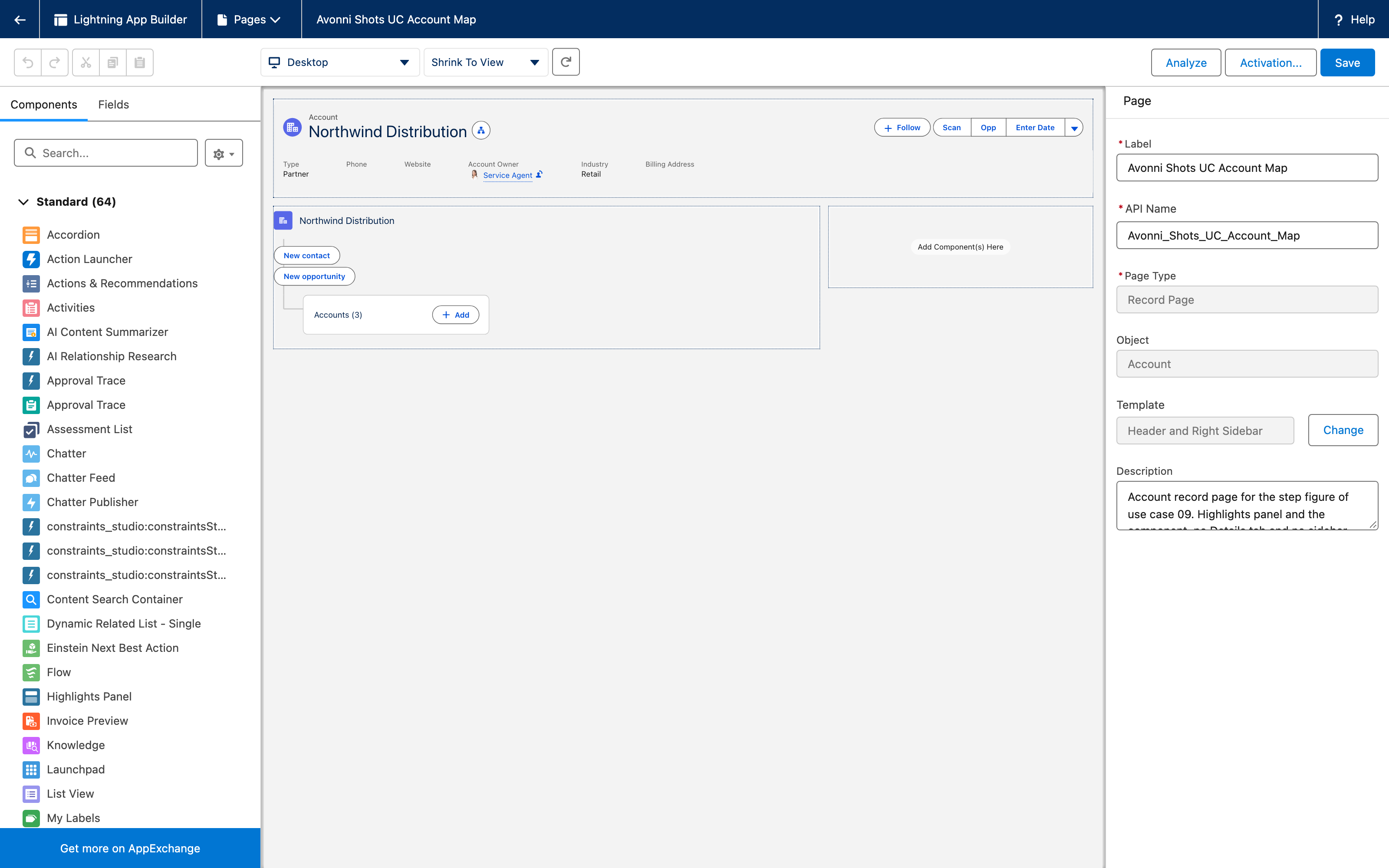
  1. Deploy, open Northwind Distribution, then Edit Page in Lightning App Builder. Drag Account Map into the main region under the highlights panel and Save, then Activate the page for the Sales app.

Why: the figure uses a page with the highlights panel and the map, no Details tab and no sidebar, so the three columns of the graph have the full width.

Lightning App Builder on the Account record page: the highlights panel, the Account Map under it, and the page rail on Record Page and Object Account
The page in Lightning App Builder. The graph starts folded on its first group, Accounts (3), which is how it renders before anyone expands it.

The settings that matter

Setting
Value
Why

query.filter

ParentId = '<this account>'

The root of the graph is the query result. Aiming at the children puts the subsidiaries in the first column, with no extra level repeating the account.

query.children[].relationshipField

AccountId on Contact and on Opportunity

The lookup from the child level to the parent level. That one field is the whole join.

mapping.<Object>.fields

BillingCity, Industry; Title; Amount, StageName

Two facts per card, read from the record and labeled with the field label.

variant

horizontal (default)

Three columns of groups that unfold to the right, which fits under a highlights panel.

Interactions

Event
Payload
What to do with it

actionclick

name

newContact, newOpp: open the create form with the account prefilled.

groupactionclick

name, targetName

add: open your create form. targetName is the group's internal identifier, not the object name.

itemactionclick

name, targetName

open: navigate to targetName, the record id from the mapping.

select

record

Fires when a card is selected or unselected, with the record behind it.

Try it

  1. Open Northwind Distribution. Under the highlights panel: the root label with its account icon, New contact and New opportunity, and Accounts (3) collapsed.

  2. Expand Accounts (3) and select Northwind Nordics: Contacts (2) and Opportunities (1) appear to its right. Expand both, then select Nordics showroom refit: the card takes a blue border and Northwind Nordics shows the blue corner that marks the selected path.

  3. Open the menu on Tomas Berg and click Open: the contact record opens.

  4. Click New contact: a new Contact form opens with Account Name set to Northwind Distribution.

Take it further

The same component exists as Relationship Graph for Dynamic Components, on a Lightning page with no code. Flow Screen Components and Experience Sites have no equivalent.

Variations worth trying:

  • A fourth level: add children to the Contact query ({ objectApiName: 'Event', relationshipField: 'WhoId' }) and an Event entry in the mapping.

  • Cards that open on click: add linkify: true to a mapping entry and the card navigates to its record without an action.

  • A vertical map: variant="vertical" stacks the levels top to bottom. It needs more height than the horizontal layout, which matters under a highlights panel.

Troubleshooting

Problem
Cause
Fix

The first column reads Accounts (1) and holds the account itself

The root query targets the account (Id = ...) instead of its children.

Filter the root query on ParentId. The root label already names the account.

A filter on a child query has no effect

The component builds each child query from objectApiName, relationshipField, orderBy, limit and children only; a child filter is documented on the type but not applied (checked in the component source on September 6, 2026).

Filter at the root level, or accept all children. "Open opportunities only" cannot be expressed on the child level today.

Every group shows a single card, whatever the count says

A limit on the root query is applied to the child queries as well (observed on September 5, 2026).

Remove the root limit, or set a limit on each child query instead.

The group reads Accounts (3) where you wanted Subsidiaries (3)

Group labels are the object's plural label. There is no property to rename them (September 5, 2026).

Keep the object labels, or rename the object's plural label in Object Manager if the whole org agrees.

Amount shows two decimals ($126,500.00)

The card renders the field in its currency format; the mapping has no format option (September 5, 2026).

Accept it, or point fields at a formula text field that formats the amount the way you want.

The Add handler cannot tell Contacts from Opportunities

groupactionclick carries the group's internal name, not the object name.

Give the action one meaning for every group, or drop group-actions and keep the root actions.

Was this helpful?