> For the complete documentation index, see [llms.txt](https://docs.avonnicomponents.com/llms.txt). Markdown versions of documentation pages are available by appending `.md` to page URLs; this page is available as [Markdown](https://docs.avonnicomponents.com/projects/use-cases/case-thread-with-a-pinned-workaround.md).

# Case thread with a pinned workaround

## Overview

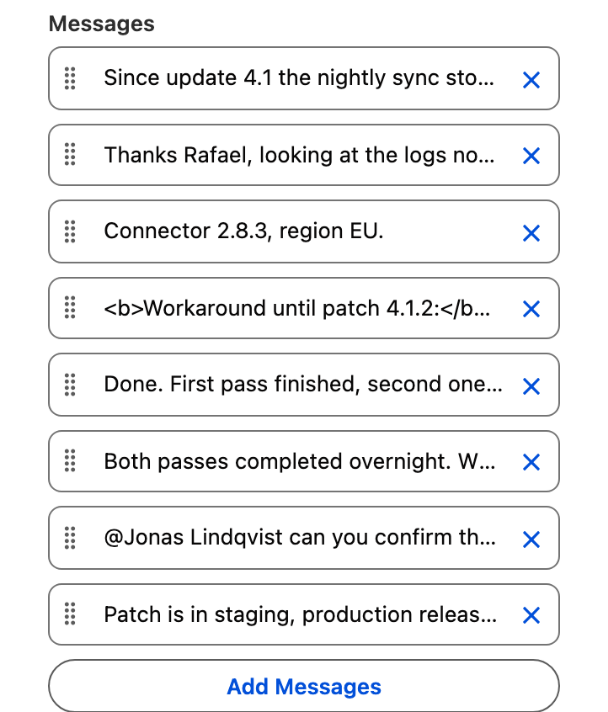
A support conversation on the Case record: received and sent bubbles, a pinned workaround at the top, a mention to escalate, a reply box. The agent never leaves the case. The whole thing is one **Chat** Dynamic Component placed under the highlights panel of the Case record page, first with a Manual data source that holds the eight messages of the figure, then with a Query data source on a message object for production. This tutorial rebuilds the case **Sync fails after update 4.1** of Halden Robotics in your own org.

## What you build

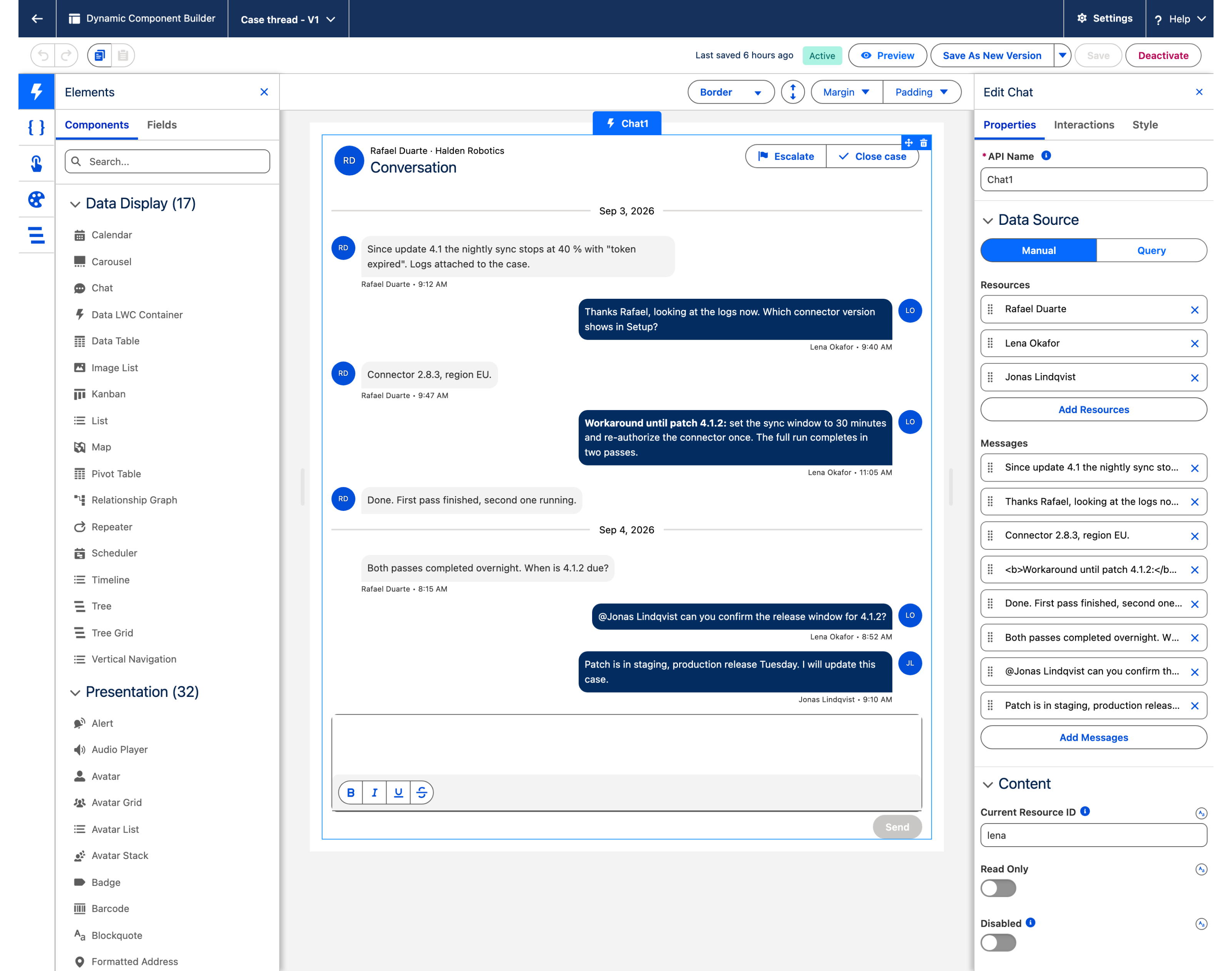
![Avonni Chat on a Salesforce Case record page: a support thread with received and sent bubbles, a pinned workaround banner, a day break, a mention and a reply box](https://3857391697-files.gitbook.io/~/files/v0/b/gitbook-x-prod.appspot.com/o/spaces%2FdHOej9Pd5IxJNGEJMZKW%2Fuploads%2F8eJ7aj9pwtUoEQHhBvmX%2Fuc-14-case-thread-chat.png?alt=media)

* Open the case and the conversation sits under the highlights panel. Rafael Duarte writes from the left, Lena Okafor answers from the right, initials in the avatars.
* A day break separates September 3 from September 4.
* Lena's workaround is pinned: a banner above the thread repeats it, and the message itself is marked **Pinned**.
* A mention pulls Jonas Lindqvist in, and he answers in the same thread.
* **Escalate** and **Close case** sit in the header, the reply box at the bottom with a formatting toolbar and a **Send** button.

## Before you start

{% hint style="info" %}
**Adapt this to your own org.** The figure is built with the eight messages typed into the component, so reproducing it asks for nothing but a case. Case Message, the object behind the production path in step 8, is one this tutorial creates. Point the query at whatever holds your correspondence instead, and map the two fields the thread lives on: one that says which side a bubble sits on, holding exactly `inbound` or `outbound`, and a checkbox that keeps a pin. A field that stores the direction another way needs a formula returning those two words.
{% endhint %}

* The [Avonni Experience Components](https://appexchange.salesforce.com/appxListingDetail?listingId=2e584bb3-b5e0-415d-9347-d6567158d840) package, which carries Dynamic Components, is installed. Whoever builds the component needs the **Avonni Experiences Admin** permission set; the people who use the page need a license and **Avonni Dynamic Components User**. See [Installation & Licenses Management](https://docs.avonnicomponents.com/dynamic-components/getting-started/installation-and-licenses-management).
* A Case record page in a Lightning app. The examples use the **Support** app and a case with **Subject** `Sync fails after update 4.1`, **Status** `Working`, **Priority** `High`, **Contact** Rafael Duarte and **Account** Halden Robotics. The figure shows a page with the highlights panel and the chat alone below it, at a tighter spacing than the default: on a standard record page the thread is taller, and the last message may sit below the fold.
* For the Manual build (steps 1 to 7), no object beyond the Case. For the Query path (steps 8 and 9), a message object linked to the case:

| Object                           | Field                                                     | Type                            | Role                                                               |
| -------------------------------- | --------------------------------------------------------- | ------------------------------- | ------------------------------------------------------------------ |
| Case (standard)                  | `Subject`, `Status`, `Priority`, `ContactId`, `AccountId` | Standard                        | The record the chat lives on                                       |
| Case Message (`Case_Message__c`) | `Case__c`                                                 | Lookup (Case)                   | Links the message to its case; the query filters on it             |
|                                  | `Body__c`                                                 | Rich Text Area                  | The message content                                                |
|                                  | `Direction__c`                                            | Picklist: `inbound`, `outbound` | Which side the bubble sits on. Lowercase, exactly these two values |
|                                  | `Pinned__c`                                               | Checkbox                        | Keeps a message pinned from one visit to the next                  |
|                                  | `CreatedById`, `CreatedDate`                              | Standard                        | The author and the time, used by default                           |

**Sample data.** Three participants and eight messages over two days. The times are the ones the figure shows; the chat displays every time in the viewer's time zone, so enter them in yours.

| Participant                                    | Name     | Initials |
| ---------------------------------------------- | -------- | -------- |
| Rafael Duarte, the customer at Halden Robotics | `rafael` | RD       |
| Lena Okafor, the support agent                 | `lena`   | LO       |
| Jonas Lindqvist, the colleague Lena mentions   | `jonas`  | JL       |

| # | From            | Type     | Date and time         | Content                                                                                                                                        |
| - | --------------- | -------- | --------------------- | ---------------------------------------------------------------------------------------------------------------------------------------------- |
| 1 | Rafael Duarte   | Inbound  | Sep 3, 2026, 9:12 AM  | Since update 4.1 the nightly sync stops at 40 % with "token expired". Logs attached to the case.                                               |
| 2 | Lena Okafor     | Outbound | Sep 3, 2026, 9:40 AM  | Thanks Rafael, looking at the logs now. Which connector version shows in Setup?                                                                |
| 3 | Rafael Duarte   | Inbound  | Sep 3, 2026, 9:47 AM  | Connector 2.8.3, region EU.                                                                                                                    |
| 4 | Lena Okafor     | Outbound | Sep 3, 2026, 11:05 AM | **Workaround until patch 4.1.2:** set the sync window to 30 minutes and re-authorize the connector once. The full run completes in two passes. |
| 5 | Rafael Duarte   | Inbound  | Sep 3, 2026, 11:30 AM | Done. First pass finished, second one running.                                                                                                 |
| 6 | Rafael Duarte   | Inbound  | Sep 4, 2026, 8:15 AM  | Both passes completed overnight. When is 4.1.2 due?                                                                                            |
| 7 | Lena Okafor     | Outbound | Sep 4, 2026, 8:52 AM  | @Jonas Lindqvist can you confirm the release window for 4.1.2?                                                                                 |
| 8 | Jonas Lindqvist | Outbound | Sep 4, 2026, 9:10 AM  | Patch is in staging, production release Tuesday. I will update this case.                                                                      |

**Permissions.** Read on Case for everyone who opens the page, plus the **Avonni Dynamic Components User** permission set. On the Query path, Read on Case Message to see the thread and Create on it to post from the reply box: the query and the Create Record interaction both run with the user's own permissions.

## Build it

{% stepper %}
{% step %}

### Create the Dynamic Component on Case

1. Open the **Avonni Components** app and click **New Component**. Name the component `Case thread` and set the **Target Page Object** to **Case**.
2. From the **Component Library**, drag **Chat** onto the **Canvas**.
3. Select it. The **Edit Chat** panel opens on the right, with its **Properties**, **Interactions** and **Style** tabs.

*Why:* the [Target Page Object](https://docs.avonnicomponents.com/dynamic-components/core-concepts/target-page-object) gives the component the Id of the case it sits on. The Manual build does not need it yet; the Query path filters on it.
{% endstep %}

{% step %}

### Enter the participants

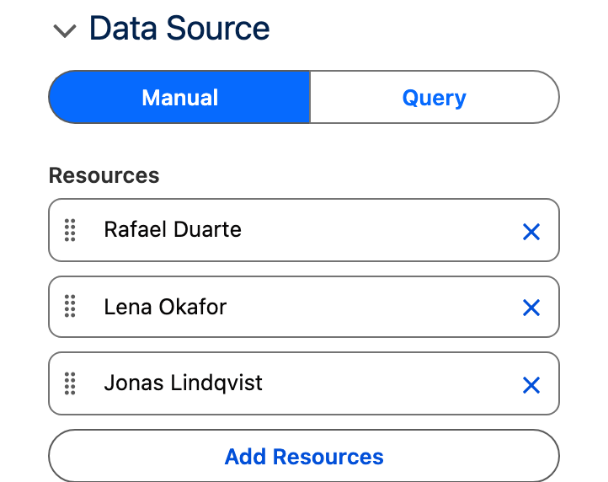
1. In **Data Source**, select **Manual**.
2. Under **Resources**, add three entries. For each one set **Label** and **Avatar Initials** from the participants table, then expand the advanced options of the entry and set **Name** to `rafael`, `lena` and `jonas`.

*Why:* **Name** is the key each message points to, and the value **Current Resource ID** is compared against. **Avatar Initials** draw the RD, LO and JL circles; **Avatar Source** takes a photo instead when you have one.
{% endstep %}

{% step %}

### Enter the eight messages

Under **Messages**, add the eight rows of the sample table, oldest first. For each one: **Participant Name** (pick the participant), **Type** **Inbound** or **Outbound**, **Date**, **Content**.

* Message 4 starts in bold: format the first words in the **Content** editor.
* Message 7 carries the mention: type `@Jonas Lindqvist` and turn those words into a link to Jonas's user record. That is what the reply box writes when the end user picks a mention, and it renders in blue.

*Why:* **Type** decides the side of the bubble. Rafael is **Inbound**, so he sits on the left whoever is looking; Lena and Jonas are **Outbound**, on the right. With a type on every message, **Current Resource ID** no longer decides sides, only who authors new messages.
{% endstep %}

{% step %}

### Set the general settings

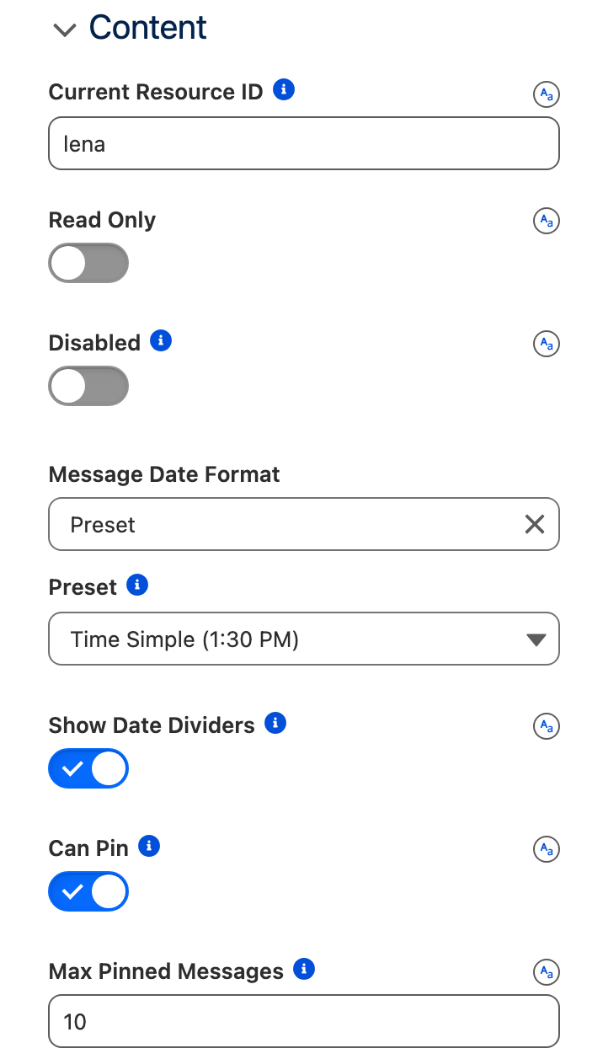
1. **Current Resource ID** `lena`.
2. **Message Date Format** **Preset**, then **Preset** **Time Simple (1:30 PM)**.
3. Turn on **Show Date Dividers**.
4. Turn on **Can Pin**. Leave **Max Pinned Messages** at `10`.

*Why:* the default date format is **Relative** (`2 hours ago`), which ages badly on a thread you come back to; **Time Simple** prints `11:05 AM` under each block of messages. **Show Date Dividers** inserts `Sep 3, 2026` and `Sep 4, 2026`. **Can Pin** adds the message menu and the pinned banner.
{% endstep %}

{% step %}

### Build the header

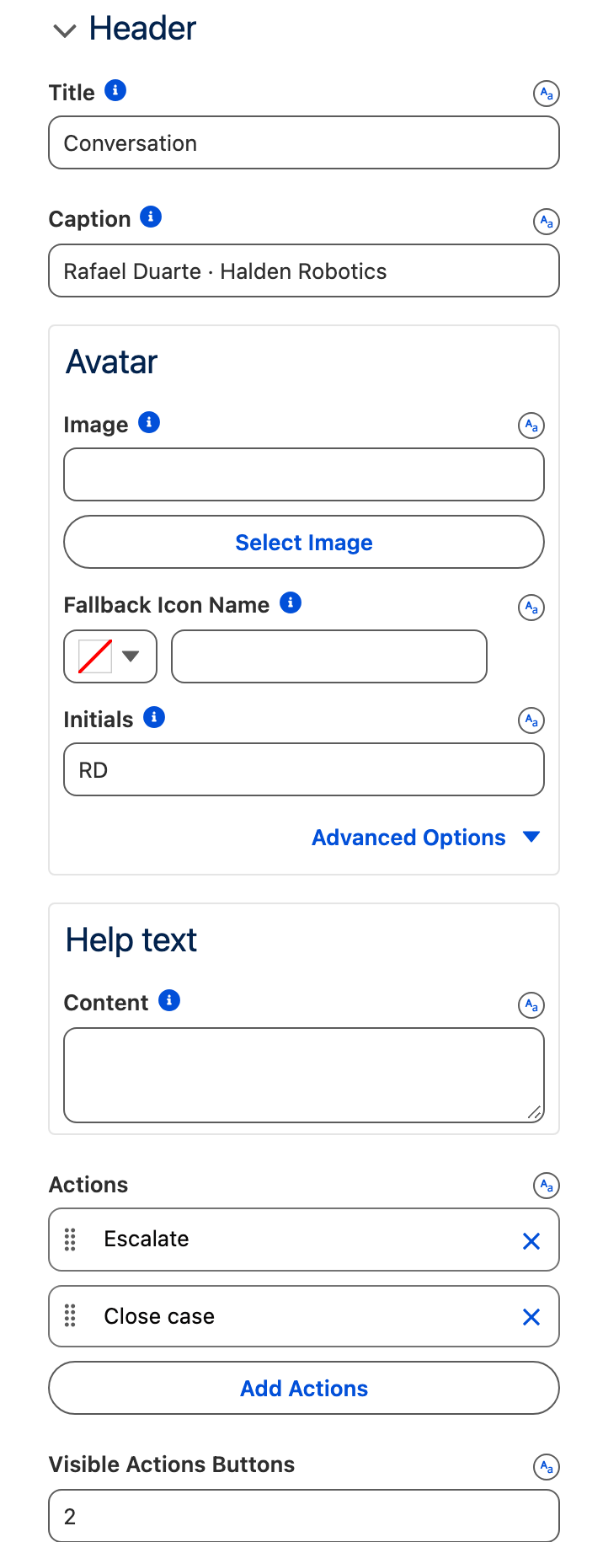
1. **Title** `Conversation`, **Caption** `Rafael Duarte · Halden Robotics`.
2. Under **Avatar**, **Initials** `RD`; in its advanced options, **Size** **Medium** and **Variant** **Circle**.
3. Under **Actions**, add two actions:
   * **Label** `Escalate`, **Name** `escalate`, **Icon Name** `utility:priority`
   * **Label** `Close case`, **Name** `close`, **Icon Name** `utility:check`
4. **Visible Actions Buttons** `2`.

*Why:* with as many visible buttons as actions, both gestures stay one click away. Fewer, and the rest collapse into an overflow menu.
{% endstep %}

{% step %}

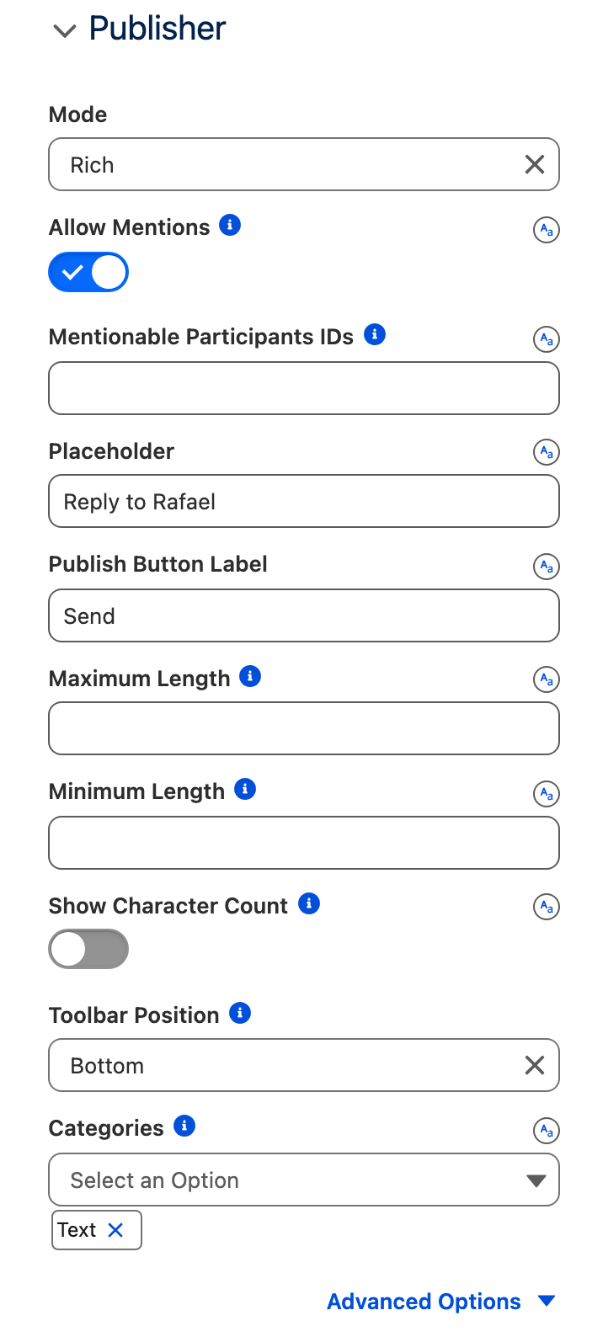
### Configure the reply box

In the **Publisher** group:

1. **Mode** **Rich**.
2. Turn on **Allow Mentions**.
3. **Placeholder** `Reply to Rafael`, **Publish Button Label** `Send`.
4. **Toolbar Position** **Bottom**.
5. **Categories**: keep **Text** only.

*Why:* mentions need the rich editor, so **Mode** stays **Rich**. **Text** gives bold, italic, underline and strikethrough and nothing else, which is what a support reply needs. The bottom toolbar keeps the typing area at the top of the box.
{% endstep %}

{% step %}

### Preview, save, activate, add to the Case record page

1. Click **Preview**: eight bubbles, two day dividers, the header with its two buttons, the reply box.
2. Click **Save**, then **Activate**, and follow [Publishing your Dynamic Components](https://docs.avonnicomponents.com/dynamic-components/core-concepts/publishing-your-dynamic-components): in **Lightning App Builder**, edit the Case record page, drag **AX - Dynamic Component** under the highlights panel, select `Case thread` in its properties, then **Save** and **Activate** the page.
3. Open the case. Pin the workaround from the thread, as described in **Try it**.

*Why:* pinning is a gesture of the end user, not a setting. With a Manual data source the pin lasts until the page reloads; the Query path below stores it in a field.
{% endstep %}

{% step %}

### Production: switch to a Query data source

The Manual list is frozen. For a live case, the messages are records.

1. Create the **Case Message** object with the fields listed above, and a few records on a test case. `Direction__c` holds `inbound` or `outbound`, in lowercase.
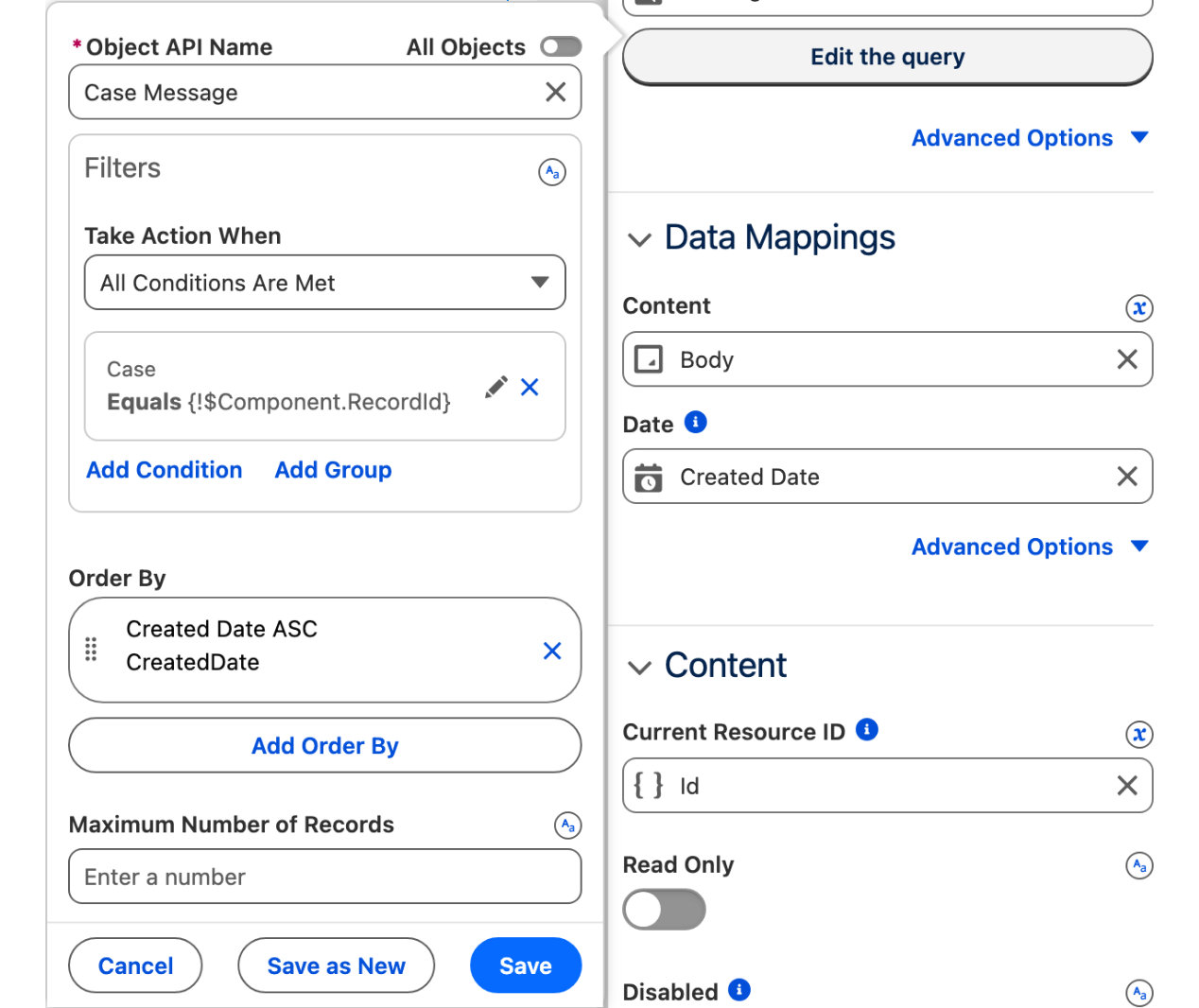
2. In **Data Source**, select **Query**. **Object** `Case_Message__c`. Add a filter: **Field** `Case__c`, **Operator** equals, **Value** `{!$Component.RecordId}`. **Order By** `CreatedDate ASC`.
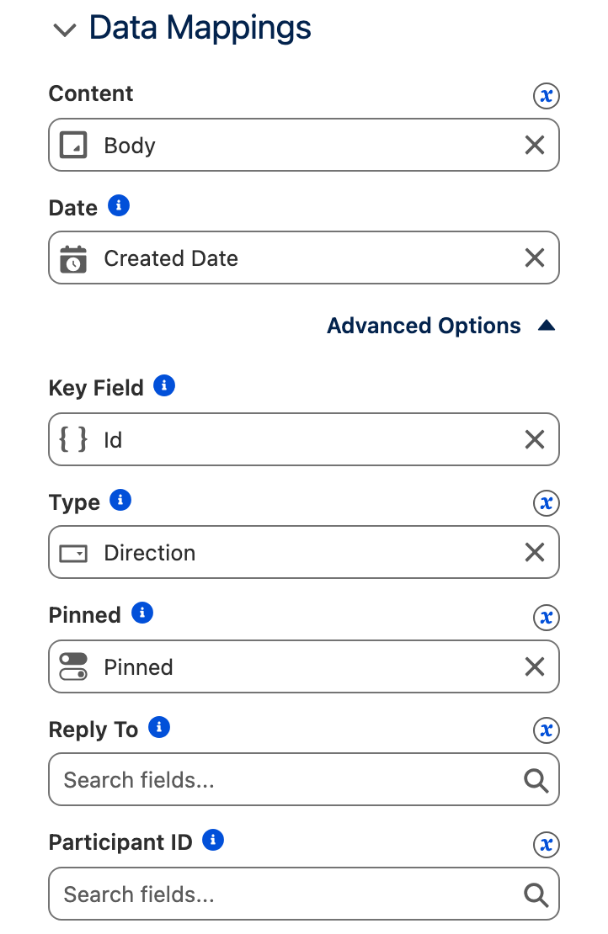
3. In **Data Mappings**, set **Content** to `Body__c`. **Date** stays on `CreatedDate`. In the advanced options, set **Type** to `Direction__c` and **Pinned Field API Name** to `Pinned__c`. Leave **Participant ID** empty: the author of each message defaults to the user who created the record, and **Participant** lets you map that user's label and avatar if the defaults are not what you want.
4. Clear **Current Resource ID**: it defaults to the running user, who then authors what is sent from the reply box. The sides still come from `Direction__c`.

*Why:* a customer writing through your Experience site is a user too, so a thread built this way reads like the figure. `Pinned__c` is what makes a pin outlive the page: records where it is true show as pinned when the thread loads.
{% endstep %}

{% step %}

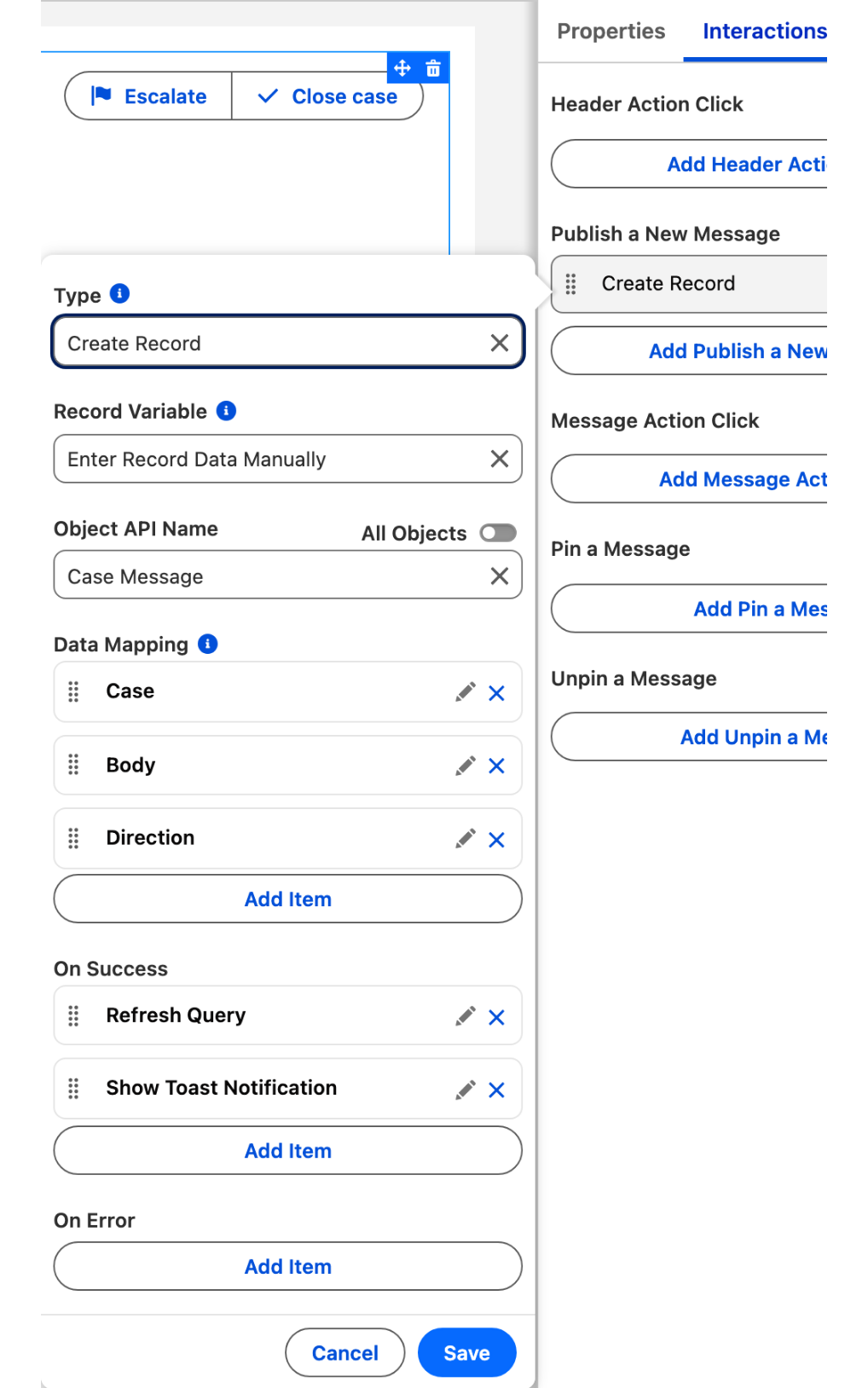
### Wire the reply box to create the message

1. Open the **Interactions** tab. On **Publish a New Message**, add a [Create Record](https://docs.avonnicomponents.com/dynamic-components/component-builder/interactions/variable-operations/create-record) action.
2. In **Record Variable**, select **Enter Record Data Manually**, then **Object** `Case_Message__c`.
3. Map the fields: `Case__c` to `{!$Component.RecordId}`, `Body__c` to the content of the message the end user sent (the chat's **Last Publication Value** output), `Direction__c` to `outbound`.
4. On success, add **Refresh Query** so the new bubble appears, and a [Show Toast](https://docs.avonnicomponents.com/dynamic-components/component-builder/interactions/navigation-and-notifications/show-toast) if you want a confirmation.

*Why:* without an action on **Publish a New Message**, **Send** clears the box and stores nothing. The chat exposes the sent text and the mentioned participants as outputs; the interaction turns them into a record, and the query redraws the thread.
{% endstep %}
{% endstepper %}

## The settings that matter

| Setting                                                                                           | Value                                                                                                                                 | Why                                                                                                               |
| ------------------------------------------------------------------------------------------------- | ------------------------------------------------------------------------------------------------------------------------------------- | ----------------------------------------------------------------------------------------------------------------- |
| **Can Pin** (`canPin`)                                                                            | on                                                                                                                                    | The workaround stays visible in a banner above the thread, and the end user pins or unpins from the message menu. |
| **Type** on each message (`items[].type`, or `Direction__c` mapped to **Type** on the Query path) | **Inbound** for Rafael, **Outbound** for Lena and Jonas                                                                               | Who sits left and who sits right, whoever is looking at the page.                                                 |
| **Current Resource ID** (`currentResourceId`)                                                     | `lena` in the Manual build, empty on the Query path                                                                                   | The author of new messages. With a type on every message it does not move any bubble.                             |
| **Show Date Dividers** (`showTimeBreaks`) and **Message Date Format** (`itemDateFormat`)          | on, **Preset** **Time Simple**                                                                                                        | The day change is a divider, the time sits under each block of messages.                                          |
| **Publisher** (`publisher`)                                                                       | **Mode** **Rich**, **Allow Mentions** on, **Placeholder** `Reply to Rafael`, **Publish Button Label** `Send`, **Categories** **Text** | Mentions need the rich editor; the button and the placeholder speak the agent's language.                         |

## Interactions

| Trigger                                             | Action                                                                                                                                                                 | What to set                                                                                                                                                                                                        |
| --------------------------------------------------- | ---------------------------------------------------------------------------------------------------------------------------------------------------------------------- | ------------------------------------------------------------------------------------------------------------------------------------------------------------------------------------------------------------------ |
| **Publish a New Message**                           | [Create Record](https://docs.avonnicomponents.com/dynamic-components/component-builder/interactions/variable-operations/create-record), **Enter Record Data Manually** | Object `Case_Message__c`; `Case__c` = `{!$Component.RecordId}`, `Body__c` = the published message (**Last Publication Value**), `Direction__c` = `outbound`. Then **Refresh Query**. Query path only.              |
| **Publish a New Message**                           | [Execute Flow](https://docs.avonnicomponents.com/dynamic-components/component-builder/interactions/flow-builder-integration/execute-flow), optional                    | An escalation flow that takes **Last Publication Mentions**, the Ids of the participants mentioned with `@`, as input. Works with either data source.                                                              |
| **Header Action Click**, **Target Name** `escalate` | [Open Flow Dialog](https://docs.avonnicomponents.com/dynamic-components/component-builder/interactions/flow-builder-integration/open-flow-dialog)                      | The escalation screen flow, with `{!$Component.RecordId}` as its case input.                                                                                                                                       |
| **Header Action Click**, **Target Name** `close`    | [Update Record](https://docs.avonnicomponents.com/dynamic-components/component-builder/interactions/variable-operations/update-record)                                 | The current page record, `Status` = `Closed`. Add a **Show Toast** on success.                                                                                                                                     |
| **Pin a Message** and **Unpin a Message**           | [Update Record](https://docs.avonnicomponents.com/dynamic-components/component-builder/interactions/variable-operations/update-record)                                 | Query path only: set `Pinned__c` to true or false on the message the trigger exposes as **Item**, so the pin is shared by everyone who opens the case. Without it, the pin is kept for the current page view only. |

## Try it

1. Open the case. Eight bubbles: RD on the left in gray, LO and JL on the right in blue, `Sep 3, 2026` above the thread and `Sep 4, 2026` between the 11:30 AM and 8:15 AM messages.
2. Hover Lena's 11:05 AM message, click the menu that appears beside the bubble and select **Pin Message**. The banner **Most recent pinned messages (1/10)** appears above the thread with her name, the time and the text, and the message reads **Pinned** under its time. Open the menu again: it now offers **Unpin Message**.
3. Click in the reply box: the placeholder `Reply to Rafael` and the bold, italic, underline and strikethrough toolbar appear under it, and **Send** stays gray until you type. Type `@Jon`: the dropdown offers Jonas Lindqvist.

## Take it further

The same Chat exists for LWC Components: [Chat](https://docs.avonnicomponents.com/lwc-components/data-driven-components/chat), as the `avonni-dd-chat` tag in your own component, with the same messages and participants or a query and a mapping. Flow Screen Components and Experience Sites have no Chat component today.

Three variations worth trying:

* Turn on **Read Only** for closed cases: the thread stays, the reply box goes.
* Restrict who can be mentioned with **Mentionable Participants IDs**, and block words with **Blocked Words**.
* Add [Real-Time Data](https://docs.avonnicomponents.com/dynamic-components/component-builder/real-time-data) on the Query path, so a message the customer posts appears without a reload.

## Troubleshooting

| Problem                                                                       | Cause                                                                                                                                                                                                                                                             | Fix                                                                                                                                                                                                                                                                     |
| ----------------------------------------------------------------------------- | ----------------------------------------------------------------------------------------------------------------------------------------------------------------------------------------------------------------------------------------------------------------- | ----------------------------------------------------------------------------------------------------------------------------------------------------------------------------------------------------------------------------------------------------------------------- |
| All messages sit on the same side                                             | With no **Type** on the messages, the side comes from **Current Resource ID**, compared to the participant **Name** exactly, case included: `Lena` and `lena` are two people. On the Query path, `Direction__c` holds a value other than `inbound` or `outbound`. | Set **Type** on each message, or map **Type** to a field that holds exactly those two values; or make **Current Resource ID** match the participant **Name**.                                                                                                           |
| No menu appears beside the messages                                           | **Can Pin** is off. The message menu exists only when it is on, and it shows on hover.                                                                                                                                                                            | Turn on **Can Pin** in the general settings, then hover a bubble.                                                                                                                                                                                                       |
| The pinned banner is gone after a reload                                      | With a Manual data source, a pin lives in the page, not in a record.                                                                                                                                                                                              | Use the Query path: map **Pinned Field API Name** to a checkbox field and wire **Pin a Message** and **Unpin a Message** to an Update Record on that field.                                                                                                             |
| Some messages show no name or time, or no avatar                              | Consecutive messages from the same author form a block: the avatar is drawn on the first one, the name and time under the last one. Message 5 has neither, because message 6 follows from Rafael.                                                                 | Nothing to configure. This is how the thread groups a run of messages.                                                                                                                                                                                                  |
| Typing `@` opens no dropdown, or the dropdown does not find a name            | **Mode** is **Plain** or **Allow Mentions** is off. Or the text typed after `@` contains a character other than letters, spaces and hyphens (`O'Brien`), which the mention search does not accept.                                                                | Set **Mode** to **Rich** and turn on **Allow Mentions**. Search on the part of the name made of letters, `@Brien`.                                                                                                                                                      |
| The thread reads No messages yet on the Query path, even though records exist | The query returns nothing: the filter does not match, or in **Preview** no record context is set.                                                                                                                                                                 | Check that the filter reads `Case__c` equals `{!$Component.RecordId}`, then in Preview open the [Debug Panel](https://docs.avonnicomponents.com/dynamic-components/component-builder/advanced-features/debug-panel) and set a Preview Context record that has messages. |


---

# Agent Instructions
This documentation is published with GitBook. GitBook is the documentation platform designed so that both humans and AI agents can read, navigate, and reason over technical content effectively. Learn more at gitbook.com.

## Querying This Documentation
If you need additional information that is not directly available in this page, you can query the documentation dynamically by asking a question.

Perform an HTTP GET request on the current page URL with the `ask` query parameter, and the optional `goal` query parameter:

```
GET https://docs.avonnicomponents.com/projects/use-cases/case-thread-with-a-pinned-workaround.md?ask=<question>&goal=<endgoal>
```

`ask` is the immediate question: it should be specific, self-contained, and written in natural language.
`goal` is optional and describes the broader end goal you are ultimately trying to accomplish on behalf of the user. GitBook uses it to tailor the answer towards what is most useful for that goal.

The response will contain a direct answer to the question and relevant excerpts and sources from the documentation.

Use this mechanism when the answer is not explicitly present in the current page, you need clarification or additional context, or you want to retrieve related documentation sections.