> For the complete documentation index, see [llms.txt](https://docs.avonnicomponents.com/llms.txt). Markdown versions of documentation pages are available by appending `.md` to page URLs; this page is available as [Markdown](https://docs.avonnicomponents.com/lwc-components/getting-started/quickstart-guide.md).

# Quickstart Guide

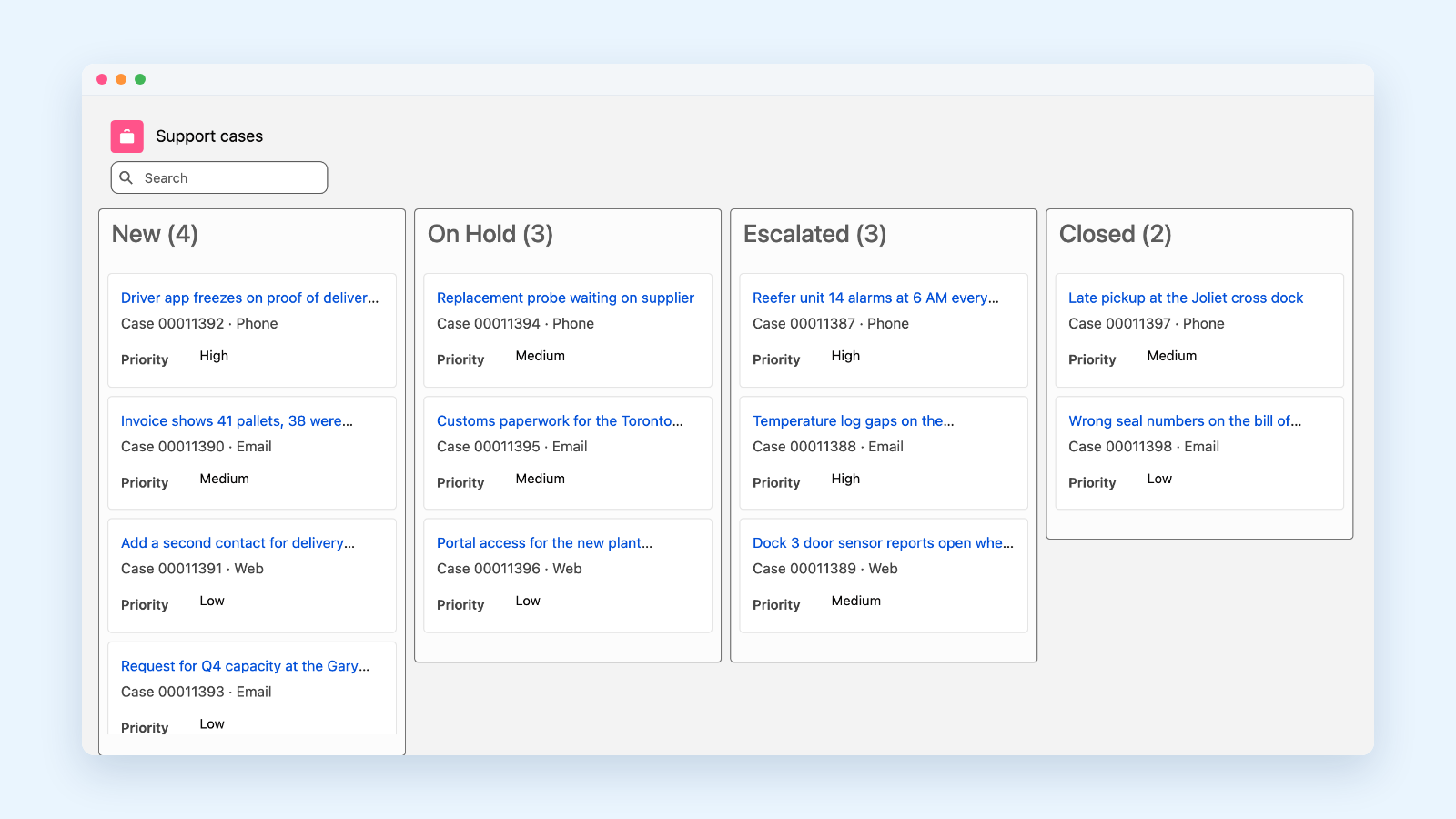
Build a support case board for the Account page in one Lightning Web Component: a query, a mapping, and an avonni-dd-kanban tag. No Apex.

A Kanban board on a record page is a classic request, and a costly one to build from scratch: an Apex controller and its test class, the SOQL, the columns, the drag and drop, the search, the counts. With the LWC Components package, all of that lives in one tag.

In the next 15 minutes you will build **caseBoard**, a Lightning Web Component that shows an account's support cases by status, lets your agents drag a case to its next status, and saves the change.

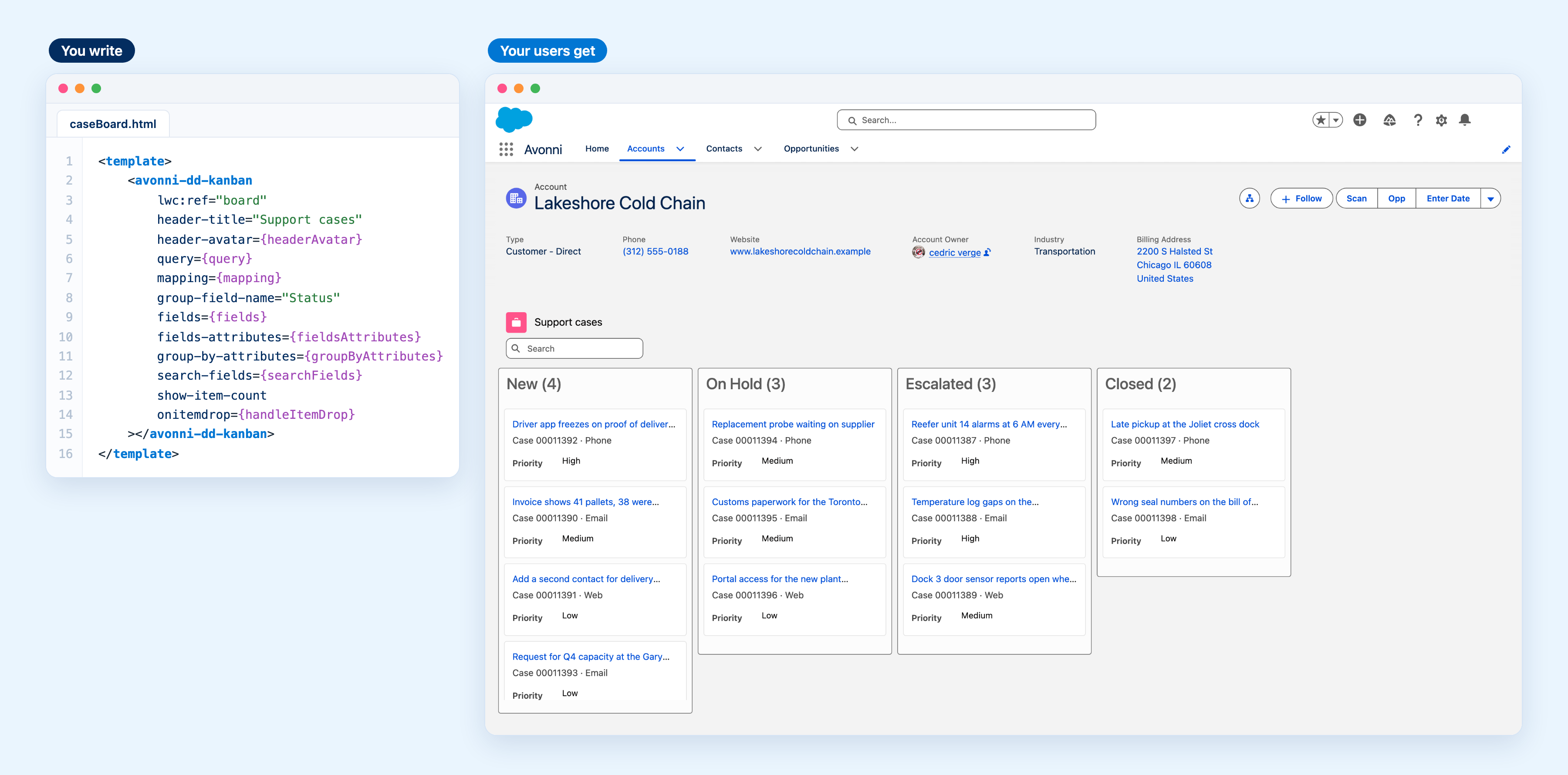
<figure><img src="https://2403786217-files.gitbook.io/~/files/v0/b/gitbook-x-prod.appspot.com/o/spaces%2FPjQbBtFNxVSSOtnsjuwx%2Fuploads%2FoOtW5gIiusM8DLAFuLnk%2Flwc-quickstart-hero.png?alt=media" alt="On the left, the 16-line caseBoard.html template with an avonni-dd-kanban tag; on the right, the Lakeshore Cold Chain account page showing a Support cases board with New, On Hold, Escalated and Closed columns, a search box and a count on each column"><figcaption><p>What you write, and what your users get: the board on a real Account page, reading that account's cases.</p></figcaption></figure>

{% hint style="success" %}
**What you will learn**

* How to use an `avonni-*` tag in your own LWC, with no import
* How a Data Driven component reads records itself, from a `query` and a `mapping`
* How to react to what the user does, here a drop, and save it
* How to put the component on a record page
  {% endhint %}

{% hint style="info" %}
**Before you start**

* The package is installed and your user has a license: see [Installation & Licenses Management](/lwc-components/getting-started/installation-and-licenses-management.md).
* You have a Salesforce DX project in VS Code, authorized to that org, with the Salesforce CLI (`sf`).
* An Account with a few Cases, to see something on the board.
  {% endhint %}

***

## Build the case board

{% embed url="<https://www.youtube.com/watch?v=5-3OlJBawh4>" %}

{% stepper %}
{% step %}

#### Create the component

From the root of your project:

```bash
sf lightning generate component --name caseBoard --type lwc --output-dir force-app/main/default/lwc
```

You get the usual three files: `caseBoard.html`, `caseBoard.js` and `caseBoard.js-meta.xml`.
{% endstep %}

{% step %}

#### Drop the Kanban into the template

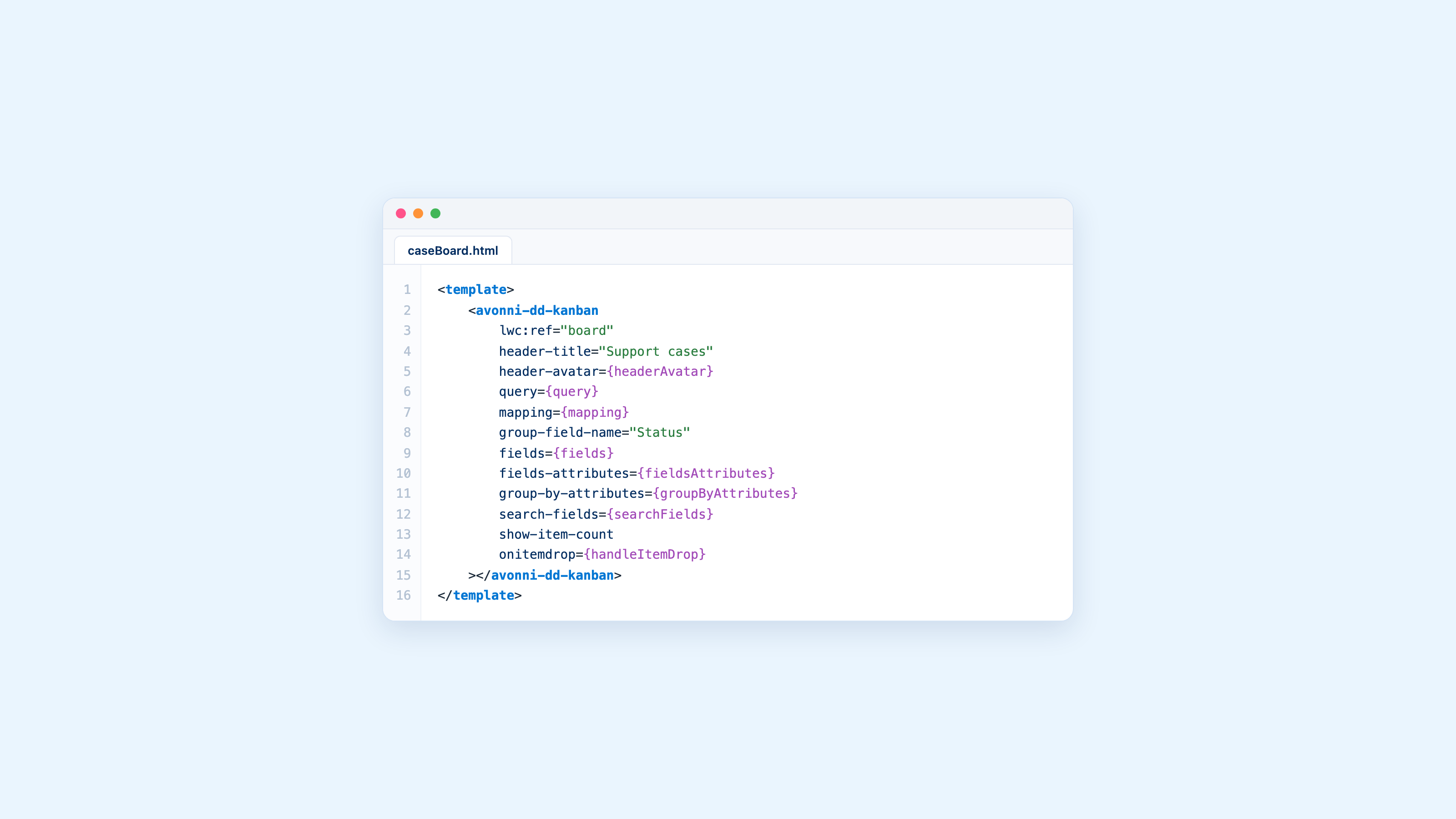
Replace `caseBoard.html` with:

```html
<template>
    <avonni-dd-kanban
        lwc:ref="board"
        header-title="Support cases"
        header-avatar={headerAvatar}
        query={query}
        mapping={mapping}
        group-field-name="Status"
        fields={fields}
        fields-attributes={fieldsAttributes}
        group-by-attributes={groupByAttributes}
        search-fields={searchFields}
        show-item-count
        onitemdrop={handleItemDrop}
    ></avonni-dd-kanban>
</template>
```

`avonni-dd-kanban` is the Data Driven Kanban from the package. Like any `avonni-*` tag, it needs no import: reference it and set its attributes in kebab-case. `group-field-name="Status"` makes one column per value of the Status picklist, in the picklist's order.
{% endstep %}

{% step %}

#### Tell it which records to read

Replace `caseBoard.js` with:

```javascript
import { LightningElement, api } from 'lwc';
import { updateRecord } from 'lightning/uiRecordApi';
import { ShowToastEvent } from 'lightning/platformShowToastEvent';

export default class CaseBoard extends LightningElement {
    @api recordId;

    headerAvatar = { fallbackIconName: 'standard:case' };
    fields = ['Priority'];
    fieldsAttributes = { variant: 'label-inline' };
    groupByAttributes = { hideUndefinedGroup: true };
    searchFields = ['Subject'];
    mapping = {
        name: '{{Record.Id}}',
        title: '{{Record.Subject}}',
        description: 'Case {{Record.CaseNumber}} · {{Record.Origin}}',
        linkify: true
    };

    get query() {
        return {
            objectApiName: 'Case',
            filter: `AccountId = '${this.recordId}'`,
            orderBy: 'Priority ASC',
            limit: 100
        };
    }

    // The board moves the card; saving the new Status is yours.
    async handleItemDrop(event) {
        const { groupValue, record } = event.detail;
        try {
            await updateRecord({ fields: { Id: record.Id, Status: groupValue } });
            this.toast(`${record.Subject} is now ${groupValue}`, 'success');
        } catch (error) {
            this.toast(error.body?.message || 'The case could not be updated', 'error');
            this.refs.board.refresh(true);
        }
    }

    toast(title, variant) {
        this.dispatchEvent(new ShowToastEvent({ title, variant }));
    }
}
```

Three properties do the work:

* **`query`** is the SOQL, as an object: the object, a `WHERE` filter, a sort and a limit. It is a getter so the filter can use `recordId`, which Salesforce sets on a record page.
* **`mapping`** turns each record into a card. `{{Record.Subject}}` inserts a field value, and `linkify` makes the title a link to the case.
* **`fields`** adds field values under each card, here the Priority.

No Apex and no wire adapter: the component runs the query itself.
{% endstep %}

{% step %}

#### Save what the user drops

The board moves a card as soon as it is dropped, then fires `itemdrop` with the record and the column it landed in. **Saving the change is yours**, which is what `handleItemDrop` above does with `updateRecord`, the standard Lightning Data Service call: it writes the new Status, then shows a toast.

If the save fails (a validation rule, a missing permission), the handler shows the error and calls `refresh(true)` on the board, which reloads it from the database so the card goes back to its saved column.
{% endstep %}

{% step %}

#### Expose it on record pages

Replace `caseBoard.js-meta.xml` with:

```xml
<?xml version="1.0" encoding="UTF-8"?>
<LightningComponentBundle xmlns="http://soap.sforce.com/2006/04/metadata">
    <apiVersion>62.0</apiVersion>
    <isExposed>true</isExposed>
    <masterLabel>Case Board</masterLabel>
    <targets>
        <target>lightning__RecordPage</target>
    </targets>
    <targetConfigs>
        <targetConfig targets="lightning__RecordPage">
            <objects>
                <object>Account</object>
            </objects>
        </targetConfig>
    </targetConfigs>
</LightningComponentBundle>
```

`masterLabel` is the name you will see in Lightning App Builder, and the target makes the component available on Account record pages.
{% endstep %}

{% step %}

#### Deploy it

```bash
sf project deploy start --source-dir force-app/main/default/lwc/caseBoard
```

{% endstep %}

{% step %}

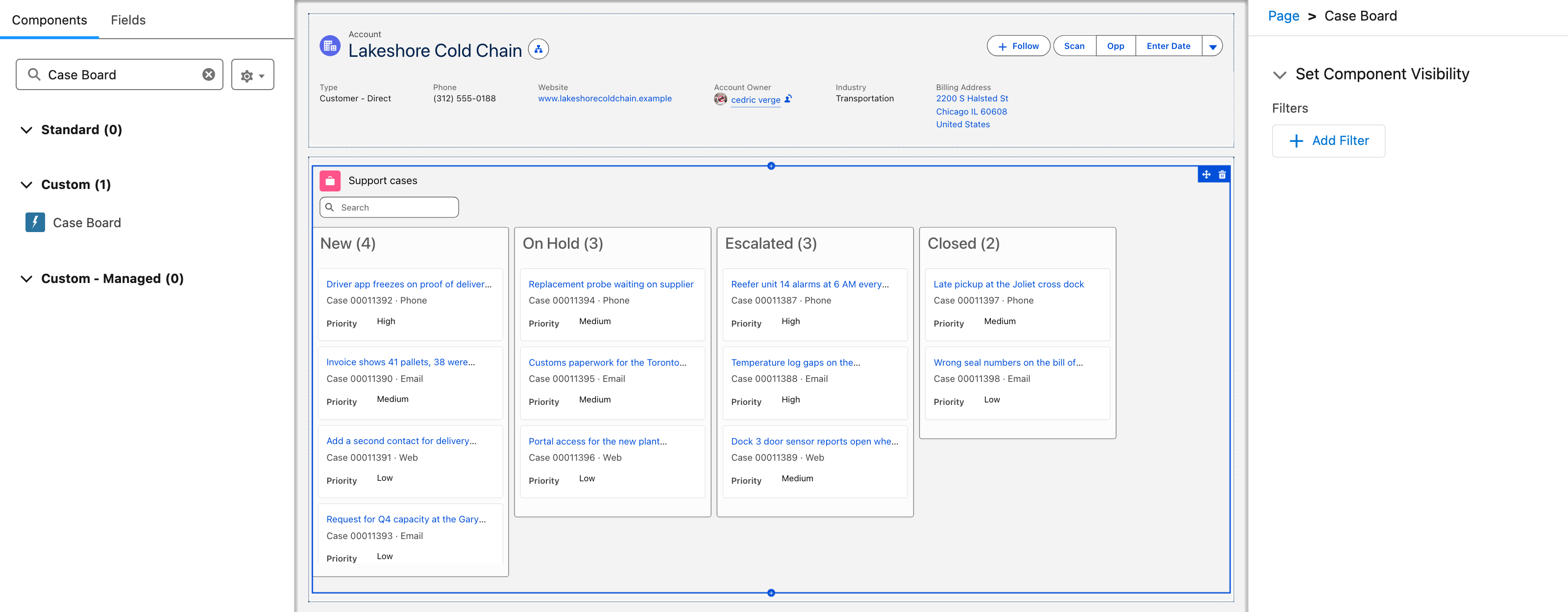
#### Add it to the Account page

1. Open any Account, click the **Setup** gear, then **Edit Page**.
2. In the **Components** panel, search for `Case Board`. It is listed under **Custom**.
3. Drag it onto the page. The board already shows that account's cases, right in the builder.
4. Click **Save**, then **Activation** if the page is not assigned yet.

<figure><img src="https://2403786217-files.gitbook.io/~/files/v0/b/gitbook-x-prod.appspot.com/o/spaces%2FPjQbBtFNxVSSOtnsjuwx%2Fuploads%2FaNh5AHVlktSJQi3euNko%2Flwc-quickstart-builder.png?alt=media" alt="Lightning App Builder with the Components panel searched for Case Board, listed under Custom (1), and the Case Board selected on the Account page, showing its four status columns"><figcaption><p>Case Board in Lightning App Builder, already reading the account's cases.</p></figcaption></figure>
{% endstep %}

{% step %}

#### Try it

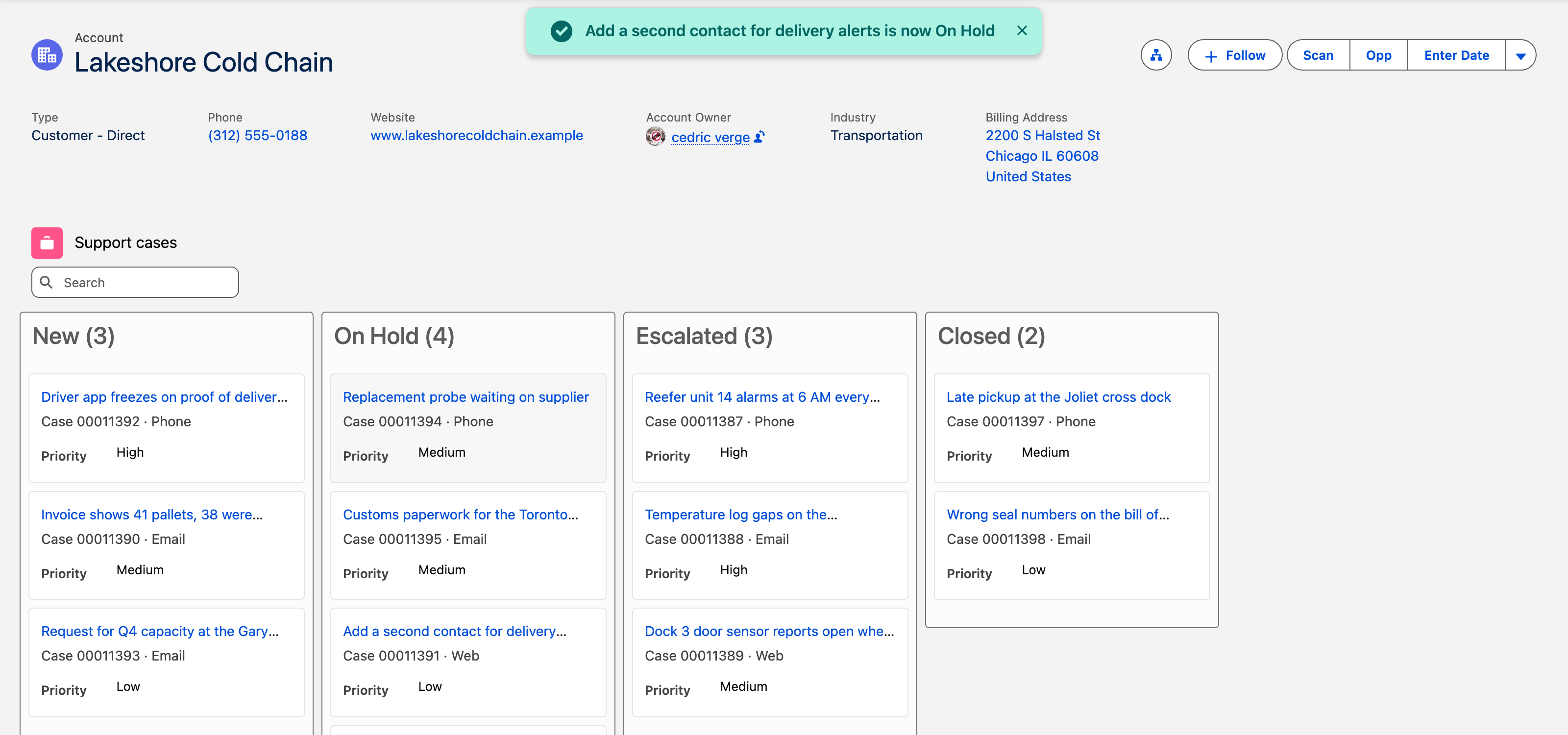
Open the Account and drag a case from **New** to **On Hold**. The column counts change, the toast confirms, and the case's Status is saved: reload the page and it stays where you put it.

<figure><img src="https://2403786217-files.gitbook.io/~/files/v0/b/gitbook-x-prod.appspot.com/o/spaces%2FPjQbBtFNxVSSOtnsjuwx%2Fuploads%2FmouUzLxX1Lz2qIJd0HRv%2Flwc-quickstart-drop.png?alt=media" alt="The Lakeshore Cold Chain account page after a drop: a success toast reads Add a second contact for delivery alerts is now On Hold, and the On Hold column now counts four cases"><figcaption><p>One drop, one saved Status. We checked this one in the database.</p></figcaption></figure>
{% endstep %}
{% endstepper %}

***

## What you did not write

| From scratch, you would write                          | With `avonni-dd-kanban`                   |
| ------------------------------------------------------ | ----------------------------------------- |
| An Apex controller with the SOQL, and its test class   | A `query` object in your JavaScript       |
| The columns, from the picklist values                  | `group-field-name="Status"`               |
| Drag and drop between columns, and the card that moves | Built in. You handle `itemdrop` to save   |
| A search box, and the count on each column             | `search-fields` and `show-item-count`     |
| Updates and fixes when Salesforce changes              | Shipped in the package, with each release |

Your component stays at about 60 lines of HTML and JavaScript, and the rest is maintained by Avonni. [The Maintenance Advantage](/lwc-components/getting-started/the-maintenance-advantage.md) explains why that matters over time.

## If something looks wrong

| What you see                                         | Likely cause                                                    | Fix                                                                                                                           |
| ---------------------------------------------------- | --------------------------------------------------------------- | ----------------------------------------------------------------------------------------------------------------------------- |
| `avonni-dd-kanban` is an unknown tag when you deploy | The package is not installed in the target org                  | Install it, see [Installation & Licenses Management](/lwc-components/getting-started/installation-and-licenses-management.md) |
| The board is empty                                   | The account has no cases, or `recordId` is not set              | Add the component to a record page, where Salesforce sets `recordId`                                                          |
| A dropped card comes back after a reload             | `itemdrop` is not handled, or the save failed                   | Save in `handleItemDrop` as in step 3, and check the error toast                                                              |
| Case Board is not in Lightning App Builder           | `isExposed` is false, or the target does not include the object | Check `caseBoard.js-meta.xml` as in step 5                                                                                    |

## Keep going

<table data-view="cards"><thead><tr><th></th><th></th><th data-hidden data-card-cover data-type="image">Cover image</th><th data-hidden data-card-target data-type="content-ref"></th></tr></thead><tbody><tr><td><h4>Kanban</h4></td><td>Swimlanes, column totals, card fields and every event of avonni-dd-kanban, with copy-paste examples.</td><td><a href="https://2403786217-files.gitbook.io/~/files/v0/b/gitbook-x-prod.appspot.com/o/spaces%2FPjQbBtFNxVSSOtnsjuwx%2Fuploads%2F9lrG1z9ejak9kDF0N2KK%2Flwc-quickstart-cover-drop.png?alt=media">https://2403786217-files.gitbook.io/~/files/v0/b/gitbook-x-prod.appspot.com/o/spaces%2FPjQbBtFNxVSSOtnsjuwx%2Fuploads%2F9lrG1z9ejak9kDF0N2KK%2Flwc-quickstart-cover-drop.png?alt=media</a></td><td><a href="/lwc-components/data-driven-components/kanban.md">Kanban</a></td></tr><tr><td><h4>Data Driven Components</h4></td><td>Data tables, schedulers, pivot tables, timelines, maps: the components that read records from a query.</td><td><a href="https://2403786217-files.gitbook.io/~/files/v0/b/gitbook-x-prod.appspot.com/o/spaces%2FPjQbBtFNxVSSOtnsjuwx%2Fuploads%2FIPhpND6gldGVxoouTm1O%2Flwc-quickstart-cover-board.png?alt=media">https://2403786217-files.gitbook.io/~/files/v0/b/gitbook-x-prod.appspot.com/o/spaces%2FPjQbBtFNxVSSOtnsjuwx%2Fuploads%2FIPhpND6gldGVxoouTm1O%2Flwc-quickstart-cover-board.png?alt=media</a></td><td><a href="/lwc-components/data-driven-components/data-driven-components.md">Overview</a></td></tr><tr><td><h4>Core Components</h4></td><td>Avatars, badges, cards, pickers, menus and the rest of the building blocks for your own UI.</td><td><a href="https://2403786217-files.gitbook.io/~/files/v0/b/gitbook-x-prod.appspot.com/o/spaces%2FPjQbBtFNxVSSOtnsjuwx%2Fuploads%2FC8iTDuH20KwTUBQmrTPC%2Flwc-quickstart-cover-core.png?alt=media">https://2403786217-files.gitbook.io/~/files/v0/b/gitbook-x-prod.appspot.com/o/spaces%2FPjQbBtFNxVSSOtnsjuwx%2Fuploads%2FC8iTDuH20KwTUBQmrTPC%2Flwc-quickstart-cover-core.png?alt=media</a></td><td><a href="/lwc-components/core-components/core-components.md">Overview</a></td></tr><tr><td><h4>Build with AI</h4></td><td>Let Claude Code, Cursor or Copilot write the avonni-* markup from the real component catalog.</td><td><a href="https://2403786217-files.gitbook.io/~/files/v0/b/gitbook-x-prod.appspot.com/o/spaces%2FPjQbBtFNxVSSOtnsjuwx%2Fuploads%2FfJQUtKbFNv4WVEOtU2v7%2Flwc-quickstart-cover-code.png?alt=media">https://2403786217-files.gitbook.io/~/files/v0/b/gitbook-x-prod.appspot.com/o/spaces%2FPjQbBtFNxVSSOtnsjuwx%2Fuploads%2FfJQUtKbFNv4WVEOtU2v7%2Flwc-quickstart-cover-code.png?alt=media</a></td><td><a href="/lwc-components/build-with-ai/overview.md">Overview</a></td></tr><tr><td><h4>The Maintenance Advantage</h4></td><td>Why a thin layer of markup on packaged components beats thousands of lines written from scratch.</td><td><a href="https://2403786217-files.gitbook.io/~/files/v0/b/gitbook-x-prod.appspot.com/o/spaces%2FPjQbBtFNxVSSOtnsjuwx%2Fuploads%2FganIpnYjgMQnf42tSM1f%2Flwc-quickstart-cover-maintenance.png?alt=media">https://2403786217-files.gitbook.io/~/files/v0/b/gitbook-x-prod.appspot.com/o/spaces%2FPjQbBtFNxVSSOtnsjuwx%2Fuploads%2FganIpnYjgMQnf42tSM1f%2Flwc-quickstart-cover-maintenance.png?alt=media</a></td><td><a href="/lwc-components/getting-started/the-maintenance-advantage.md">The Maintenance Advantage</a></td></tr><tr><td><h4>Boards and pipelines</h4></td><td>Complete Kanban and dispatch projects built end to end in a real org.</td><td><a href="https://2929066058-files.gitbook.io/~/files/v0/b/gitbook-x-prod.appspot.com/o/spaces%2FDL6JQuZArjJeQvX2ot4y%2Fuploads%2Fvejyb4hYQyKAJqqSaKxj%2Fprojects-boards-and-pipelines.png?alt=media">https://2929066058-files.gitbook.io/~/files/v0/b/gitbook-x-prod.appspot.com/o/spaces%2FDL6JQuZArjJeQvX2ot4y%2Fuploads%2Fvejyb4hYQyKAJqqSaKxj%2Fprojects-boards-and-pipelines.png?alt=media</a></td><td><a href="https://docs.avonnicomponents.com/projects/use-cases/boards-and-pipelines">https://docs.avonnicomponents.com/projects/use-cases/boards-and-pipelines</a></td></tr></tbody></table>


---

# Agent Instructions
This documentation is published with GitBook. GitBook is the documentation platform designed so that both humans and AI agents can read, navigate, and reason over technical content effectively. Learn more at gitbook.com.

## Querying This Documentation
If you need additional information that is not directly available in this page, you can query the documentation by asking a question.

Perform an HTTP GET request on the following URL with the `ask` and `goal` query parameters:

```
GET https://docs.avonnicomponents.com/lwc-components/getting-started/quickstart-guide.md?ask=<question>&goal=<user_goal>
```

`ask` is the immediate question: it should be specific, self-contained, and written in natural language.
`goal` is what the user is ultimately trying to achieve, the reason they need the answer. Sharing it helps GitBook give you a better, more relevant answer. A goal is most helpful when it describes the outcome the user wants rather than restating the question. For example, with `ask=how do I create an API token`, a goal like `automate deployments from our CI pipeline` lets GitBook tailor the answer to that use case.

The response will contain a direct answer to the question and relevant excerpts and sources from the documentation.

Use this mechanism when the answer is not explicitly present in the current page, you need clarification or additional context, or you want to retrieve related documentation sections.