> For the complete documentation index, see [llms.txt](https://docs.avonnicomponents.com/llms.txt). Markdown versions of documentation pages are available by appending `.md` to page URLs; this page is available as [Markdown](https://docs.avonnicomponents.com/lwc-components/data-driven-components/tree.md).

# Tree

`avonni-dd-tree`

The Avonni Data Driven Tree displays related records as nested tree items.

## Overview

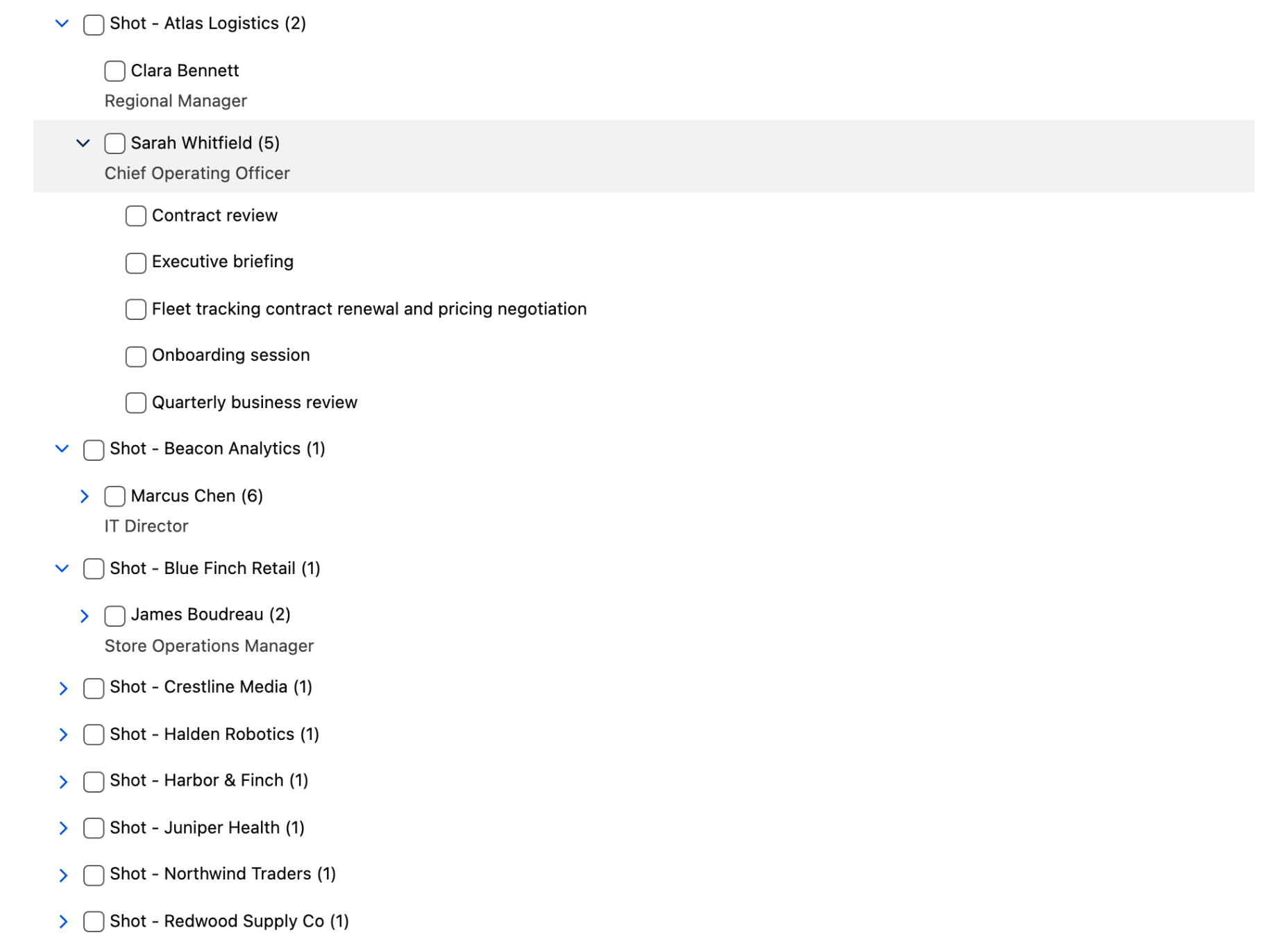
**Tree** is a data-driven Lightning Web Component that displays related records as nested, expandable tree items, with each level of the hierarchy populated by its own query.

The Tree runs in **query mode only**. You define a `query` whose `children` describe each nested level and the lookup field that relates it to its parent, plus a per-object `mapping` that maps record fields to tree item properties. The component fetches every level and renders the resulting hierarchy. There is no static-items mode.

### Use Cases

* **Account hierarchies:** Show Accounts with their related Contacts and Opportunities nested beneath.
* **Org and team structures:** Represent reporting or grouping relationships across objects.
* **Record navigation:** Let users drill from a parent record into related children in a single tree.
* **Multi-object browsing:** Combine several SObjects into one nested view (e.g. Account → Contact → Event).
* **Selection pickers:** Use single- or multi-select to choose records from a related hierarchy.

***

## Use Case Examples

### Example 1: Query mode

**Scenario:** Display Accounts with their related Contacts nested beneath each account, showing how many contacts each account has.

```html
<!-- accountTree.html -->
<template>
    <avonni-dd-tree
        query={treeQuery}
        mapping={treeMapping}
        show-item-count
        onselect={handleSelect}
    ></avonni-dd-tree>
</template>
```

```js
// accountTree.js
import { LightningElement } from 'lwc';

export default class AccountTree extends LightningElement {
    treeQuery = {
        objectApiName: 'Account',
        orderBy: 'Name ASC NULLS LAST',
        limit: 50,
        children: [
            {
                objectApiName: 'Contact',
                relationshipField: 'AccountId',
                orderBy: 'Name ASC',
                limit: 10
            }
        ]
    };
    treeMapping = {
        Account: {
            label: '{{Record.Name}}',
            name: '{{Record.Id}}',
            metatext: '{{Record.Industry}}'
        },
        Contact: {
            label: '{{Record.Name}}',
            name: '{{Record.Id}}',
            metatext: '{{Record.Title}}'
        }
    };

    handleSelect(event) {
        const { record, selectedNames } = event.detail;
    }
}
```

**Result:** A tree of Accounts (each showing its Industry as metatext) with a child count badge. Expanding an account reveals up to 10 related Contacts, each showing its Title. Clicking an item fires `select` with the clicked record and the current selection.

### Example 2: Multi-level, multi-select query

**Scenario:** Build a three-level hierarchy—Account → Contact → Event—and let users select multiple records at once.

```html
<!-- relatedTree.html -->
<template>
    <avonni-dd-tree
        query={treeQuery}
        mapping={treeMapping}
        is-multi-select
        independent-multi-select
        show-item-count
        onselect={handleSelect}
    ></avonni-dd-tree>
</template>
```

```js
// relatedTree.js
import { LightningElement } from 'lwc';

export default class RelatedTree extends LightningElement {
    treeQuery = {
        objectApiName: 'Account',
        orderBy: 'Name ASC',
        limit: 25,
        children: [
            {
                objectApiName: 'Contact',
                relationshipField: 'AccountId',
                orderBy: 'Name ASC',
                limit: 5,
                children: [
                    {
                        objectApiName: 'Event',
                        relationshipField: 'WhoId',
                        orderBy: 'Subject ASC NULLS LAST'
                    }
                ]
            }
        ]
    };
    treeMapping = {
        Account: { label: '{{Record.Name}}', name: '{{Record.Id}}' },
        Contact: {
            label: '{{Record.Name}}',
            name: '{{Record.Id}}',
            metatext: '{{Record.Title}}'
        },
        Event: { label: '{{Record.Subject}}', name: '{{Record.Id}}' }
    };

    handleSelect(event) {
        const { record, selectedNames } = event.detail;
        // selectedNames holds every checked item across all levels
    }
}
```

**Result:** A three-level tree where each Account expands into Contacts, and each Contact expands into its related Events. Checkboxes let users select records; because `independent-multi-select` is set, selecting a parent does not auto-select its children. Each `select` event reports the full set of checked item names.

***

## Specifications

### Attributes

| Name                       | Description                                                                                                                                                                                                                                                                                                                                                                                                              | Type                            | Default | Required |
| -------------------------- | ------------------------------------------------------------------------------------------------------------------------------------------------------------------------------------------------------------------------------------------------------------------------------------------------------------------------------------------------------------------------------------------------------------------------ | ------------------------------- | ------- | -------- |
| `independent-multi-select` | Used only if `is-multi-select` is present. If present, the parent and children nodes will be selected independently of each other.                                                                                                                                                                                                                                                                                       | Boolean                         | `false` |          |
| `is-multi-select`          | If present, multiple items can be selected and a checkbox is displayed to the left of the items.                                                                                                                                                                                                                                                                                                                         | Boolean                         | `false` |          |
| `items`                    | Array of static items displayed in the tree. When this property is set, the tree ignores the `query` and `mapping` properties and displays the items directly.                                                                                                                                                                                                                                                           | DdTreeItem\[]                   | —       |          |
| `mapping`                  | Object defining the way the records returned by the query should be displayed in the tree. Each key is an SObject API name (e.g., 'Account', 'Contact'), and each value is an object that defines how the records fields should be mapped to the tree item properties. To insert the value of a field, use the syntax `{{Record.FieldApiName}}`. For example, to use the value of the Name field, use `{{Record.Name}}`. | object.\<string, DdTreeMapping> | —       |          |
| `show-item-count`          | If present, the number of children items is displayed next to each item label.                                                                                                                                                                                                                                                                                                                                           | Boolean                         | `false` |          |

### Mapping

The Tree's `mapping` is keyed by SObject API name. Each entry maps that object's record fields to tree item properties using the `{{Record.FieldApiName}}` syntax.

| Mapping key | Maps to                                                          |
| ----------- | ---------------------------------------------------------------- |
| `label`     | Item label (the text shown for the node).                        |
| `name`      | Unique item identifier (usually `{{Record.Id}}`). **Required.**  |
| `metatext`  | Secondary text displayed below the item label.                   |
| `disabled`  | If true, the item is disabled and cannot be selected or toggled. |

```js
const TREE_MAPPING = {
    Account: {
        label: '{{Record.Name}}',
        name: '{{Record.Id}}',
        metatext: '{{Record.Industry}}'
    },
    Contact: {
        label: '{{Record.Name}}',
        name: '{{Record.Id}}',
        metatext: '{{Record.Title}}'
    }
};
```

Within `query`, each `children` entry must specify a `relationshipField`—the lookup field on the child SObject that points back to the parent level (for example, `AccountId` on Contact relating it to Account).

### Custom Events

#### `select`

Event fired when an item is selected or unselected.

The `select` event returns the following parameters.

| Parameter       | Type      | Description                                                                                                     |
| --------------- | --------- | --------------------------------------------------------------------------------------------------------------- |
| `item`          | object    | Tree item that was selected or unselected.                                                                      |
| `record`        | object    | Record of the item that was selected or unselected. In static mode, no record is associated and this is `null`. |
| `selectedNames` | string\[] | Array of selected item names.                                                                                   |

The event properties are as follows.

| Property   | Value | Description                                                                                               |
| ---------- | ----- | --------------------------------------------------------------------------------------------------------- |
| bubbles    | false | This event does not bubble.                                                                               |
| cancelable | false | This event has no default behavior that can be canceled. You can't call `preventDefault()` on this event. |
| composed   | false | This event does not propagate outside of the component in which it was dispatched.                        |

### Styling Hooks

| CSS Variable                                     | Type      | Default    |
| ------------------------------------------------ | --------- | ---------- |
| `--avonni-dd-tree-header-font-size`              | dimension | `0.875rem` |
| `--avonni-dd-tree-header-font-style`             | string    | `normal`   |
| `--avonni-dd-tree-header-font-weight`            | number    | `700`      |
| `--avonni-dd-tree-header-text-color`             | color     | —          |
| `--avonni-dd-tree-header-title-image-height`     | dimension | `3rem`     |
| `--avonni-dd-tree-header-title-image-object-fit` | string    | `cover`    |
| `--avonni-dd-tree-header-title-image-width`      | string    | `unset`    |

## Key Considerations

* **Query mode only:** The Tree has no static-items mode; you must supply a `query` and a `mapping` to render anything.
* **Mapping is keyed by object:** Every SObject appearing in the query (parent and each child) needs its own entry in `mapping`, keyed by API name.
* **`relationshipField` is required for children:** Each child query must name the lookup field that ties it to the parent level, or that level won't load.
* **Selection mode matters:** By default selection is single; add `is-multi-select` for checkboxes, and `independent-multi-select` to decouple parent/child selection.
* **Mind the limits:** Set `limit` and `orderBy` per level—deep hierarchies without limits can fetch large volumes of records.
* **Best Practice:** Map `name` to `{{Record.Id}}` on every object so each tree item has a unique, stable identifier, and set `orderBy` (and a sensible `limit`) on each query level to keep large hierarchies readable.

***

## Troubleshooting Common Issues

* **Children don't appear:** Verify each child query has the correct `relationshipField` (the lookup on the child object pointing to the parent) and that the running user can access those records.
* **Items render blank or without labels:** Ensure every queried object has a `mapping` entry with `label` and a unique `name` (such as `{{Record.Id}}`).
* **Selection behaves unexpectedly:** Confirm `is-multi-select` is present for checkbox selection, and add `independent-multi-select` if parent and child selection should not cascade.
* **If issues persist:** Contact our support team at <support@avonni.app> for assistance.


---

# Agent Instructions
This documentation is published with GitBook. GitBook is the documentation platform designed so that both humans and AI agents can read, navigate, and reason over technical content effectively. Learn more at gitbook.com.

## Querying This Documentation
If you need additional information that is not directly available in this page, you can query the documentation dynamically by asking a question.

Perform an HTTP GET request on the current page URL with the `ask` query parameter, and the optional `goal` query parameter:

```
GET https://docs.avonnicomponents.com/lwc-components/data-driven-components/tree.md?ask=<question>&goal=<endgoal>
```

`ask` is the immediate question: it should be specific, self-contained, and written in natural language.
`goal` is optional and describes the broader end goal you are ultimately trying to accomplish on behalf of the user. GitBook uses it to tailor the answer towards what is most useful for that goal.

The response will contain a direct answer to the question and relevant excerpts and sources from the documentation.

Use this mechanism when the answer is not explicitly present in the current page, you need clarification or additional context, or you want to retrieve related documentation sections.