> For the complete documentation index, see [llms.txt](https://docs.avonnicomponents.com/llms.txt). Markdown versions of documentation pages are available by appending `.md` to page URLs; this page is available as [Markdown](https://docs.avonnicomponents.com/flow/tutorials/components/data-table/tips-and-tricks/data-table-editor.md).
# Data Table Editor
## Overview
The Avonni Data Table Editor simplifies the customization of the Avonni Datatable. With this tool, you cannot use just the Property panel for modifications. Instead, you can directly edit the datatable, offering a more user-friendly and efficient way to tailor it according to your needs, providing enhanced control and flexibility.
## Drag and drop fields.
Fields can be dragged and dropped into the Datatable canvas to create columns for your datatable.
{% hint style="info" %}
The field panel automatically appears when you add a get records collection (a variable) or use the Query data source. This panel is integrated into the data table, allowing you to build your query directly.
{% endhint %}
## Adjusting column settings
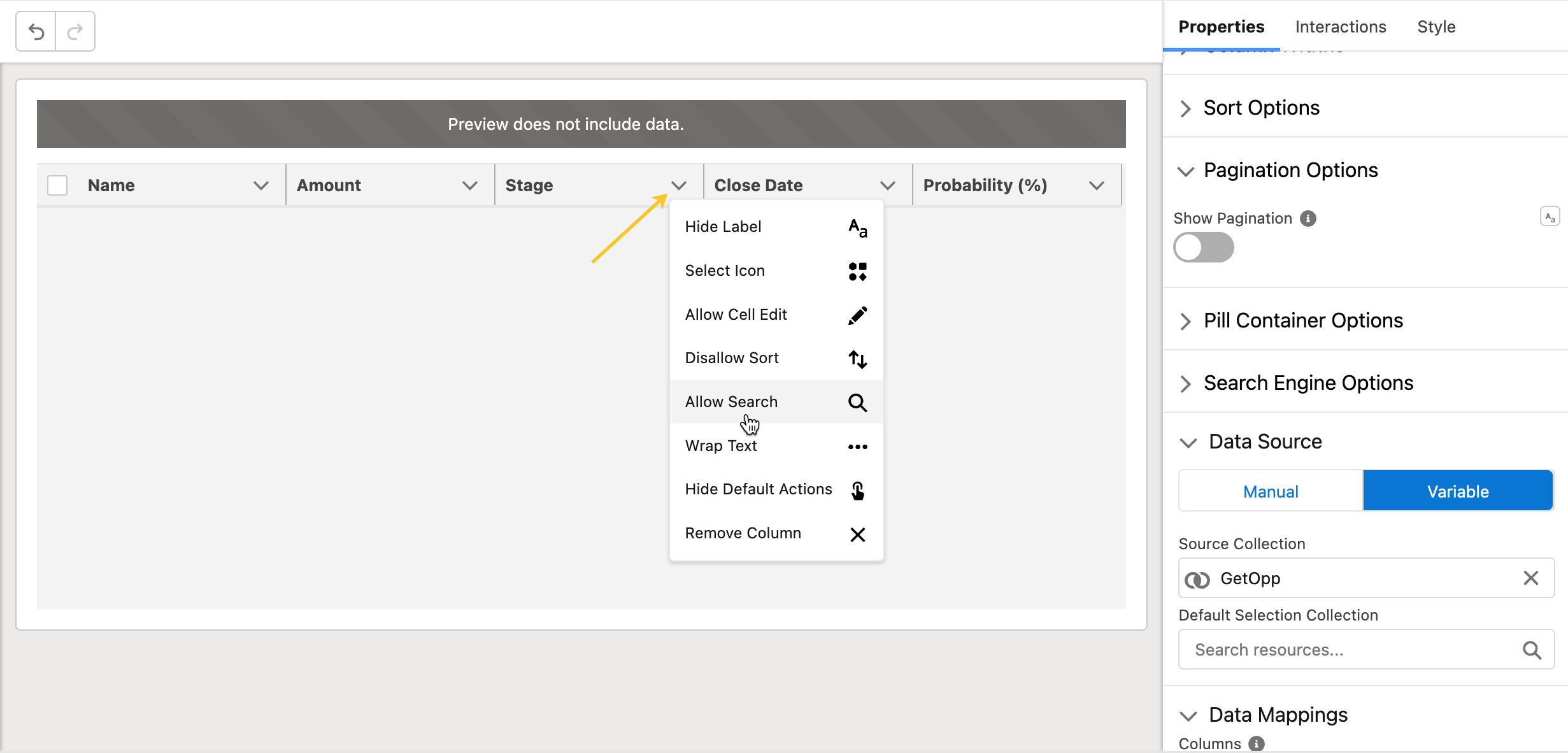
Column settings can be accessible by clicking the arrow icon next to your column header.
**Customizable column settings:**
* **Hide Label:** to hide the column label.
* **Select Icon:** to add an icon next to the label.
* **Allow Cell edit:** column data will be editable.
* **Disallow Sort**: column data will not be sortable.
* **Allow Search:** column data will be searchable.
* **Wrap Text:** column data will be wrapped.
* **Hide Default Actions**
* **Remove Column**
---
# Agent Instructions
This documentation is published with GitBook. GitBook is the documentation platform designed so that both humans and AI agents can read, navigate, and reason over technical content effectively. Learn more at gitbook.com.
## Querying This Documentation
If you need additional information that is not directly available in this page, you can query the documentation dynamically by asking a question.
Perform an HTTP GET request on the current page URL with the `ask` query parameter, and the optional `goal` query parameter:
```
GET https://docs.avonnicomponents.com/flow/tutorials/components/data-table/tips-and-tricks/data-table-editor.md?ask=&goal=
```
`ask` is the immediate question: it should be specific, self-contained, and written in natural language.
`goal` is optional and describes the broader end goal you are ultimately trying to accomplish on behalf of the user. GitBook uses it to tailor the answer towards what is most useful for that goal.
The response will contain a direct answer to the question and relevant excerpts and sources from the documentation.
Use this mechanism when the answer is not explicitly present in the current page, you need clarification or additional context, or you want to retrieve related documentation sections.
.gif?alt=media)