> For the complete documentation index, see [llms.txt](https://docs.avonnicomponents.com/llms.txt). Markdown versions of documentation pages are available by appending `.md` to page URLs; this page is available as [Markdown](https://docs.avonnicomponents.com/flow/tutorials/components/data-table/how-to-add-images-onthe-data-table.md).
# How to add Images onthe Data Table
## Overview
Incorporating images into your [Avonni Data Table](/flow/flow-components/data-table.md) can enhance your application's visual appeal and usability. Follow these steps to add images seamlessly.
## Step 1: Create a URL Field Type
First, define a URL field type within your data model. This field will store the web links to your images. Ensure each record has a unique URL pointing to the image you wish to display.
## Step 2: Fetch the Data
There are two ways to retrieve data for your table:
* **Use a 'Get Records' Collection**: This method fetches data from your database or a specified data source.
* [**Query Data Source**](/flow/component-builder/data-sources/query.md) **Directly**: Avonni Data Table offers a feature to query your data source from within the interface, streamlining the process.
## Step 3: Add the Avonni Data Table to Your Screen
Navigate to the screen elements within your application builder and drag the Avonni Data Table component to the desired location on your screen.
## Step 4: Map Your Data
Configure the data mapping to ensure that the data table correctly displays the information from your data source. This step is crucial for accurate data representation.
## Step 5: Insert the Image Field
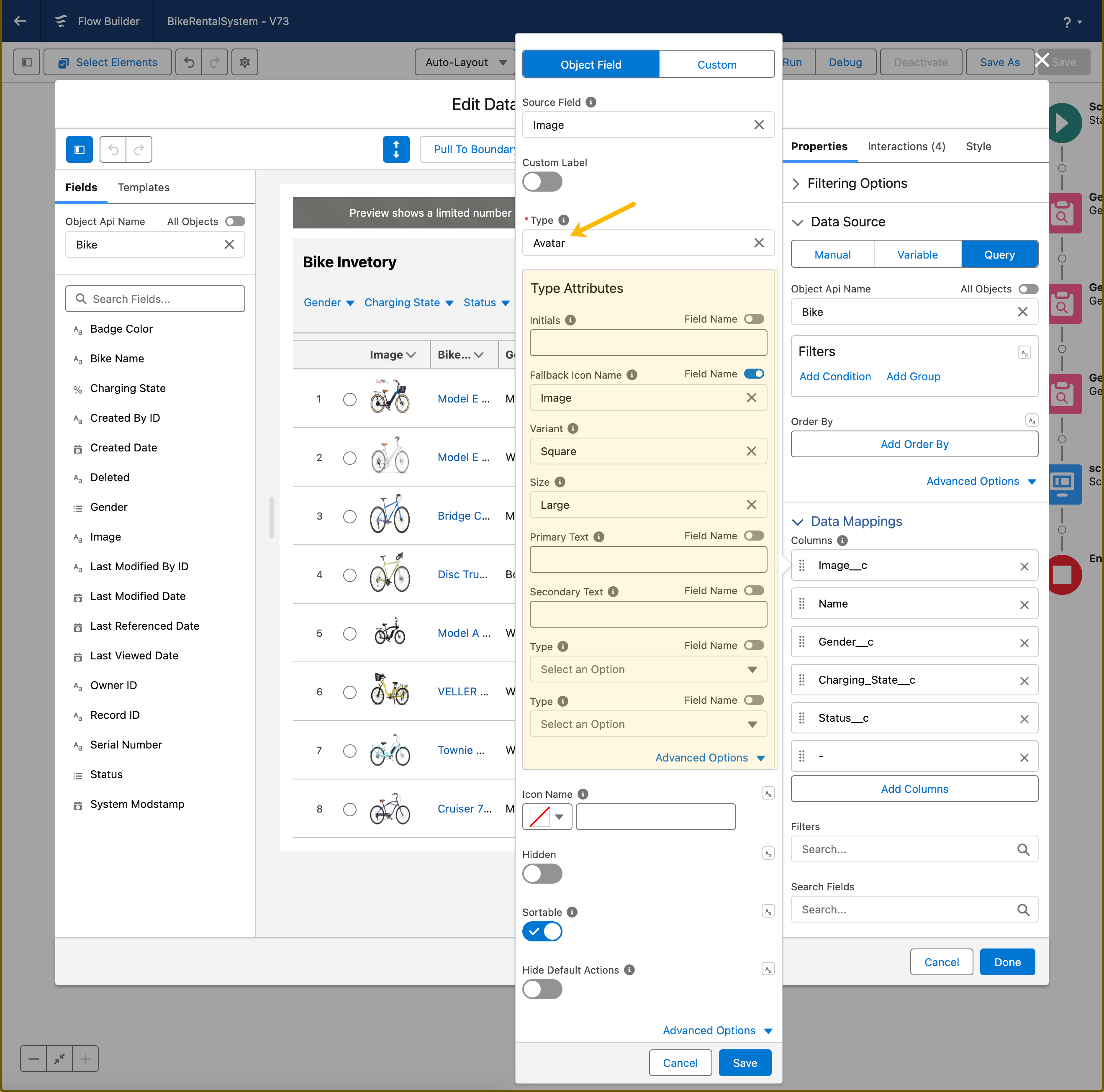
Drag the image field (URL field type created in Step 1) into your data table. This action will inform the table where to fetch the images from.
## Step 6: Select the Image Type
For the image type, choose 'Avatar'. This option is designed to display images in a user-friendly and visually engaging way.
## Step 7: Configure Type Attributes
Fine-tune how your images are displayed by configuring the following type attributes:
* **Fallback Icon Name**: In case an image fails to load, you can specify a fallback icon. Toggle the field name option and select the URL field created in Step 1.
* **Variant**: Choose between a circle or square shape for your images.
* **Size**: Determine the size of the images. Options typically range from small to large.
## Step 8: Save Your Configuration
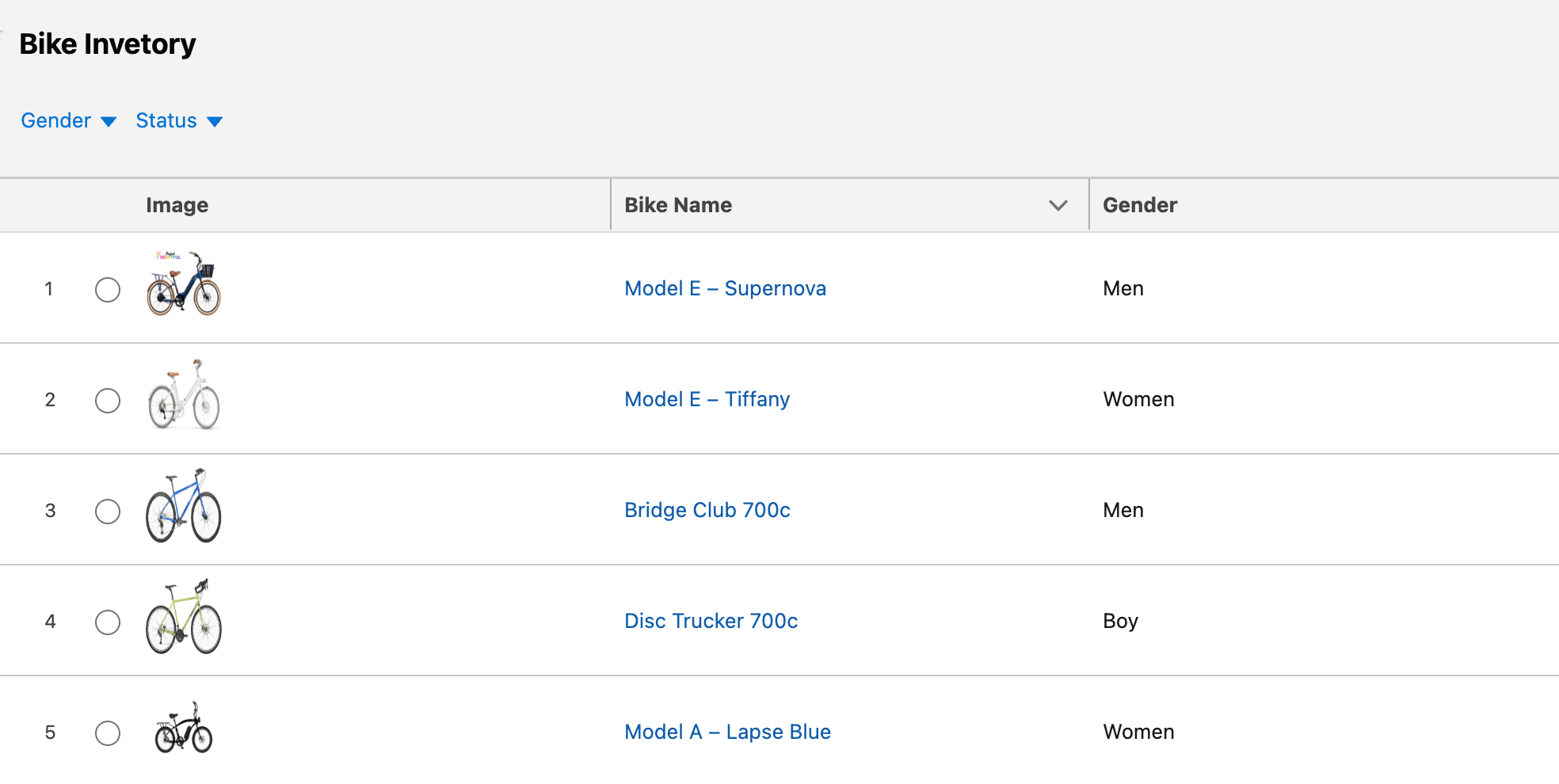
Once you have set up all configurations, click 'Save'. Your data table will display images as avatars next to the corresponding records.
---
# Agent Instructions
This documentation is published with GitBook. GitBook is the documentation platform designed so that both humans and AI agents can read, navigate, and reason over technical content effectively. Learn more at gitbook.com.
## Querying This Documentation
If you need additional information that is not directly available in this page, you can query the documentation dynamically by asking a question.
Perform an HTTP GET request on the current page URL with the `ask` query parameter, and the optional `goal` query parameter:
```
GET https://docs.avonnicomponents.com/flow/tutorials/components/data-table/how-to-add-images-onthe-data-table.md?ask=&goal=
```
`ask` is the immediate question: it should be specific, self-contained, and written in natural language.
`goal` is optional and describes the broader end goal you are ultimately trying to accomplish on behalf of the user. GitBook uses it to tailor the answer towards what is most useful for that goal.
The response will contain a direct answer to the question and relevant excerpts and sources from the documentation.
Use this mechanism when the answer is not explicitly present in the current page, you need clarification or additional context, or you want to retrieve related documentation sections.
.gif?alt=media)