> For the complete documentation index, see [llms.txt](https://docs.avonnicomponents.com/llms.txt). Markdown versions of documentation pages are available by appending `.md` to page URLs; this page is available as [Markdown](https://docs.avonnicomponents.com/flow/help/support-and-troubleshooting.md).
# Support & Troubleshooting
At Avonni, we're committed to helping you succeed with our components. Whether you're just getting started or building advanced solutions, this page is your one-stop resource for getting help, resolving common issues, and knowing when to contact our support team.
{% hint style="warning" %}
## What Our Standard Support Covers (and What It Doesn’t)
**Our standard support covers issues specific to the Avonni Components Suite—for example, if a component isn’t working as expected.**
We do **not** provide general support for Flow Builder or assist with troubleshooting entire flows that are not working as expected.
If you require assistance with more complex flow design, custom solutions, or advanced troubleshooting beyond our components, [**our consulting services**](https://www.avonni.app/community/success-plans#premier) may be the ideal fit for your needs.
{% endhint %}
***
## Before Contacting Support
### **Quick Troubleshooting Checklist**
Over 80% of support questions are solved by following these simple checks. Please go through them before reaching out — it could save you valuable time!
### 1. Check Your Package Version
Many issues stem from using outdated versions of the Avonni Components package.
* ➤ **Latest version available?** Visit: [**https://docs.avonnicomponents.com/releases-notes/flows-experience-sites**](https://docs.avonnicomponents.com/releases-notes/flows-experience-sites?fallback=true)
* ➤ [**Subscribe to updates**](https://dashboard.mailerlite.com/forms/808392/134910842135119740/share) to be notified about new releases and improvements.
***
### 2. Test in an Incognito or Private Browser Window
Sometimes, browser extensions or cached data interfere with Avonni components.
* Try reproducing the issue in an **Incognito/Private session**.
* If the issue disappears, it's likely related to your browser settings or cache.
***
### 3. Check Lightning Web Security Settings
The performance and behavior of Avonni Components can be impacted if Lightning Web Security is disabled in your Salesforce Org.
* We **strongly recommend** enabling [**Lightning Web Security**](https://developer.salesforce.com/docs/platform/lightning-components-security/guide/lws-enable.html) to ensure optimal functionality.
***
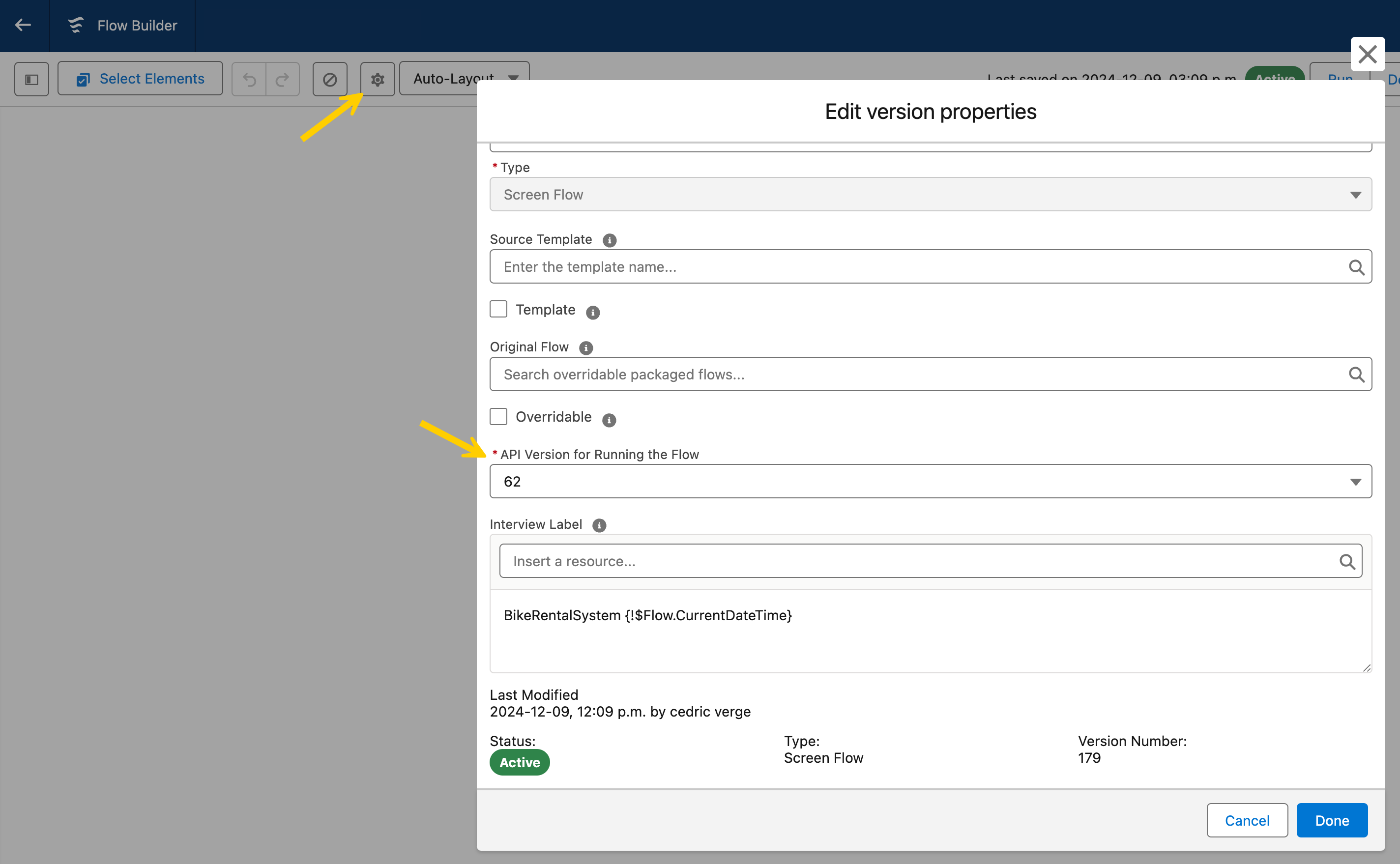
### 4. Confirm Flow API Version
Using an outdated Flow API version can lead to performance issues or unexpected behavior.
* Open your Flow in the Builder.
* Check the API version — we recommend using the **latest supported API version**.
***
### 5. Review User Permissions
Ensure the affected users have the correct setup:
* ✔ Assigned the [appropriate **Permission Sets**](/flow/getting-started/installation-and-licenses-management.md#assigning-permission-sets) for Avonni Components.
* ✔ [Package **Licenses** are assigned](/flow/getting-started/installation-and-licenses-management.md#license-management).
* ✔ Correct **Object** and **Field-Level Security (FLS)** permissions are in place.
***
## How to Contact Support
If you've completed the checklist and still need assistance, we're here to help.
### ✉️ **Support Email**
Reach us at: [**flowcomponents@avonni.app**](mailto:flowcomponents@avonni.app)
To help us assist you as quickly and efficiently as possible, please include the following information in your message:
✔ **Package version** of Avonni Components you're using.
✔ **Org ID** where the issue occurs.
✔ If possible, please **grant temporary login access** to our support team. This allows us to investigate directly within your org. [Learn how to grant access →](https://help.salesforce.com/s/articleView?id=000324129\&type=1)
✔ The **name of the Flow**, Screen, or Salesforce Site where the issue happens.
✔ A clear **description of the issue** and steps to reproduce it.
✔ **Screenshots or screen recordings**, if applicable.
The more details you provide, the faster we can resolve your issue.
***
### 🕒 Support Hours
We’re a Canadian company, and when you talk to us, you’re speaking directly to the people who build and support Avonni.
* **Monday - Friday**
* **8:00 AM - 6:00 PM EST**
We aim to respond to all support inquiries within **one business day**. During peak periods, responses may take slightly longer, but rest assured — we'll get back to you as soon as possible.
**Please note****:** On Canadian bank holidays, our support team is unavailable. This means responses may be delayed, but we carefully review all messages and prioritize responding once we return to work.
***
### 💼 Sales Inquiries
For pricing, licensing, or partnership questions, contact: [**sales@avonni.app**](mailto:sales@avonni.app)
***
## How to Report Bugs
Have you encountered a bug? Here's how to provide all the essential information for a speedy resolution.
You can report bugs in two ways:
* Via the **chat feature** located in the bottom-right corner of your screen.
* By emailing us at [**flowcomponents@avonni.app**](mailto:flowcomponents@avonni.app).
#### **What information should I include?**
The more details you provide, the faster we can investigate and resolve the issue:
✔ **Is your request related to a specific Screen Component?** Please mention it.
✔ **Steps to reproduce**: Describe precisely what you do, what happens, and what you expect to happen instead.
✔ **Error Messages**: If applicable, include any error messages, especially those shown when using Flow Debug Mode.
✔ **Visual Evidence**: Screenshots or short videos demonstrating the issue are extremely helpful.
✔ **Org Access**: For quicker resolution, consider granting us temporary access to your Salesforce Org. [How to grant access →](https://help.salesforce.com/s/articleView?id=000324129\&type=1)
✔ **Org ID**, Flow name, and affected Sites.
The more complete the information, the faster we can assist you.
***
## Our Support Commitment
Whether you're on a free plan or a paid subscription, we're committed to you and care about your success.
Plan Type
Support Details
Paid Users
Priority support with faster response times and dedicated assistance.
Free Users
We strive to assist you as quickly as possible; however, response times may vary depending on the volume.
***
## Troubleshooting
Here are the most common errors when adding a flow that includes Avonni componentswith Avonni components inside.
#### **Flow API Version**
If you're running into issues with Avonni Components, ensure the flow you're having issues with is running on the latest API version. You can check this in your flow settings. This might help resolve some problems up front.
***
### Avonni Components Access
#### You do not have the level of access necessary error
You'll see this error message on a flow in Experience Cloud if the user doesn't have permission to run it. Ensure that users with the selected profile either have general flow permissions or their profile is explicitly listed as able to access this flow.
#### You don't have access to this Avonni Component error
This error happens when either:
* The affected user doesn't have the necessary permission set assigned to them.
* The selected user doesn't have a license assigned to them.
To fix this, you can add a license to the user by going to the **Installed Packages** page in Salesforce Setup and then clicking **Manage Licenses.**
#### Flow and Avonni Components are Visible, but No Data
If you see the flow and Avonni Components on your page, but the components are empty (no data is displayed), it's usually a permissions issue.
**Check these two things:**
1. **Object and Field Permissions:** Ensure the users experiencing the issue have at least "Read" access to the object and fields you're trying to display in the Avonni Components.
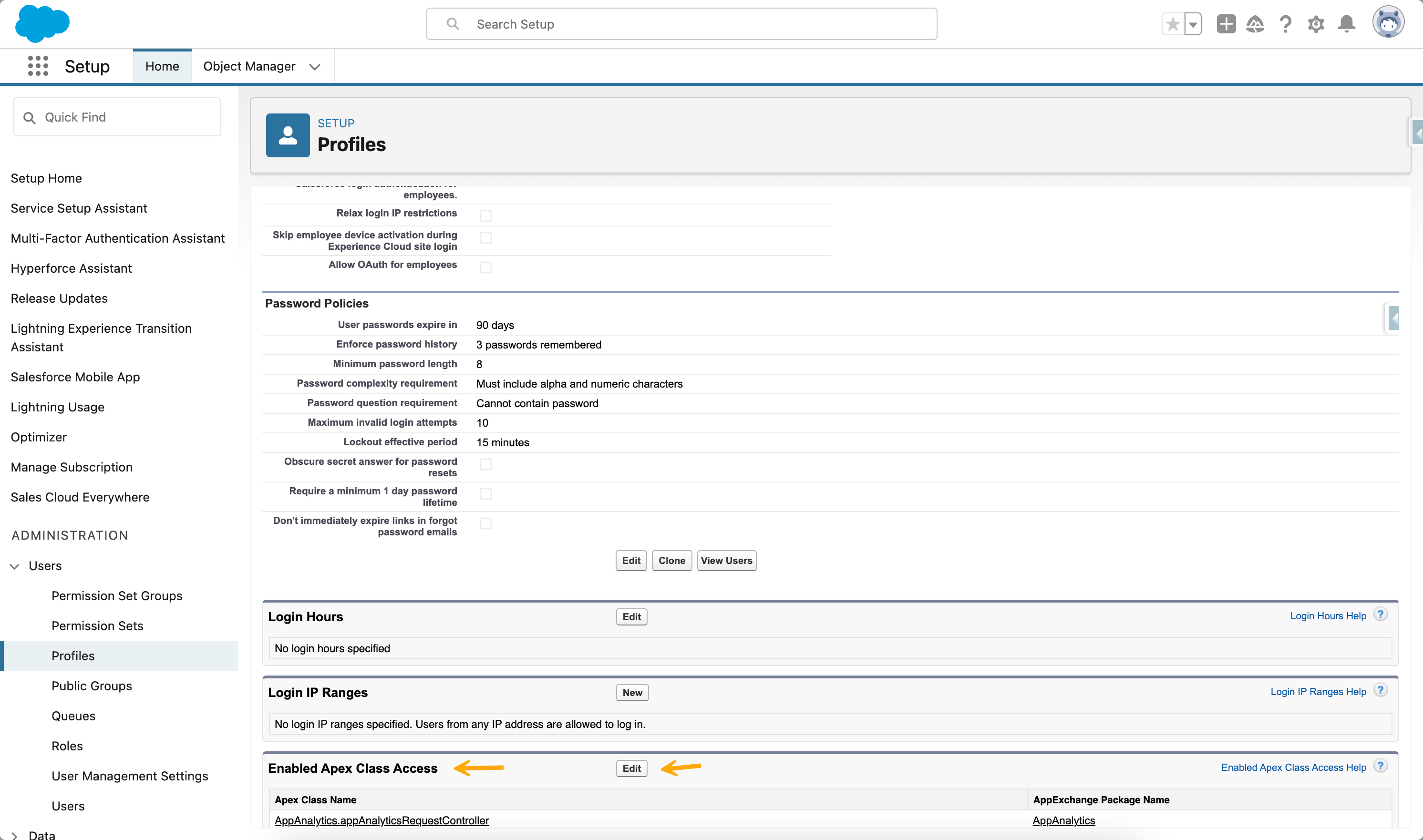
2. **Apex Class Access:** Check the affected user's profile to ensure they have access to the necessary Avonni Apex classes. If not:
* Go to the profile settings.
* Search for "Avonni Components (avcmpbuilder)" APEX classes.
* Add those classes to the profile
***
### Flow Deployment process
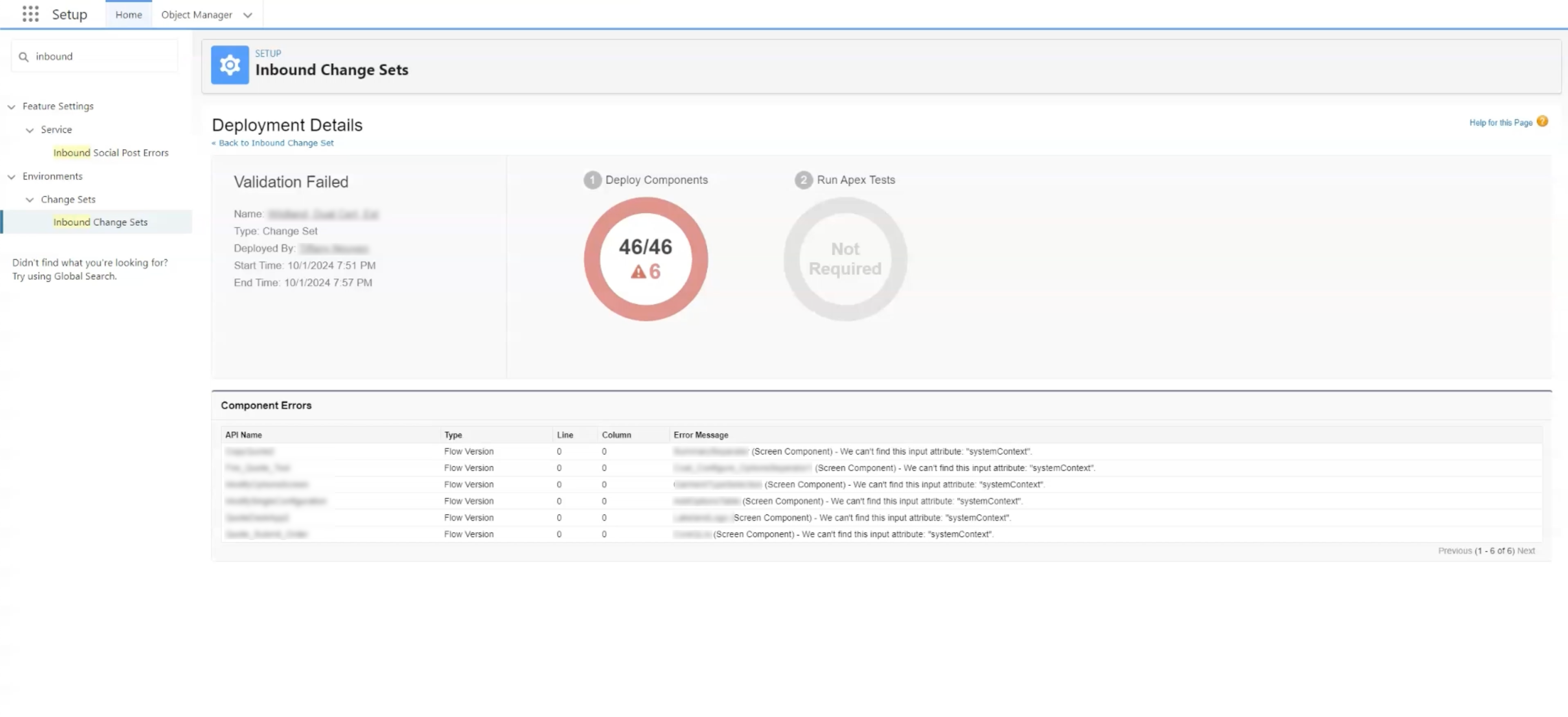
You might encounter problems deploying flows built with Avonni Components from your sandbox to production. This can result in various error messages. In most cases, these errors happen because different versions of the Avonni package are installed in your sandbox and production environments.
To fix this, ensure you're running the same version of the Avonni package in both your sandbox and production. You can always update to the latest version from our [**AppExchange listing page**](https://appexchange.salesforce.com/listingDetail?listingId=a0N4V00000IDsfbUAD\&tab=e)**.**
***
## Additional Resources
We want to empower you to get the most from Avonni Components.
* 📚 [**Documentation & Tutorials**](https://flow.avonnicomponents.com/)
* 🎓 [**Solution Library**](https://docs.avonnicomponents.com/projects/flow-components/home)
* 👨💻 [**Consulting Services**](https://www.avonni.app/community/success-plans#premier)
***
## Still Have Questions?
No problem — we’re here to help. But please take a moment to review the troubleshooting checklist above first — it resolves most issues quickly.
---
# Agent Instructions
This documentation is published with GitBook. GitBook is the documentation platform designed so that both humans and AI agents can read, navigate, and reason over technical content effectively. Learn more at gitbook.com.
## Querying This Documentation
If you need additional information that is not directly available in this page, you can query the documentation dynamically by asking a question.
Perform an HTTP GET request on the current page URL with the `ask` query parameter, and the optional `goal` query parameter:
```
GET https://docs.avonnicomponents.com/flow/help/support-and-troubleshooting.md?ask=&goal=
```
`ask` is the immediate question: it should be specific, self-contained, and written in natural language.
`goal` is optional and describes the broader end goal you are ultimately trying to accomplish on behalf of the user. GitBook uses it to tailor the answer towards what is most useful for that goal.
The response will contain a direct answer to the question and relevant excerpts and sources from the documentation.
Use this mechanism when the answer is not explicitly present in the current page, you need clarification or additional context, or you want to retrieve related documentation sections.


.webp?alt=media)