> For the complete documentation index, see [llms.txt](https://docs.avonnicomponents.com/llms.txt). Markdown versions of documentation pages are available by appending `.md` to page URLs; this page is available as [Markdown](https://docs.avonnicomponents.com/flow/flow-components/delay-interaction.md).

# Delay Interaction

The Delay Interaction component allows you to pause the UI for a set time, useful for creating smooth transitions, simulating processing, and enhancing user experience.

The Delay Interaction pauses the flow screen for a set duration, then fires a **Finish** interaction. Use it to create smooth transitions, simulate processing, or trigger an action a moment after a screen loads — with or without a loading spinner.

## Overview

The Delay Interaction is a timing component. When the screen it sits on loads, it waits for the duration you set, then fires its **Finish** interaction so you can chain another action — show a confirmation, launch a flow dialog, navigate, or run flow logic.

The component is invisible on the screen unless **Show Loading** is enabled, in which case it displays a loading spinner for the duration of the delay. This makes it equally useful as a visible "please wait" indicator or as a silent, behind-the-scenes timer.

To use it, drag the Delay Interaction onto the screen where you want the pause to occur, set the delay duration in the **Properties** tab, and (optionally) wire up an interaction in the **Interactions** tab to define what happens once the delay elapses.

## Tutorials

<table><thead><tr><th width="308">Name</th><th>Description</th></tr></thead><tbody><tr><td><a href="/flow/tutorials/components/delay-interaction/creating-a-confetti-celebration-on-the-final-screen.md"><strong>Creating a confetti celebration on the final screen</strong></a></td><td>Learn to celebrate user milestones with confetti in Salesforce Flow!</td></tr><tr><td><a href="/flow/tutorials/components/delay-interaction/launch-a-flow-dialog-without-a-screen.md"><strong>Launch a flow dialog without a screen</strong></a></td><td>Learn to subtly initiate flow dialogs using the invisible Delay Interaction component for smoother, cleaner user experiences.</td></tr></tbody></table>

## Configuration

Configure the Delay Interaction from the **Properties** tab of the Edit Delay Interaction Component panel.

### Properties

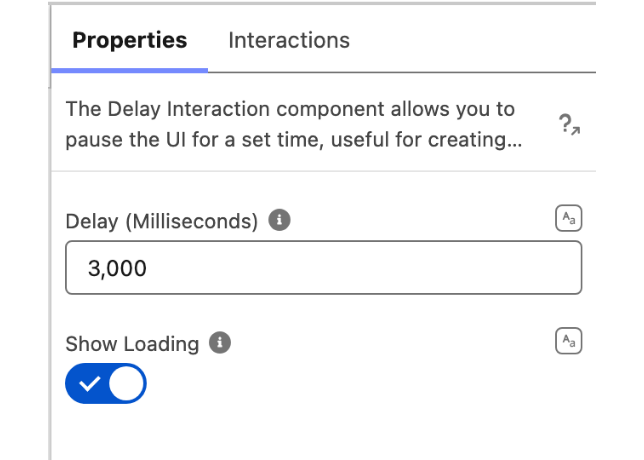
* **Delay (Milliseconds)** — The length of the pause, in milliseconds, before the **Finish** interaction fires (1000 milliseconds = 1 second).
* **Show Loading** — When enabled, a loading spinner is displayed for the duration of the delay. Leave it off to keep the component invisible on the screen.

<figure><img src="https://27923732-files.gitbook.io/~/files/v0/b/gitbook-x-prod.appspot.com/o/spaces%2F1FUd4apB9YHgCEMUFbVb%2Fuploads%2FFnpoUlsNLQvLQVhk2BHv%2Fdelay-interaction-panel.png?alt=media" alt="" width="320"><figcaption><p>The whole Properties tab: a delay of three seconds, with the spinner turned on. There is no Style tab, because the component has nothing to style.</p></figcaption></figure>

## Use Cases

* **Splash screen:** Show your app's logo for a few seconds while it loads.
* **Onboarding flow:** Give users a moment to read instructions before asking them to interact.
* **Progress indicator:** Display a loading spinner while a task is being completed.
* **Interactive tutorials:** Pause between steps to allow users to follow along.
* **Form validation:** Briefly display an error message before clearing a form field.

## Interactions

[Interactions](/flow/component-builder/interactions-panel.md) define what happens when the delay elapses. Configure them from the **Interactions** tab of the Edit Delay Interaction panel.

### Finish

Fires once the **Delay (Milliseconds)** duration has elapsed after the screen loads. Wire it to any interaction — [Show Toast](/flow/component-builder/interactions-panel/show-toast.md), [Fire Confetti](/flow/component-builder/interactions-panel/fire-confetti.md), [Open Flow Dialog](/flow/component-builder/interactions-panel/open-flow-dialog.md), [Navigate](/flow/component-builder/interactions-panel/navigate.md), and more — to run an action a set moment after the screen appears.

## Output Variables

### Flow Interaction Output Variables

Like all interactive Flow components, the Delay Interaction exposes generic output slots (Variable 1–10) that an [Open Flow Dialog](/flow/component-builder/interactions-panel/open-flow-dialog.md) or [Open Flow Panel](/flow/component-builder/interactions-panel/open-flow-panel.md) interaction can fill with values from a launched flow. See [Flow Interaction Output Variables](/flow/component-builder/interactions-panel/flow-interaction-output-variables.md).

## Troubleshooting Common Issues

* **The delay is far shorter or longer than expected** — The duration is set in **milliseconds**, not seconds. Enter `1000` for a one-second pause, `3000` for three seconds, and so on.
* **Nothing happens after the delay** — No interaction is wired to the **Finish** event. Open the **Interactions** tab and configure what should run once the delay elapses.


---

# Agent Instructions
This documentation is published with GitBook. GitBook is the documentation platform designed so that both humans and AI agents can read, navigate, and reason over technical content effectively. Learn more at gitbook.com.

## Querying This Documentation
If you need additional information that is not directly available in this page, you can query the documentation dynamically by asking a question.

Perform an HTTP GET request on the current page URL with the `ask` query parameter, and the optional `goal` query parameter:

```
GET https://docs.avonnicomponents.com/flow/flow-components/delay-interaction.md?ask=<question>&goal=<endgoal>
```

`ask` is the immediate question: it should be specific, self-contained, and written in natural language.
`goal` is optional and describes the broader end goal you are ultimately trying to accomplish on behalf of the user. GitBook uses it to tailor the answer towards what is most useful for that goal.

The response will contain a direct answer to the question and relevant excerpts and sources from the documentation.

Use this mechanism when the answer is not explicitly present in the current page, you need clarification or additional context, or you want to retrieve related documentation sections.
