> For the complete documentation index, see [llms.txt](https://docs.avonnicomponents.com/llms.txt). Markdown versions of documentation pages are available by appending `.md` to page URLs; this page is available as [Markdown](https://docs.avonnicomponents.com/flow/flow-components/date-picker.md).
# Date Picker
The Date Picker offers a calendar interface for selecting dates in Salesforce, often used in scheduling, forms, and reports.
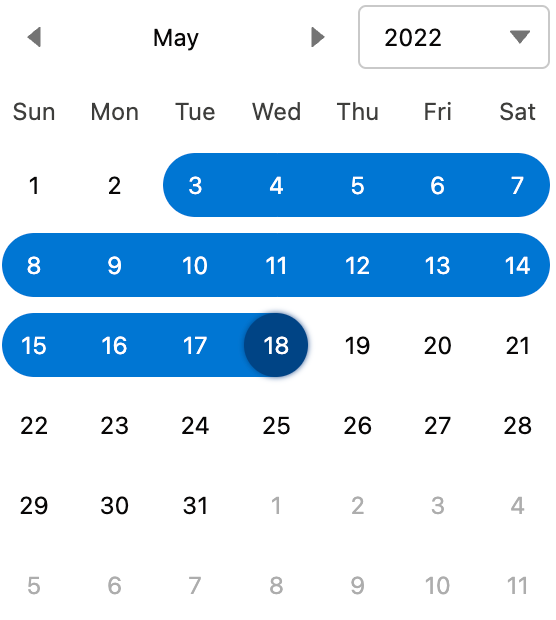
The Avonni Date Picker displays an interactive calendar that lets users select single dates, multiple dates, or a date range (interval) within a Screen Flow. It supports minimum/maximum date bounds, disabled dates, disabled intervals, marked dates with colored indicators, and optional week numbers.
***
## Overview
The Date Picker offers a calendar interface for selecting dates in Salesforce, often used in scheduling, forms, and reports.
***
## Configuration
To configure it, click the component on the Flow screen. The **Edit Date Picker Component** panel opens on the right with three tabs: Properties, Interactions, and Style. The sections below mirror the Properties tab.
### Properties
**Selection Mode** controls how many dates a user can choose:
* **Single** — only one date at a time (default).
* **Multiple** — users can select several individual dates.
* **Interval** — users select a start and end date to define a range.
**Orientation** sets whether multiple month calendars are displayed **Horizontally** or **Vertically** (relevant when **Number of Month Calendars** is greater than 1).
**Selected Dates** pre-fills the calendar with one or more selected dates (set from a flow variable).
**Disabled Dates** marks specific dates as unselectable. Accepts an array of ISO 8601 date strings.
**Disabled Intervals** defines time ranges during which dates cannot be selected.
**Date Labels** assigns a text label (and optional styling) to specific calendar days — useful for marking holidays, deadlines, or special events.
**Marked Dates** visually highlights specific dates using a colored indicator (up to three markers per date).
**Min** sets the earliest selectable date. Dates before this value are not shown.
**Max** sets the latest selectable date. Dates after this value are not shown.
**Number of Month Calendars** controls how many months are displayed at once.
**Display week number column** adds a column showing ISO week numbers alongside the calendar days.
**Hide Navigation** hides the previous/next month navigation arrows and the header.
**Disabled** makes the entire calendar non-interactive.
***
## Interactions
[Interactions](/flow/component-builder/interactions-panel.md) define what happens when users interact with the Date Picker. Configure them from the **Interactions** tab of the Edit Date Picker panel.
### Change
Fires when the user selects or changes a date. Use this to store the selected date in a flow variable or drive conditional logic downstream.
***
## Styling
The **Style** tab gives you fine-grained control over the Date Picker's appearance. Configure it from the **Style** tab of the Edit Date Picker panel.
{% tabs %}
{% tab title="Margin" %}
Controls the *outer* spacing around the date picker, creating space between it and other elements on the screen.
* **Top / Right / Bottom / Left:** Adjust the space on each side.
{% endtab %}
{% tab title="Padding" %}
Controls the *inner* spacing between the calendar content and its border.
* **Top / Right / Bottom / Left:** Adjust the inner spacing on each side.
{% endtab %}
{% tab title="Text" %}
Styles the color of the various text elements in the calendar.
* **Dates / Disabled Dates / Today / Weekdays / Month:** Set the color of each date-related text element.
* **Selected Date / Focused Selected Date / Hovered Selected Date:** Set the text color of selected dates in their default, focused, and hovered states.
{% endtab %}
{% tab title="Background" %}
Sets the background colors of the calendar and its dates.
* **Color / Linear Gradient:** Set the overall background color or apply a gradient.
* **Date Picker / Today / Hovered Date:** Set the background of the calendar area, today, and hovered dates.
* **Selected Date / Focused Selected Date / Hovered Selected Date:** Set the background of selected dates in their default, focused, and hovered states.
{% endtab %}
{% tab title="Flow Dialog" %}
Adjusts display when the date picker is opened as a modal dialog inside a Flow screen.
* **Width:** Dialog width.
* **Height:** Dialog height.
* **Background Color:** Dialog background color.
{% endtab %}
{% tab title="Multi Selected Border" %}
Styles the border shown around dates when interval (range) selection mode is active.
* **Color:** Set the border color.
* **Style:** Choose a border style (e.g. solid, dashed, dotted).
{% endtab %}
{% endtabs %}
***
## Output Variables
The Date Picker exposes these output variables you can reference in your flow after the screen. To use them, select the screen element in Flow Builder, then the Date Picker component, and pick the output variable you need.
### Date Selection
Updated whenever the user selects or changes a date.
| Output variable | Type | What it returns |
| -------------------- | --------------- | ------------------------------------------------------------------------------------------------------------------------------------------------- |
| **Value** | Date | The first selected date as an ISO 8601 date string. Use this in single-selection mode, or when only the earliest selected date matters. |
| **Value Collection** | Date Collection | All selected dates as an array of ISO 8601 date strings. Use this in Multiple or Interval selection mode to capture the full set of chosen dates. |
> **Example:** In Interval mode, store **Value Collection** in a flow Date Collection variable, then pass the first and last elements to a downstream record-update to set a start date and end date on a record.
### Flow Interaction Output Variables
Like all interactive Flow components, the Date Picker exposes generic output slots (Variable 1–10) that an [Open Flow Dialog](/flow/component-builder/interactions-panel/open-flow-dialog.md) or [Open Flow Panel](/flow/component-builder/interactions-panel/open-flow-panel.md) interaction can fill with values from a launched flow. See [Flow Interaction Output Variables](/flow/component-builder/interactions-panel/flow-interaction-output-variables.md).
---
# Agent Instructions
This documentation is published with GitBook. GitBook is the documentation platform designed so that both humans and AI agents can read, navigate, and reason over technical content effectively. Learn more at gitbook.com.
## Querying This Documentation
If you need additional information that is not directly available in this page, you can query the documentation dynamically by asking a question.
Perform an HTTP GET request on the current page URL with the `ask` query parameter, and the optional `goal` query parameter:
```
GET https://docs.avonnicomponents.com/flow/flow-components/date-picker.md?ask=&goal=
```
`ask` is the immediate question: it should be specific, self-contained, and written in natural language.
`goal` is optional and describes the broader end goal you are ultimately trying to accomplish on behalf of the user. GitBook uses it to tailor the answer towards what is most useful for that goal.
The response will contain a direct answer to the question and relevant excerpts and sources from the documentation.
Use this mechanism when the answer is not explicitly present in the current page, you need clarification or additional context, or you want to retrieve related documentation sections.
.avif?alt=media)