> For the complete documentation index, see [llms.txt](https://docs.avonnicomponents.com/llms.txt). Markdown versions of documentation pages are available by appending `.md` to page URLs; this page is available as [Markdown](https://docs.avonnicomponents.com/flow/component-builder/interactions-panel/navigate.md).
# Navigate
To set a navigation on your Salesforce.
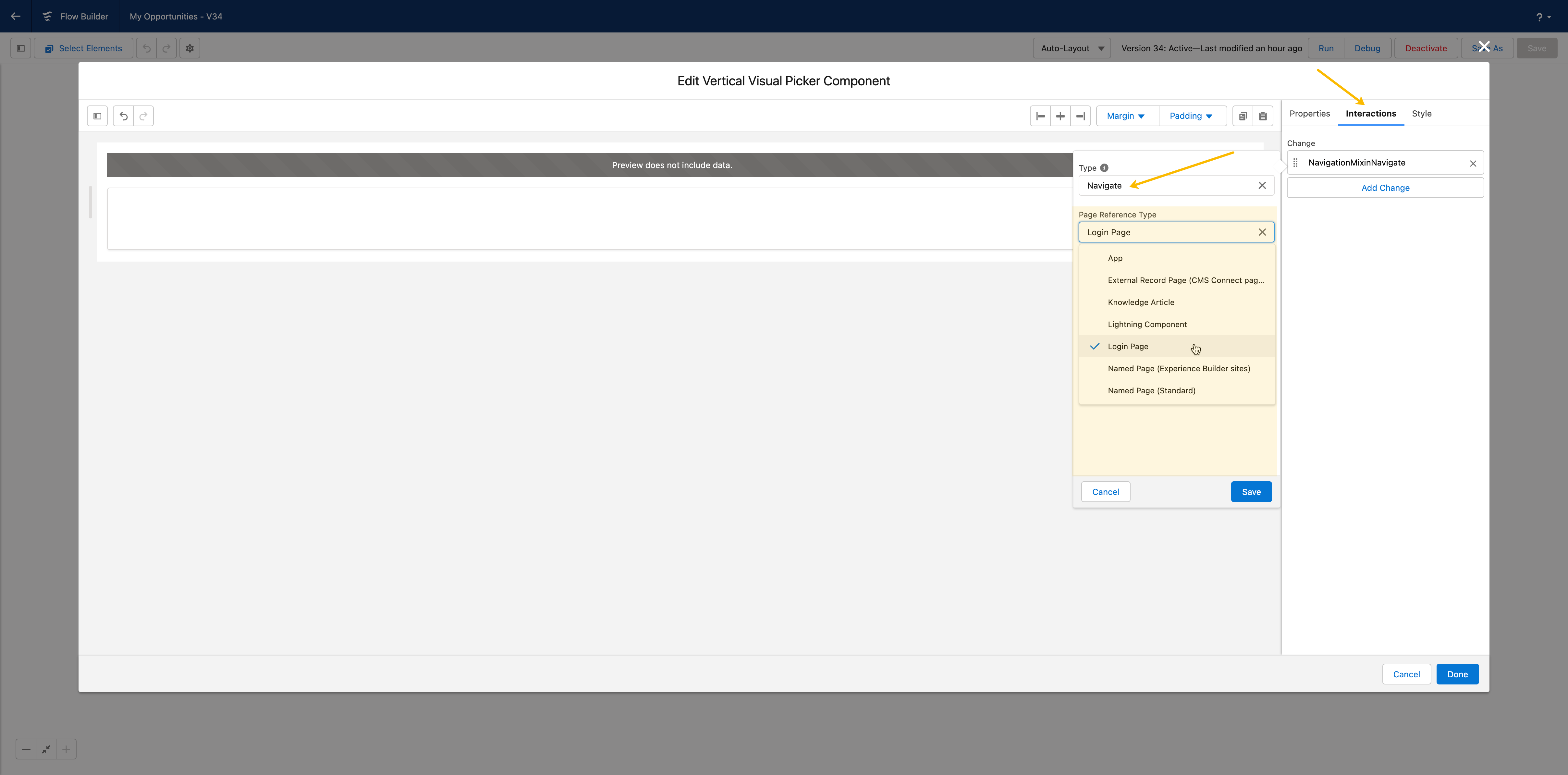
The Navigate interaction sends the user to another Salesforce page or an external URL.
## Overview
The **`Navigate`** interaction allows you to set the navigation when a user clicks on an action. This feature will enable you to trigger and customize different page references, making it easy for end-users to navigate to other pages. This helps to create a seamless user experience and improve user engagement.
## Configuration
Select a **Page Reference Type** to define where the interaction navigates, then fill in the properties for that type. You can also choose to open the destination in a Lightning Console tab (see [Open in a Console Tab](#open-in-a-console-tab)).
**Target** sits directly under **Page Reference Type** and decides whether the destination replaces the current page or opens in a new one. Default: **Current Window**. It applies to every page reference type below except **External URL**, which carries a **Target** of its own.
These page reference types are supported.
* [App](#app)
* [External Record Page](#external-record-page)
* [Knowledge Article](#knowledge-article)
* [Lightning Component](#lightning-component)
* [Login Page](#login-page)
* [Named Page (Experience Builder)](#named-page-experience-builder)
* [Named Page (Standard)](#named-page-standard)
* [Navigation Item Page](#navigation-item-page)
* [Object Page](#object-page)
* [Record Page](#record-page)
* [Record Relationship Page](#record-relationship-page)
* [External URL](#external-url)
### App
To set interaction navigation to an app, enter the app ID in the App Target field.
{% hint style="info" %}
The `App ID` can be found here: Setup-->Apps-->App Manager-->Edit (on the desired app)-->you will find at app ID in the address bar. 
{% endhint %}
#### URL Format Examples
Navigate to the app’s homepage using the `appId`
```html
/lightning/app/06mRM0000008dNrYAI
```
Navigate to an object record’s page in the app using the `appId`
```html
/lightning/app/06mRM0000008dNrYAI/o/Case/home
```
Navigate to the app’s homepage using the `appDeveloperName`
```html
/lightning/app/standard__LightningSales
```
Navigate to an object record’s page in the app using the `appDeveloperName`
```html
/lightning/app/standard__LightningSales/o/Case/home
```
### External Record Page
A page that interacts with an Experience Cloud external record backed by CMS content.
| Property | Description |
| --------------- | -------------------------------------------------------------------------------------------------------------------------------------------------------------------------------------------------------------------------------------- |
| Record ID | The external record identifier. When the component uses a query data source and the interaction is triggered by a record item, you can reference a Reference field with `{{Record.FieldName}}`; otherwise provide a literal record ID. |
| CMS Source Name | The CMS source name for the external record page. |
| CMS Type Name | The CMS type name for the external record page. |
### Knowledge Article
A page that interacts with a Knowledge Article record.
| Property | Description |
| ------------ | ----------------------------------------------------------------------------------------------------------------------------------------------------- |
| Article Type |
The articleType API name of the Knowledge Article record.
In Experience Builder sites, articleType is ignored.
|
| URL Name |
The articleType API name of the Knowledge Article record.
In Experience Builder sites, articleType is ignored.
|
### Lightning Component
A link to a Lightning Component.
| Property | Description |
| -------------- | ---------------------------------------------------------------------- |
| Component Name | The Lightning component name in the format `namespace__componentName.` |
### Login Page
A page for authentication into an Experience Builder site.
| Property | Description |
| ----------- | ----------------------------------------------------------------------------------------------------------------------------------- |
| Action Name |
A login-related action to be performed. Possible values are:
login
logout
|
### Named Page (Experience Builder)
To navigate to a page in an Experience Builder site.
| Property | Description |
| ---------- | ---------------------------------------------------------------------------------------------------------------------------------------------------------------------- |
| Page Name | The name of the Experience Builder page. The API name can be appended with `__c` for a custom object label. |
| Parameters | Optional key-value parameters to pass to the named page. A value can reference a record field with `{{Record.FieldName}}` when the component uses a query data source. |
### Named Page (Standard)
To navigate to a standard page with a unique name. If an error occurs, the error view loads, and the URL isn’t updated.
| Property | Description |
| ---------- | ------------------------------------------------------------------------------------------------------------------------------------------------------------------------------------------------------------------------------------------------------------------------------------------------------------- |
| Page Name |
The unique name of the page. Possible values are:
home
chatter
today
dataAssessment
filePreview
|
| Record IDs | Requires **Page Name** = `filePreview`. Comma-separated list of all record IDs available for download. When the component uses a query data source and the interaction is triggered by a record item, you can reference a Reference field with `{{Record.FieldName}}`; otherwise provide a literal record ID. |
### Navigation Item Page
To set navigation to a page that displays the content mapped to a custom tab. Visualforce, web, Lightning Pages, and Lightning Component tabs are supported.
| Property | Description |
| ------------ | ---------------------------------- |
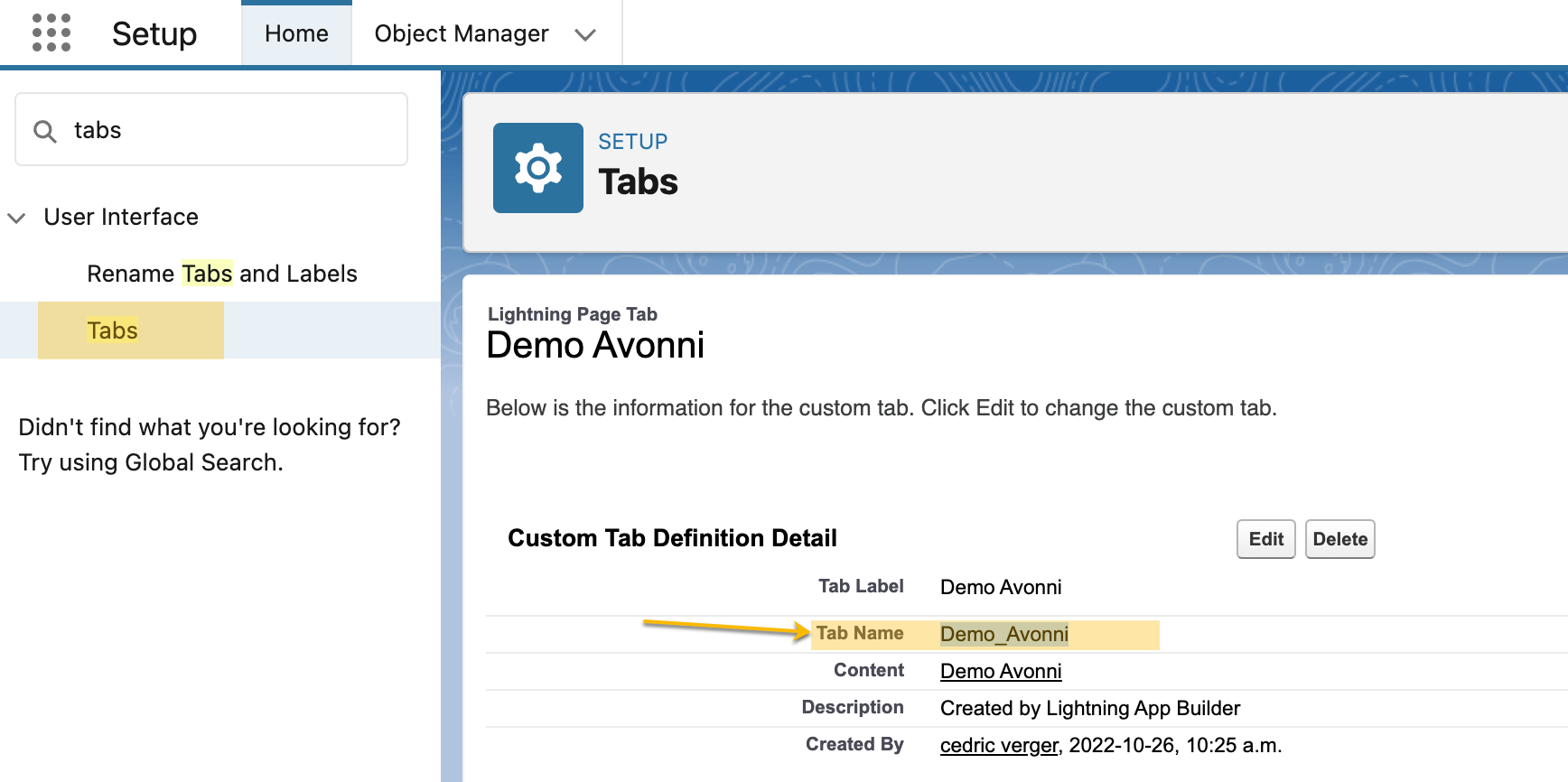
| Tab API Name | The unique name of the custom tab. |
### Object Page
To set navigation to a page that interacts with a standard or custom object in the org and supports standard actions for that object.
| Property | Description |
| ---------------------- | ------------------------------------------------------------------------------------------------------------------------------------------- |
| Object API Name | The API name of the standard or custom object. For custom objects that are part of a managed package, prefix the custom object with `ns__.` |
|
Action Name
| The action name to invoke. Valid values include **`home`**, **`list`**, and **`new`**. |
#### Automatically Populated Fields When Creating a New Record
When using the “Create Record” interaction, you will now notice that specific values are pre-filled. This feature facilitates quicker and more efficient record creation by automatically populating relevant fields, allowing you to focus on adding the necessary unique information without manually entering commonly used data.
You can also enable a record type check so the user selects a record type before the new record is created.
{% hint style="info" %}
You can automatically fill in values using a flow variable. This means certain information can be automatically entered or selected in a field, making the process faster and easier.
{% endhint %}
#### Tutorial
| Name | Description |
| -------------------------------------------------------------------------------------------------------------------------------------------------- | ----------------------------------------------------------------------------------- |
| [**How to create an interaction to navigate to an object**](/flow/tutorials/interactions/how-to-create-an-interaction-to-navigate-to-an-object.md) | Learn to navigate records with interactive, step-by-step guidance in this tutorial. |
### Record Page
A page that interacts with a record in the org and supports standard actions for that record.
| Property | Description |
| --------------- | ----------------------------------------------------------------------------------------------------------------------------------------------------------------------------------------------------------------------------------------------------------------------------------------------------------------------- |
| Object API Name | The API name of the record’s object. |
| Record ID | The record ID or custom value to link to that specific record. |
| Action Name |
The action name to invoke. Valid values include clone, edit, and view.
Experience Builder sites don’t support the values clone or edit.
|
#### Tutorial
| Name | Description |
| ---------------------------------------------------------------------------------------------------------------------------------------------- | ----------------------------------------------------------------------------------- |
| [**How to create an interaction to navigate to a record page**](/flow/tutorials/interactions/how-to-create-an-interaction-to-a-record-page.md) | Learn to navigate records with interactive, step-by-step guidance in this tutorial. |
### Record Relationship Page
A page that displays a related list of records for a parent record.
| Property | Description |
| --------------------- | --------------------------------------------------------------------- |
| Object API Name | The API name of the parent object. |
| Record ID | The Id of the parent record. |
| Relationship API Name | The API name of the relationship field representing the related list. |
### External URL
To set interaction navigation to an address outside Salesforce, enter it in the **URL** field. The picker lists this type as **External URL**.
| Property | Description |
| -------- | ------------------------------------------------------------------------------------------------------------------------------------------------------------------------------------------------------------------------------ |
| URL | The URL of the page to navigate to. When the component uses a query data source and the interaction is triggered by a record item, you can reference a URL field with `{{Record.FieldName}}`; otherwise provide a literal URL. |
| Target | Whether the address opens in a new tab or window, or replaces the current one. Default: **New Tab/Window**. |
{% hint style="info" %}
**External URL shows two fields named Target, and only the lower one applies.** The **Target** directly under **Page Reference Type** serves the other page reference types and is ignored here. The **Target** listed above, among the **External URL** properties, is the one that decides where the address opens, and it defaults to **New Tab/Window**. Changing the upper one has no effect on an **External URL** destination.
{% endhint %}
### Open in a Console Tab
Any page reference type can be opened inside a Lightning Console app instead of navigating in place. When enabled, the destination opens as a workspace tab (or a subtab of a parent tab), with optional controls for the tab's record, URL, focus, navigation-rule override, label, and icon.
| Property | Description |
| ------------------------- | ----------------------------------------------------------------- |
| Open Tab | Opens the destination in a Lightning Console app tab. |
| Open Subtab | Opens the destination as a subtab instead of a workspace tab. |
| Subtab Parent ID | Optional parent tab Id for the subtab. |
| Record ID | Optional record Id to open directly in the tab. |
| URL | Optional URL to load in the console tab. |
| Focus | Focuses the tab after opening. |
| Override Navigation Rules | Overrides navigation rules and forces the tab to open. |
| Label | Optional custom label for the console tab. |
| Icon | Optional custom icon (with alternative text) for the console tab. |
---
# Agent Instructions
This documentation is published with GitBook. GitBook is the documentation platform designed so that both humans and AI agents can read, navigate, and reason over technical content effectively. Learn more at gitbook.com.
## Querying This Documentation
If you need additional information that is not directly available in this page, you can query the documentation dynamically by asking a question.
Perform an HTTP GET request on the current page URL with the `ask` query parameter, and the optional `goal` query parameter:
```
GET https://docs.avonnicomponents.com/flow/component-builder/interactions-panel/navigate.md?ask=&goal=
```
`ask` is the immediate question: it should be specific, self-contained, and written in natural language.
`goal` is optional and describes the broader end goal you are ultimately trying to accomplish on behalf of the user. GitBook uses it to tailor the answer towards what is most useful for that goal.
The response will contain a direct answer to the question and relevant excerpts and sources from the documentation.
Use this mechanism when the answer is not explicitly present in the current page, you need clarification or additional context, or you want to retrieve related documentation sections.