# Query VS Variable

When building your Salesforce flows with Avonni components, selecting the right data source is crucial for performance and flexibility. Avonni offers two main options:

## **Variable Data Source**

### How It Works

You use standard Salesforce Flow logic (such as **Get Records**) to fetch data. The results are stored in a **Flow variable**, which is then linked to your Avonni component.

### Best Used For

* **Simple use cases** that involve a single object or simple relationships
* **Reusing existing Flow logic** where the data has already been retrieved
* When you want to **transform or manipulate the data** (e.g., sort, filter, calculate) in the Flow before displaying it

### Limitations

* Subject to the **50,000 record limit** of Flow’s "Get Records" element
* Not suitable for **complex queries** involving deep relationships or advanced filtering
* **No built-in real-time filtering** based on user interaction

***

## **Query Data Source**

### How It Works

You write a **SOQL query** directly inside the Avonni component configuration. The component runs the query and loads the data automatically.

### Best Used For

* **Complex or large queries** involving multiple objects, lookups, or filters
* Situations where you need to **retrieve more than 50,000 records**
* **Dynamic, interactive components** that respond to user input in real time (e.g., filtering, search)

### Considerations

* Requires a **basic understanding of SOQL**
* May be **less intuitive** for Flow beginners compared to using variables
* Doesn’t allow for complex post-processing logic within the Flow itself

***

## Key Differences at a Glance

| Feature                 | Variable Data Source          | Query Data Source                                           |
| ----------------------- | ----------------------------- | ----------------------------------------------------------- |
| **Data Source**         | Flow variable (`Get Records`) | Inline SOQL query                                           |
| **Record Limit**        | 50,000                        | No hard limit                                               |
| **Query Complexity**    | Low (1–2 related objects)     | High (multi-object, filters, joins)                         |
| **Real-Time Filtering** | ❌ No                          | ✅ Yes                                                       |
| **Ease of Use**         | ✅ Beginner-friendly           | ⚠️ Requires SOQL knowledge when used with reactive formulas |

## **Which to Choose?**

| Use a **Variable** if:                           | Use a **Query** if:                                         |
| ------------------------------------------------ | ----------------------------------------------------------- |
| You already have a Get Records step in your Flow | You need to pull data dynamically based on user interaction |
| You want full Flow control over the data         | You need faster or more complex queries                     |
| You’re working with small datasets               | You're working with large or complex datasets               |

## **Example: Displaying Contacts**

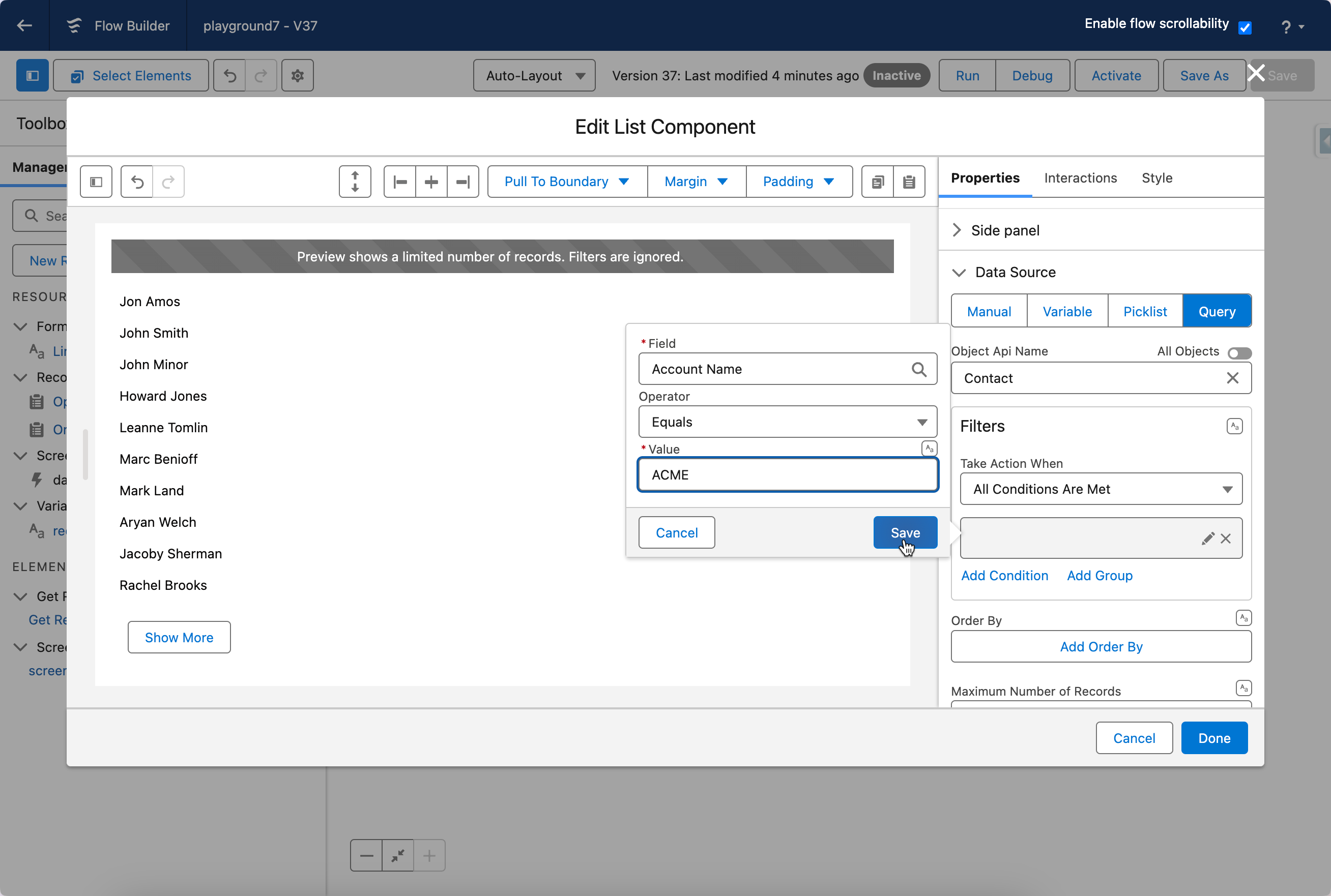
* **Variable:** Use a "Get Records" element to fetch contacts based on certain criteria (e.g., Account Name). Store the results in a variable and connect it to an Avonni List component.
* **Query:** Write a SOQL query directly in the Avonni List component: `SELECT Id, Name, Email FROM Contact WHERE Account.Name = 'Acme'`

<figure><img src="/files/3EHq7aX2ZMpthNam2KHi" alt=""><figcaption></figcaption></figure>

## Dynamic Query Tutorials

These hands-on tutorials walk you through building **interactive, data-driven components using reactive queries** in Avonni. Reactive queries enable one component’s data to update automatically in response to user interaction with another, eliminating the need for extra Flow logic or screen refreshes.

For example, when a user selects an Account in one Data Table, a second Data Table can instantly show the related Contacts. These examples show you how to implement that kind of dynamic, real-time behavior using SOQL queries directly in your components.

<table data-view="cards"><thead><tr><th></th><th></th><th></th><th data-hidden data-card-target data-type="content-ref"></th><th data-hidden data-card-cover data-type="files"></th></tr></thead><tbody><tr><td><strong>How to make Data Tables Reactive</strong></td><td></td><td></td><td><a href="/pages/qAu0AxNOiPmaOSqI80t4">/pages/qAu0AxNOiPmaOSqI80t4</a></td><td><a href="/files/ZnOy9LhFtqmIPkPRfA84">/files/ZnOy9LhFtqmIPkPRfA84</a></td></tr><tr><td><strong>How to build a reactive 'Quarterly Opportunity Tracker' component</strong></td><td></td><td></td><td><a href="/pages/BFdeFKFaL0haxvQUeCw6">/pages/BFdeFKFaL0haxvQUeCw6</a></td><td><a href="/files/FEEztLJ7o6NaVlQlZDdM">/files/FEEztLJ7o6NaVlQlZDdM</a></td></tr><tr><td><strong>How to Create a Combobox-Filtered Data Table</strong></td><td></td><td></td><td><a href="/pages/3oyNpYs1KscEIRYwLNUo">/pages/3oyNpYs1KscEIRYwLNUo</a></td><td><a href="/files/iD6Om3VfUIlmVtfEuOfr">/files/iD6Om3VfUIlmVtfEuOfr</a></td></tr><tr><td><strong>Create a Dynamically Linked Account-Contact View</strong></td><td></td><td></td><td><a href="/pages/ujk52k81RdoagQXyjkeO">/pages/ujk52k81RdoagQXyjkeO</a></td><td><a href="/files/rKa89DD9jjRLAzlh2O4a">/files/rKa89DD9jjRLAzlh2O4a</a></td></tr><tr><td><strong>Build a dynamic Data Table Using Dependent Picklists</strong></td><td></td><td></td><td><a href="/pages/jYHwtcCxr9kGHdliJmni">/pages/jYHwtcCxr9kGHdliJmni</a></td><td><a href="/files/9FaFuopDo5Us3tDFoRJ2">/files/9FaFuopDo5Us3tDFoRJ2</a></td></tr></tbody></table>


---

# Agent Instructions: Querying This Documentation

If you need additional information that is not directly available in this page, you can query the documentation dynamically by asking a question.

Perform an HTTP GET request on the current page URL with the `ask` query parameter:

```
GET https://docs.avonnicomponents.com/flow/component-builder/data-sources/query-vs-variable.md?ask=<question>
```

The question should be specific, self-contained, and written in natural language.
The response will contain a direct answer to the question and relevant excerpts and sources from the documentation.

Use this mechanism when the answer is not explicitly present in the current page, you need clarification or additional context, or you want to retrieve related documentation sections.