# Guide to Implementing
## **Guide to Implementing Reactivity in Avonni Components**
Transform your Avonni components into a dynamic and interactive experience with our guide on setting up reactive data components. This tutorial will walk you through the process, ensuring that your components display data and respond to user interactions in real-time.
{% hint style="info" %}
Reactive-Ready Data Experience Components are: the [Data Table](../../experience-components/data-table), [List](../../experience-components/list), [Map](../../experience-components/map), [Timeline](../../experience-components/timeline) and the Avonni Text Block.
{% endhint %}
### Step 1: Assigning API Names to Your Data Components
Start by giving each of your data components a unique identifier, known as an API name. This name acts as a reference point, allowing different parts of your page to communicate.
* **For Example**:
* If you're working with a Data Table component, you can name it `accountsDatatable`.
### Step 2: Configuring Reactive Expressions in Target Components
Next, decide where you want the interactive data to appear. This could be within a Text Block, another Data Table, or any component displaying data. Here, you'll use reactive expressions to instruct the component on what data to show and when in the filter menu.
* **The Reactive Expression Format**: Use the format `{{componentApiName.selectedRecord.componentFieldApiName}}` to link your components.
* `componentApiName`: This is where you put the API name of your data component (like the `accountsDatatable` you named above).
* `componentFieldApiName`: This refers to the specific field from the record you want to display (for instance, `Name` or `Industry`).
* **For Example**:
* To show the 'Name' field of a record selected from your `accountsDatatable`, use `{{accountsDatatable.selectedRecord.Name}}`.
* To display the 'Industry' field from the same selection, use `{{accountsDatatable.selectedRecord.Industry}}`.
### Practical Use Cases:
1. **Interactive Maps for Account Visualization**:
* Suppose you have an interactive map tagged as `accountMap`. When a user selects a location, you can display the Account Name in a Text Block by using an expression like `{{accountMap.selectedRecord.Name}}`. This ensures the selected account's name appears dynamically based on user interaction.
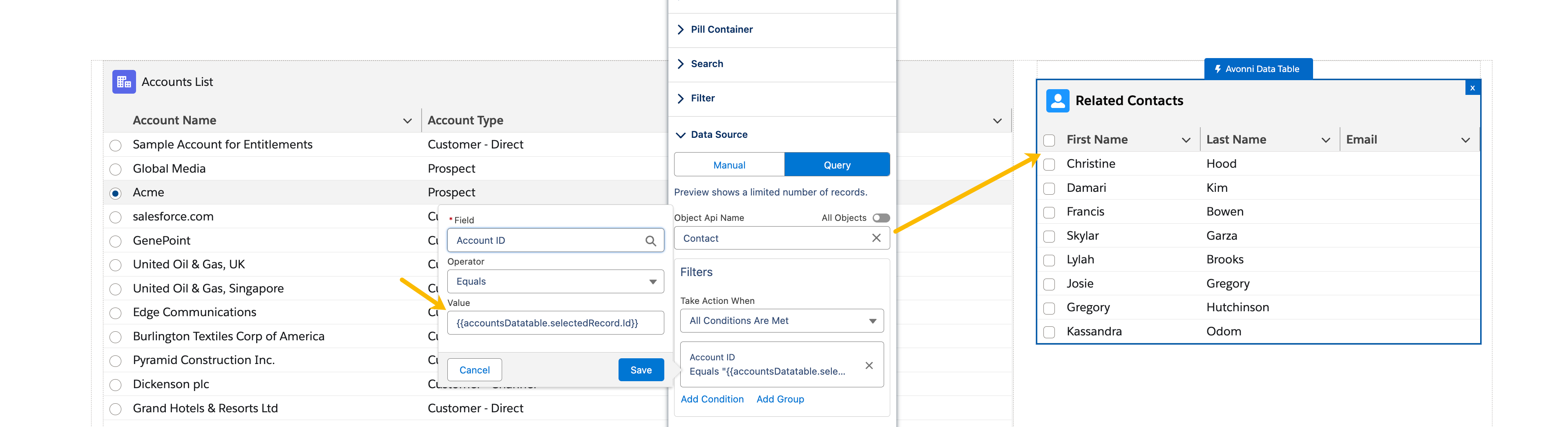
2. **Synchronized Data Tables for Accounts and Contacts**:
* Imagine you have one table showing accounts (`accountsDatatable`) and another showing related contacts (`contactsDatatable`).
* You can configure the `contactsDatatable` to react to selections in the `accountsDatatable`. For instance, to display the contact name associated with the selected account, use `{{accountsTable.selectedRecord.Id}}`.
These steps will turn your static components into a rich, responsive experience, making your web applications more intuitive and user-friendly. The power of reactive data lies in its ability to make every interaction on your site feel connected and purposeful.
Happy Building!