> For the complete documentation index, see [llms.txt](https://docs.avonnicomponents.com/llms.txt). Markdown versions of documentation pages are available by appending `.md` to page URLs; this page is available as [Markdown](https://docs.avonnicomponents.com/experience-cloud/experience-cloud-ja/welcome.md).

# ようこそ

Experience Cloudサイト向けの40を超えるコンポーネント: ブランド化されたレイアウト、データコンポーネント、インタラクションを、あなたの組織に所属していない人々のために提供します。

<button type="button" class="button primary" data-action="ask" data-icon="gitbook-assistant">何を作りたいですか？</button>

<a href="https://appexchange.salesforce.com/appxListingDetail?listingId=2e584bb3-b5e0-415d-9347-d6567158d840&#x26;channel=recommended&#x26;other_source=AppExchange+Recommended" class="button primary" data-icon="up-right-from-square">コンポーネントをインストール</a> <a href="/experience-cloud/experience-cloud-ja/hajimeni/quick-start-guide.md" class="button secondary" data-icon="stars">クイックスタート</a> <a href="/experience-cloud/experience-cloud-ja/aide/overview.md" class="button secondary" data-icon="wand-magic-sparkles">AIで構築</a>

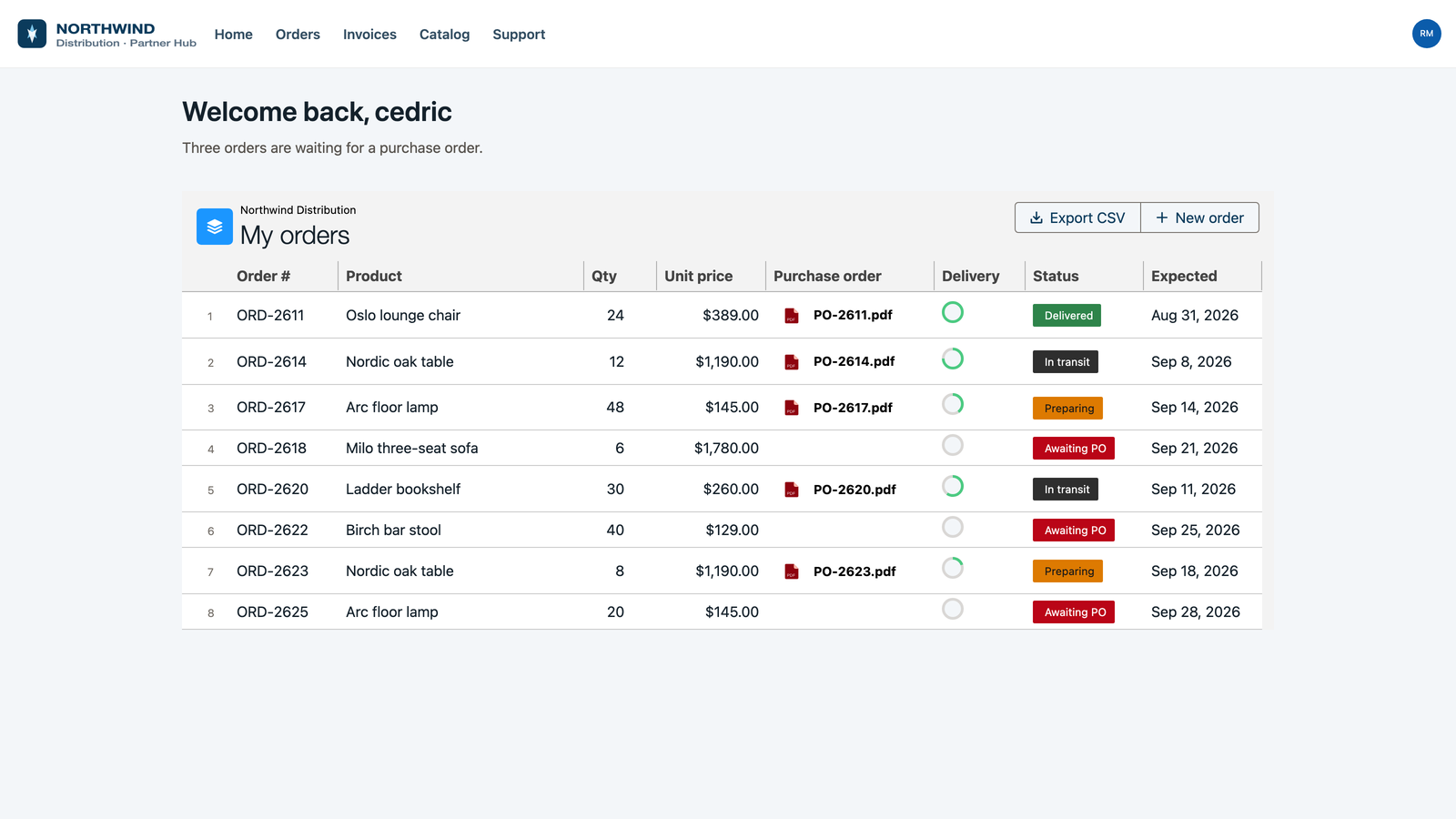
<figure><img src="https://2929066058-files.gitbook.io/~/files/v0/b/gitbook-x-prod.appspot.com/o/spaces%2FDL6JQuZArjJeQvX2ot4y%2Fuploads%2FKQ4muzT9PbBJrnzZ3Jzs%2Fwelcome-hero-portal.png?alt=media" alt="A partner portal page with its own logo and navigation, showing a table of orders with the purchase order file, the delivery progress and the status on each row."><figcaption><p>Experienceサイト上でAvonniコンポーネントを使って構築されたパートナーポータル。</p></figcaption></figure>

***

<h3 align="center">ここから始める</h3>

<p align="center">3ページを順番に進めると、サイトページ上でAvonniコンポーネントが動作します。</p>

<table data-view="cards"><thead><tr><th></th><th></th><th></th><th data-hidden data-card-target data-type="content-ref"></th></tr></thead><tbody><tr><td><h4><i class="fa-rocket">:rocket:</i></h4></td><td><h4>クイックスタートガイド</h4></td><td>Experience Siteページに最初のAvonniコンポーネントを、最初から最後まで追加します。</td><td><a href="/experience-cloud/experience-cloud-ja/hajimeni/quick-start-guide.md">クイックスタートガイド</a></td></tr><tr><td><h4><i class="fa-compass">:compass:</i></h4></td><td><h4>基本を学ぶ</h4></td><td>スロット、コンテナ、そしてサイトページ上でコンポーネントが配置される方法。</td><td><a href="/experience-cloud/experience-cloud-ja/hajimeni/learning-the-basics.md">基本を学ぶ</a></td></tr><tr><td><h4><i class="fa-pager">:pager:</i></h4></td><td><h4>データソース</h4></td><td>コンポーネントをクエリ、CMSコレクション、または手動リストに接続すると、レコードが表示されます。</td><td><a href="/experience-cloud/experience-cloud-ja/puropatipaneru/data-sources.md">データソース</a></td></tr></tbody></table>

***

<h3 align="center">作れるもの</h3>

<p align="center">Experience Builderでページに配置し、データに接続できる44のコンポーネント。以下にそのうち6つを、実際のサイトで撮影した写真付きで紹介します。</p>

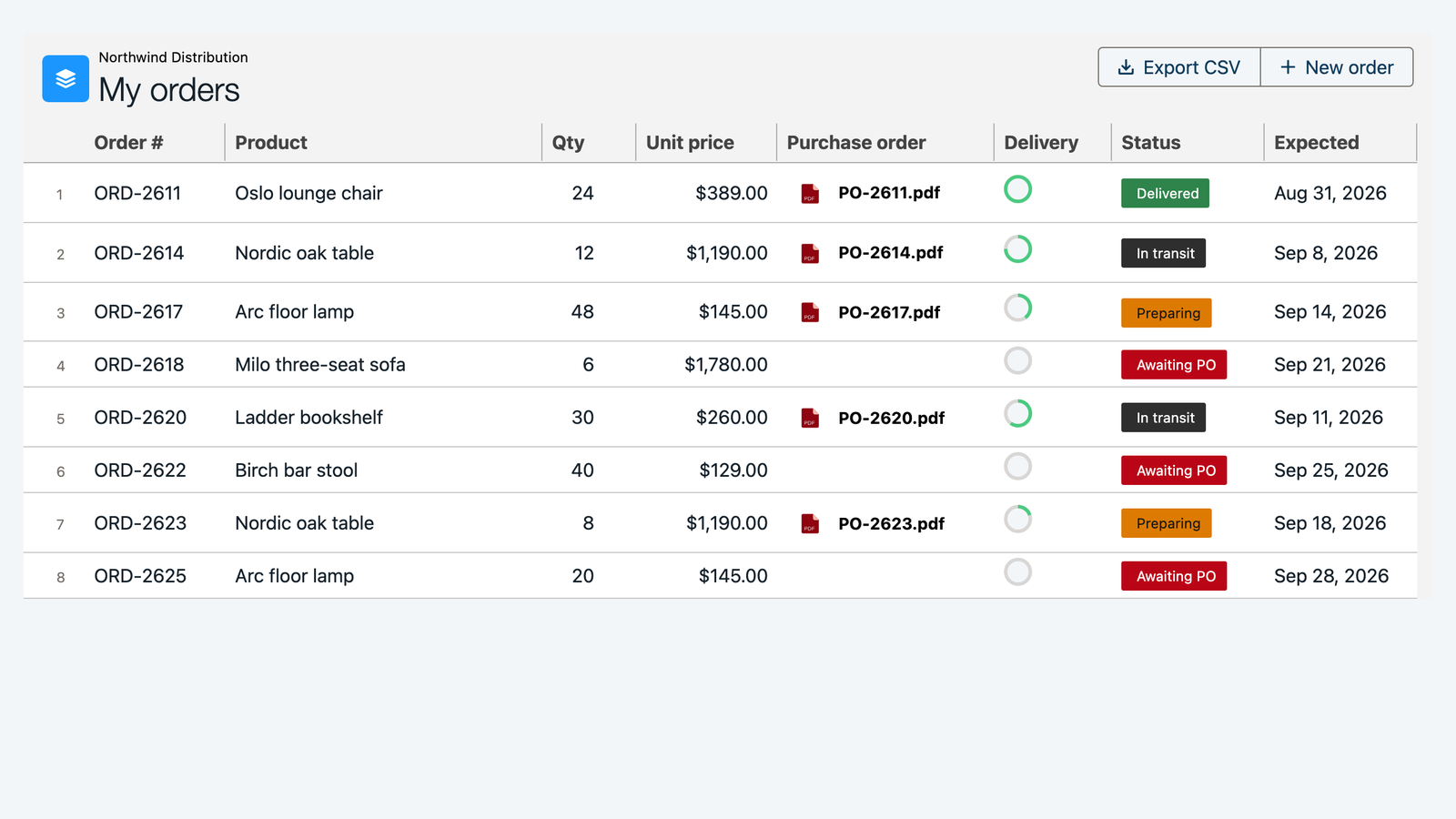
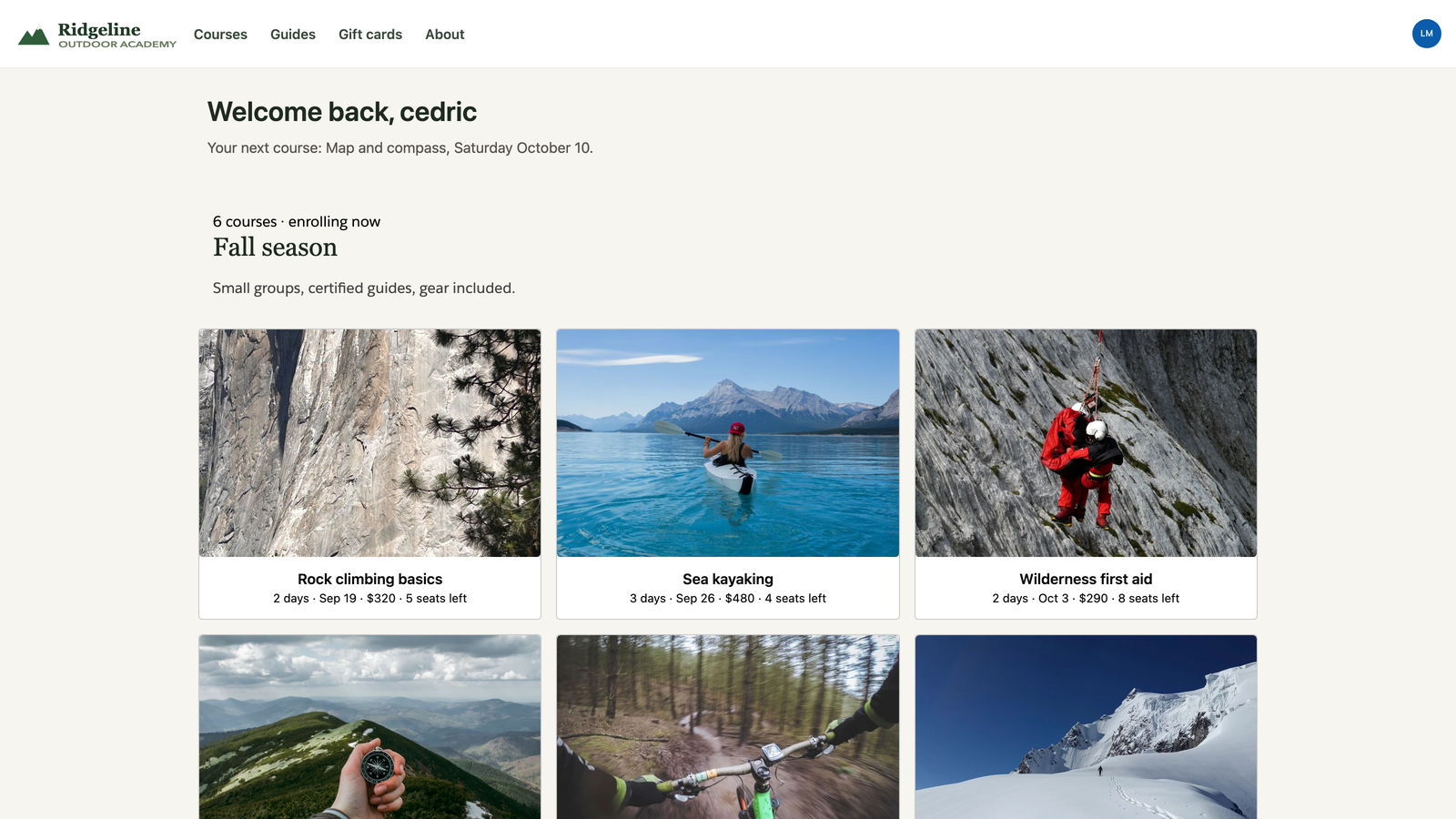
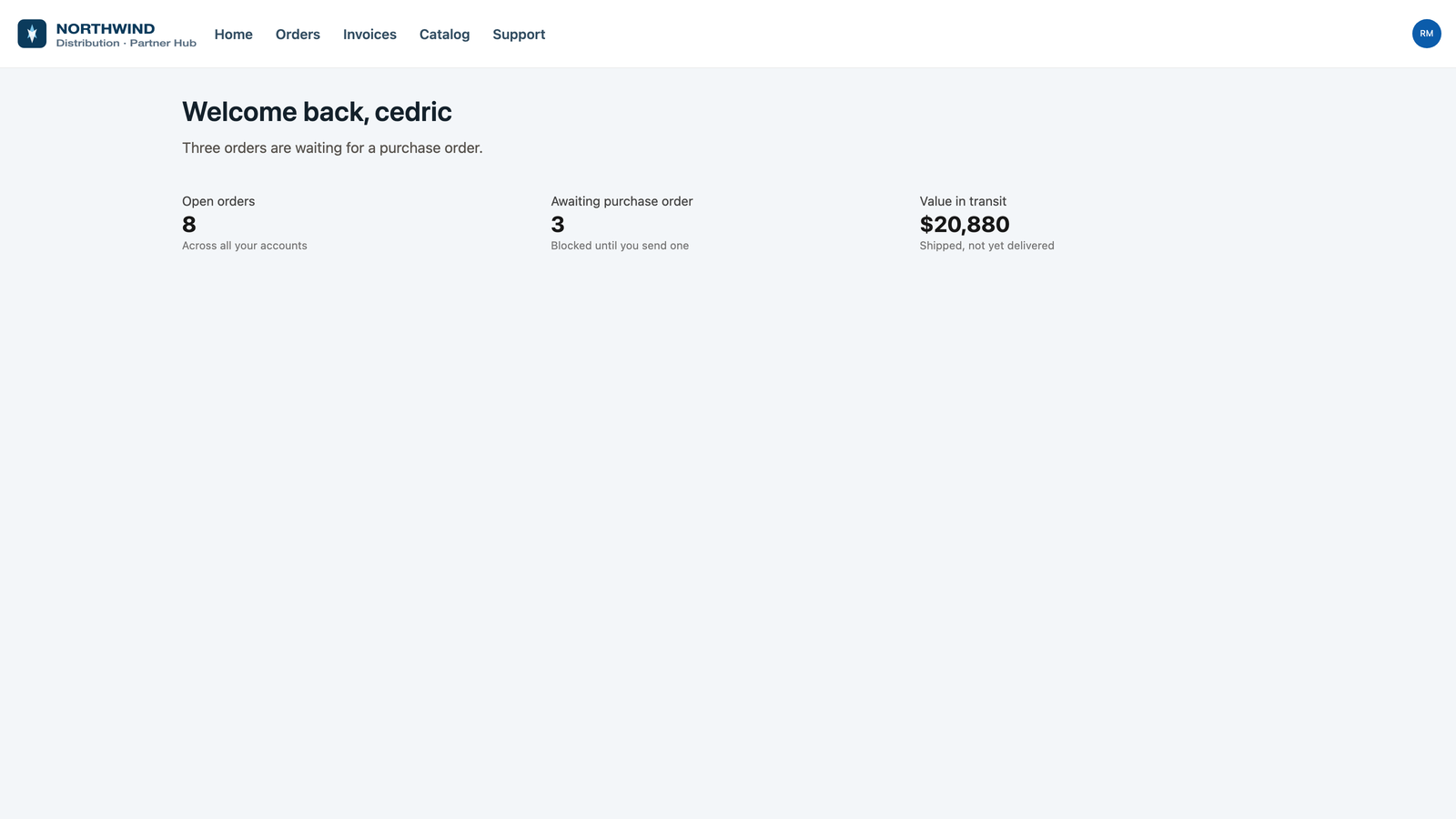
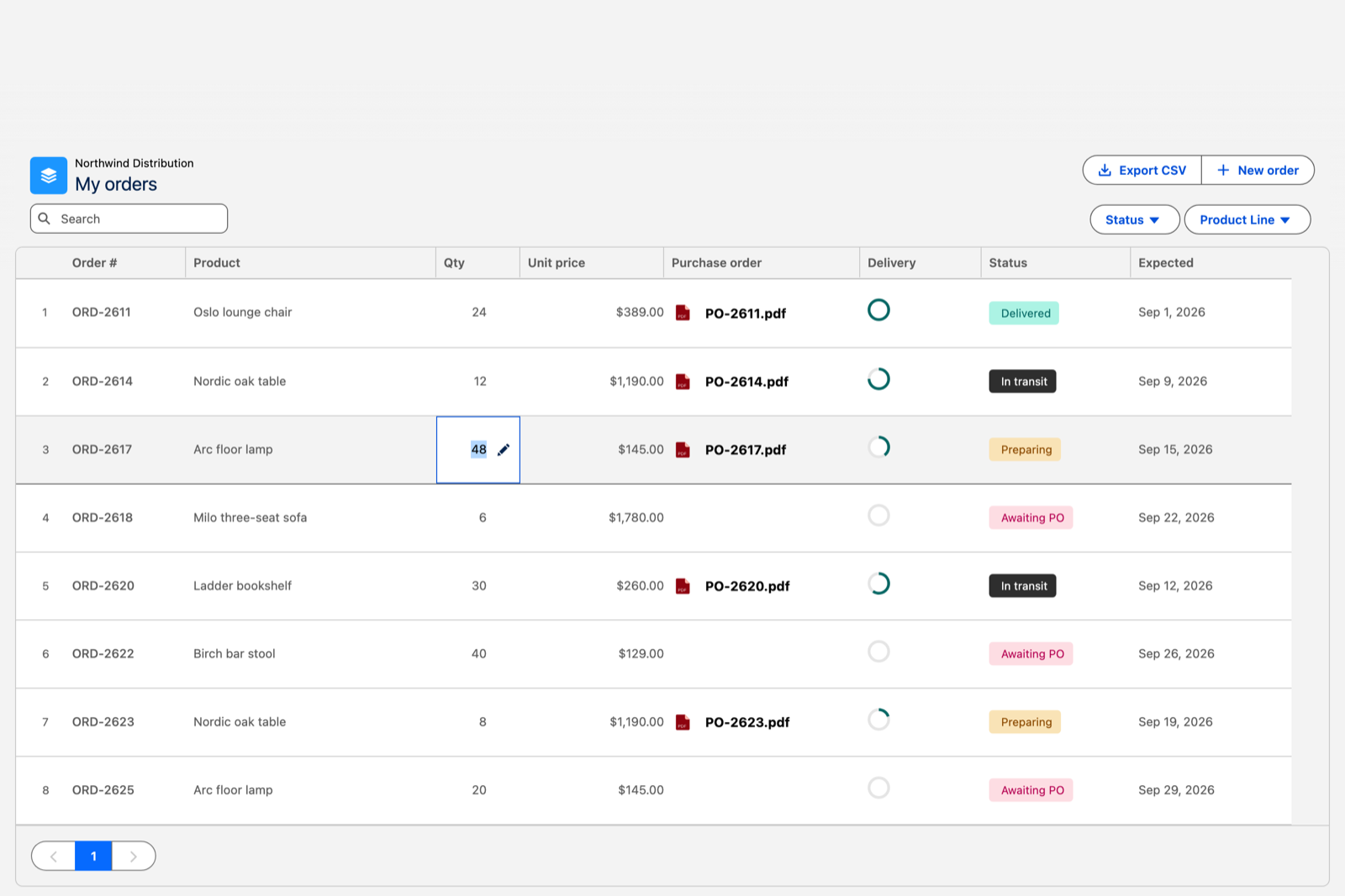
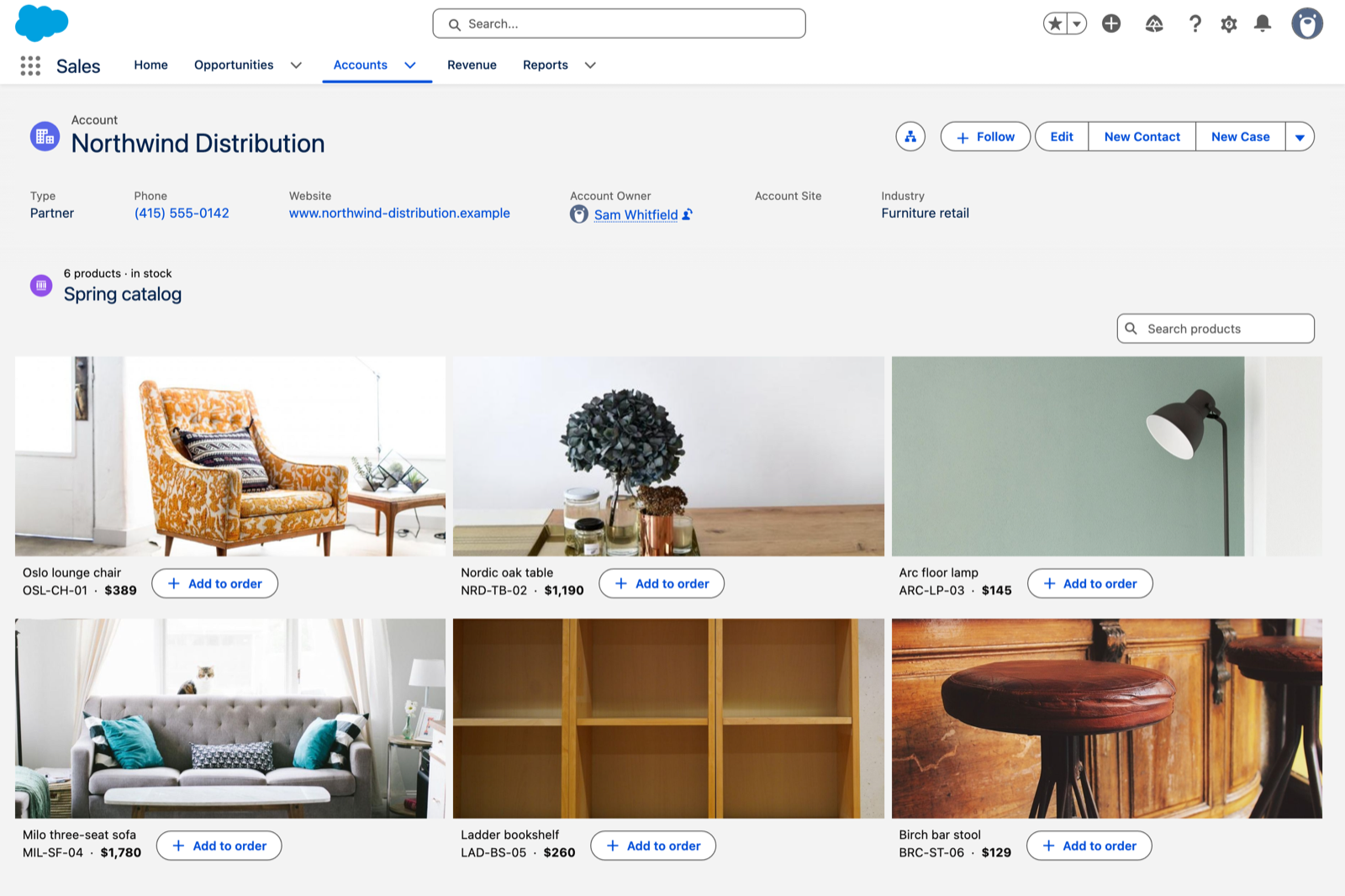
<table data-view="cards"><thead><tr><th></th><th></th><th data-hidden data-card-cover data-type="image">カバー画像</th><th data-hidden data-card-target data-type="content-ref"></th></tr></thead><tbody><tr><td><h4>データテーブル</h4></td><td>レコードの並べ替え、フィルタリング、検索、セルのインライン編集、各行に添付されたファイルの表示ができます。ここでは、パートナーの未処理注文とその発注書を表示しています。</td><td><a href="https://2929066058-files.gitbook.io/~/files/v0/b/gitbook-x-prod.appspot.com/o/spaces%2FDL6JQuZArjJeQvX2ot4y%2Fuploads%2FdYBnT69WbVXtAxk8Po6r%2Fwelcome-portal-data-table.png?alt=media">https://2929066058-files.gitbook.io/~/files/v0/b/gitbook-x-prod.appspot.com/o/spaces%2FDL6JQuZArjJeQvX2ot4y%2Fuploads%2FdYBnT69WbVXtAxk8Po6r%2Fwelcome-portal-data-table.png?alt=media</a></td><td><a href="/experience-cloud/experience-cloud-ja/experience-components/ax-data-table.md">AX - データテーブル</a></td></tr><tr><td><h4>ギャラリー</h4></td><td>レコードをカードのグリッドとして配置し、各カードに画像、タイトル、選択した詳細を表示します。ここでは、会員が予約できるコースです。</td><td><a href="https://2929066058-files.gitbook.io/~/files/v0/b/gitbook-x-prod.appspot.com/o/spaces%2FDL6JQuZArjJeQvX2ot4y%2Fuploads%2FGQnXLd3mRWB5VXWQu1PY%2Fwelcome-portal-gallery.png?alt=media">https://2929066058-files.gitbook.io/~/files/v0/b/gitbook-x-prod.appspot.com/o/spaces%2FDL6JQuZArjJeQvX2ot4y%2Fuploads%2FGQnXLd3mRWB5VXWQu1PY%2Fwelcome-portal-gallery.png?alt=media</a></td><td><a href="/experience-cloud/experience-cloud-ja/experience-components/ax-gallery.md">AX - ギャラリー</a></td></tr><tr><td><h4>タイムライン</h4></td><td>起こったことと今後の予定を月ごとにまとめ、各ステップに専用のアイコンと日付を表示します。ここでは、顧客の導入状況を示しています。</td><td><a href="https://2929066058-files.gitbook.io/~/files/v0/b/gitbook-x-prod.appspot.com/o/spaces%2FDL6JQuZArjJeQvX2ot4y%2Fuploads%2FJXabf1sG7ZisuveU8kzm%2Fwelcome-portal-timeline.png?alt=media">https://2929066058-files.gitbook.io/~/files/v0/b/gitbook-x-prod.appspot.com/o/spaces%2FDL6JQuZArjJeQvX2ot4y%2Fuploads%2FJXabf1sG7ZisuveU8kzm%2Fwelcome-portal-timeline.png?alt=media</a></td><td><a href="/experience-cloud/experience-cloud-ja/experience-components/ax-timeline.md">AX - タイムライン</a></td></tr><tr><td><h4>地図</h4></td><td>住所からレコードをGoogleまたはLeaflet上にプロットし、各ピンに選択した詳細を表示します。ここでは、パートナーの注文の行き先を示しています。</td><td><a href="https://2929066058-files.gitbook.io/~/files/v0/b/gitbook-x-prod.appspot.com/o/spaces%2FDL6JQuZArjJeQvX2ot4y%2Fuploads%2FQfYpTlYi1KhZ6D8lUTpn%2Fwelcome-portal-map.png?alt=media">https://2929066058-files.gitbook.io/~/files/v0/b/gitbook-x-prod.appspot.com/o/spaces%2FDL6JQuZArjJeQvX2ot4y%2Fuploads%2FQfYpTlYi1KhZ6D8lUTpn%2Fwelcome-portal-map.png?alt=media</a></td><td><a href="/experience-cloud/experience-cloud-ja/experience-components/ax-map.md">AX - 地図</a></td></tr><tr><td><h4>カレンダー</h4></td><td>リソース、部屋、または人ごとに、予約状況を1週間または1か月表示します。ここでは、提供中のコースと各コースの開催場所を示しています。</td><td><a href="https://2929066058-files.gitbook.io/~/files/v0/b/gitbook-x-prod.appspot.com/o/spaces%2FDL6JQuZArjJeQvX2ot4y%2Fuploads%2FIe8CfeyqteKMfGSmiSlj%2Fwelcome-portal-calendar.png?alt=media">https://2929066058-files.gitbook.io/~/files/v0/b/gitbook-x-prod.appspot.com/o/spaces%2FDL6JQuZArjJeQvX2ot4y%2Fuploads%2FIe8CfeyqteKMfGSmiSlj%2Fwelcome-portal-calendar.png?alt=media</a></td><td><a href="/experience-cloud/experience-cloud-ja/experience-components/ax-calendar.md">AX - カレンダー</a></td></tr><tr><td><h4>指標</h4></td><td>ページ上部に重要な数値を、専用の書式と各項目の下に文脈を添えて表示します。ここでは、パートナーの未処理注文です。</td><td><a href="https://2929066058-files.gitbook.io/~/files/v0/b/gitbook-x-prod.appspot.com/o/spaces%2FDL6JQuZArjJeQvX2ot4y%2Fuploads%2FxNaeTIfcYr6WyR71ArQv%2Fwelcome-portal-metric.png?alt=media">https://2929066058-files.gitbook.io/~/files/v0/b/gitbook-x-prod.appspot.com/o/spaces%2FDL6JQuZArjJeQvX2ot4y%2Fuploads%2FxNaeTIfcYr6WyR71ArQv%2Fwelcome-portal-metric.png?alt=media</a></td><td><a href="/experience-cloud/experience-cloud-ja/experience-components/ax-metric.md">AX - メトリクス</a></td></tr></tbody></table>

<p align="center"><a href="/experience-cloud/experience-cloud-ja/experience-components/view-all-components.md" class="button secondary" data-icon="grid-round-2-plus">すべてのコンポーネントを表示</a></p>

{% hint style="info" %}
コンポーネントは **AuraサイトとLWRサイトで動作します**。Auraサイトでは、 [スロット](/experience-cloud/experience-cloud-ja/hajimeni/learning-the-basics.md#understanding-slots) は利用できません。
{% endhint %}

<details>

<summary>パレットの色でコンポーネントを区別する方法</summary>

* **コンテンツコンポーネント（緑のアイコン）** メッセージを表示します。テキスト、メディア、それらを囲むブロックです。
* **レイアウトコンポーネント（青のアイコン）** ページの構造を定義し、機能性と見た目が連携するようにします。
* **データコンポーネント（紫のアイコン）** データを表示し、操作します。
* **その他のコンポーネント（赤のアイコン）** 上記3つに当てはまらない特殊なケースをカバーします。

</details>

***

<h3 align="center">AIアシスタントで構築する</h3>

<p align="center">作りたいページを自然な言葉で説明してください。アシスタントがAvonni MCPサーバーを通じて実際のコンポーネントカタログを参照し、構築します。</p>

<table data-view="cards"><thead><tr><th></th><th></th><th></th><th data-hidden data-card-target data-type="content-ref"></th></tr></thead><tbody><tr><td><h4><i class="fa-wand-magic-sparkles">:wand-magic-sparkles:</i></h4></td><td><h4>セットアップ</h4></td><td>Avonni Skillsをインストールし、MCPサーバーを一度だけアシスタントに接続します。</td><td><a href="/experience-cloud/experience-cloud-ja/aide/setup.md">セットアップ</a></td></tr><tr><td><h4><i class="fa-list-check">:list-check:</i></h4></td><td><h4>プロンプトライブラリ</h4></td><td>目的別に整理されたコピペ用プロンプト。単一ブロックからページ全体まで対応します。</td><td><a href="/experience-cloud/experience-cloud-ja/aide/prompt-library.md">プロンプトライブラリ</a></td></tr><tr><td><h4><i class="fa-circle-question">:circle-question:</i></h4></td><td><h4>制限事項とFAQ</h4></td><td>サーバーとSkillsで対応していない内容、および一般的なセットアップ問題の解決方法です。</td><td><a href="/experience-cloud/experience-cloud-ja/aide/limitations-and-faq.md">制限事項とFAQ</a></td></tr></tbody></table>

***

<h3 align="center">構築例を見る</h3>

<p align="center">実際の組織で最初から最後まで構築されたプロジェクト。各プロジェクトのスクリーンショットと設定も確認できます。上記のサイトはその最初のプロジェクトからのものです。</p>

<table data-view="cards"><thead><tr><th></th><th></th><th data-hidden data-card-cover data-type="image">カバー画像</th><th data-hidden data-card-target data-type="content-ref"></th></tr></thead><tbody><tr><td><h4>ポータルとパートナーサイト</h4></td><td>組織外の人向けのExperienceサイトページ。フローも含まれます。</td><td><a href="https://2929066058-files.gitbook.io/~/files/v0/b/gitbook-x-prod.appspot.com/o/spaces%2FDL6JQuZArjJeQvX2ot4y%2Fuploads%2F3KtJGDtgwDzuWVjJKH9n%2Fprojects-portals-and-partner-sites.png?alt=media">https://2929066058-files.gitbook.io/~/files/v0/b/gitbook-x-prod.appspot.com/o/spaces%2FDL6JQuZArjJeQvX2ot4y%2Fuploads%2F3KtJGDtgwDzuWVjJKH9n%2Fprojects-portals-and-partner-sites.png?alt=media</a></td><td><a href="https://docs.avonnicomponents.com/projects/use-cases/portals-and-partner-sites">https://docs.avonnicomponents.com/projects/use-cases/portals-and-partner-sites</a></td></tr><tr><td><h4>より充実したレコードページ</h4></td><td>レコードページ自体に表示されるパネル、タイムライン、カタログ、スレッド。</td><td><a href="https://2929066058-files.gitbook.io/~/files/v0/b/gitbook-x-prod.appspot.com/o/spaces%2FDL6JQuZArjJeQvX2ot4y%2Fuploads%2F4jet8C6IXFGoWdvnHlyL%2Fprojects-record-pages.png?alt=media">https://2929066058-files.gitbook.io/~/files/v0/b/gitbook-x-prod.appspot.com/o/spaces%2FDL6JQuZArjJeQvX2ot4y%2Fuploads%2F4jet8C6IXFGoWdvnHlyL%2Fprojects-record-pages.png?alt=media</a></td><td><a href="https://docs.avonnicomponents.com/projects/use-cases/record-pages">https://docs.avonnicomponents.com/projects/use-cases/record-pages</a></td></tr><tr><td><h4>ボードとパイプライン</h4></td><td>カンバンボード、配車タイムライン、ライブウォール。ドラッグ操作が実際の更新になります。</td><td><a href="https://2929066058-files.gitbook.io/~/files/v0/b/gitbook-x-prod.appspot.com/o/spaces%2FDL6JQuZArjJeQvX2ot4y%2Fuploads%2Fvejyb4hYQyKAJqqSaKxj%2Fprojects-boards-and-pipelines.png?alt=media">https://2929066058-files.gitbook.io/~/files/v0/b/gitbook-x-prod.appspot.com/o/spaces%2FDL6JQuZArjJeQvX2ot4y%2Fuploads%2Fvejyb4hYQyKAJqqSaKxj%2Fprojects-boards-and-pipelines.png?alt=media</a></td><td><a href="https://docs.avonnicomponents.com/projects/use-cases/boards-and-pipelines">https://docs.avonnicomponents.com/projects/use-cases/boards-and-pipelines</a></td></tr></tbody></table>

***

<h3 align="center">続ける</h3>

<table data-view="cards"><thead><tr><th></th><th></th><th></th><th data-hidden data-card-target data-type="content-ref"></th></tr></thead><tbody><tr><td><h4><i class="fa-arrow-down-to-bracket">:arrow-down-to-bracket:</i></h4></td><td><h4>ライセンス管理</h4></td><td>ライセンスと権限セットを割り当て、誰が保有しているかを確認できます。</td><td><a href="/experience-cloud/experience-cloud-ja/hajimeni/license-management.md">ライセンス管理</a></td></tr><tr><td><h4><i class="fa-code-compare">:code-compare:</i></h4></td><td><h4>リアクティブコンポーネント</h4></td><td>1つのコンポーネントで別のコンポーネントをフィルタリングし、途中にコードは不要です。</td><td><a href="/experience-cloud/experience-cloud-ja/hajimeni/reactive-components.md">リアクティブコンポーネント</a></td></tr><tr><td><h4><i class="fa-graduation-cap">:graduation-cap:</i></h4></td><td><h4>チュートリアル</h4></td><td>よく質問されるコンポーネントの手順付きレシピ。</td><td><a href="/experience-cloud/experience-cloud-ja/chtoriaru/components.md">コンポーネント</a></td></tr><tr><td><h4><i class="fa-life-ring">:life-ring:</i></h4></td><td><h4>サポートに連絡</h4></td><td>サポートが必要なときにチームへ連絡する方法です。</td><td><a href="/experience-cloud/experience-cloud-ja/herupu/how-do-i-contact-support.md">サポートにはどのように連絡すればよいですか？</a></td></tr><tr><td><h4><i class="fa-bug">:bug:</i></h4></td><td><h4>バグを報告</h4></td><td>こちらで問題を再現できるように送っていただきたい情報です。</td><td><a href="/experience-cloud/experience-cloud-ja/herupu/how-do-i-report-bugs.md">バグはどのように報告すればよいですか？</a></td></tr><tr><td><h4><i class="fa-shield-check">:shield-check:</i></h4></td><td><h4>セキュリティ</h4></td><td>項目レベルセキュリティ、共有ルール、そしてパッケージがアクセスできる範囲。</td><td><a href="/experience-cloud/experience-cloud-ja/herupu/security.md">セキュリティ</a></td></tr></tbody></table>

直接ご連絡いただく場合は、メールで <experiencecomponents@avonni.app>.


---

# Agent Instructions
This documentation is published with GitBook. GitBook is the documentation platform designed so that both humans and AI agents can read, navigate, and reason over technical content effectively. Learn more at gitbook.com.

## Querying This Documentation
If you need additional information that is not directly available in this page, you can query the documentation by asking a question.

Perform an HTTP GET request on the following URL with the `ask` and `goal` query parameters:

```
GET https://docs.avonnicomponents.com/experience-cloud/experience-cloud-ja/welcome.md?ask=<question>&goal=<user_goal>
```

`ask` is the immediate question: it should be specific, self-contained, and written in natural language.
`goal` is what the user is ultimately trying to achieve, the reason they need the answer. Sharing it helps GitBook give you a better, more relevant answer. A goal is most helpful when it describes the outcome the user wants rather than restating the question. For example, with `ask=how do I create an API token`, a goal like `automate deployments from our CI pipeline` lets GitBook tailor the answer to that use case.

The response will contain a direct answer to the question and relevant excerpts and sources from the documentation.

Use this mechanism when the answer is not explicitly present in the current page, you need clarification or additional context, or you want to retrieve related documentation sections.