> For the complete documentation index, see [llms.txt](https://docs.avonnicomponents.com/llms.txt). Markdown versions of documentation pages are available by appending `.md` to page URLs; this page is available as [Markdown](https://docs.avonnicomponents.com/experience-cloud/experience-cloud-ja/hajimeni/reactive-components.md).

# リアクティブコンポーネント

## 概要

リアクティブコンポーネントは、ユーザーが Experience Site を操作すると自動的に更新されます。ユーザーがあるコンポーネントで何かをクリックまたは選択すると、接続された他のコンポーネントが即座に更新され、関連情報を表示します。これにより、シームレスでインタラクティブな体験が生まれます。

{% hint style="success" %}

## 主なコンポーネント

リアクティブコンポーネントとは：

* [AX - データテーブル](/experience-cloud/experience-cloud-ja/experience-components/ax-data-table.md)
* [AX - ](/experience-cloud/experience-cloud-ja/experience-components/ax-data-table.md)[マップ](/experience-cloud/experience-cloud-ja/experience-components/ax-map.md)
* [AX - ](/experience-cloud/experience-cloud-ja/experience-components/ax-data-table.md)[リスト](/experience-cloud/experience-cloud-ja/experience-components/ax-list.md)
* [AX - ](/experience-cloud/experience-cloud-ja/experience-components/ax-data-table.md)[タイムライン](/experience-cloud/experience-cloud-ja/experience-components/ax-timeline.md)
* [AX - ](/experience-cloud/experience-cloud-ja/experience-components/ax-data-table.md)[テキストブロック](/experience-cloud/experience-cloud-ja/experience-components/ax-text-block.md)
  {% endhint %}

### **これが役立つ理由**

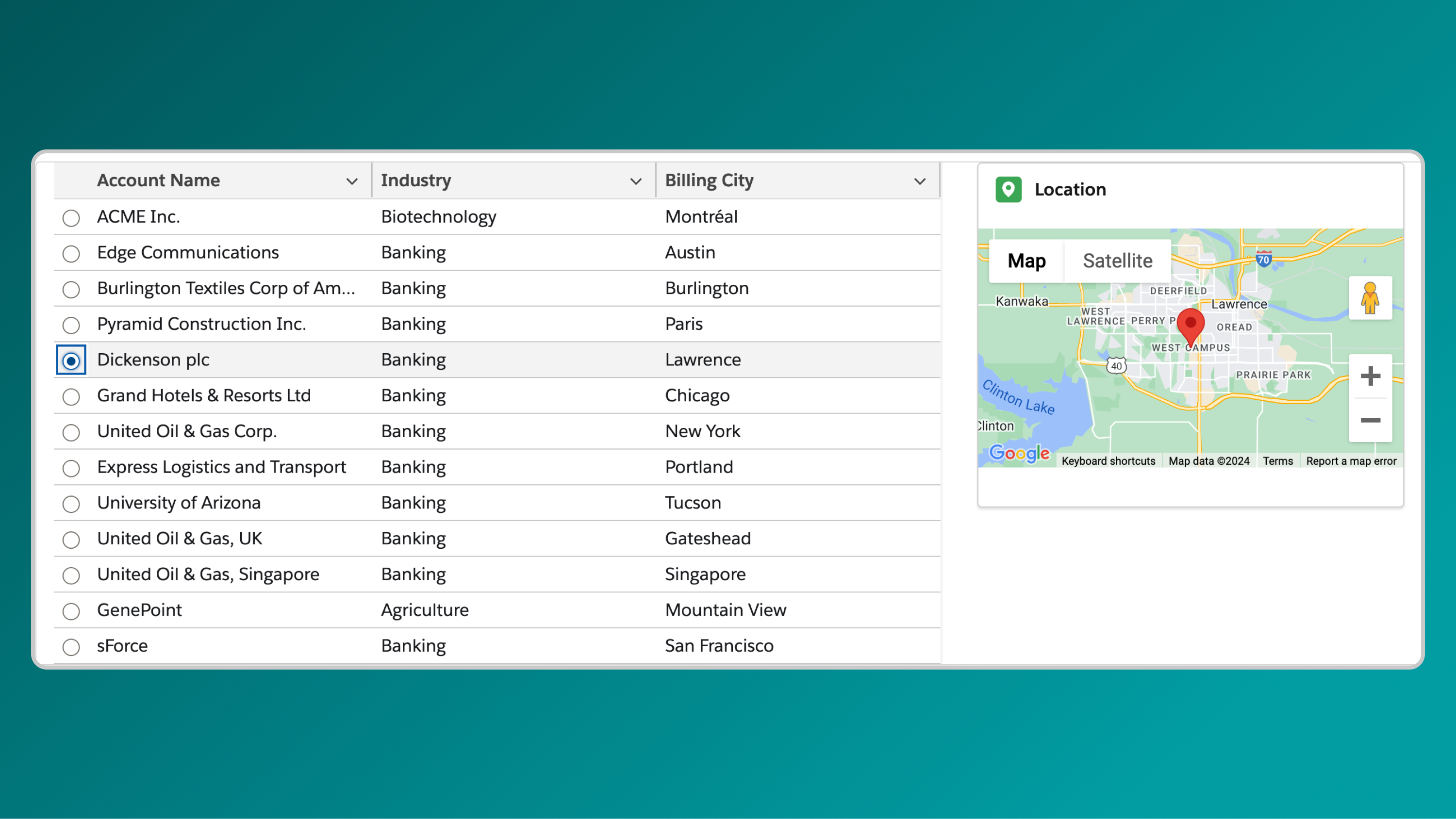

リアクティブコンポーネントを使うと、ユーザーがデータを動的に探索できるインタラクティブなページを構築できます。たとえば、AX - Data Table でレコードをクリックすると、AX - Map が自動的に更新されてそのレコードの場所を表示したり、AX - Timeline を絞り込んで関連アクティビティを表示したりできます。しかも、ページの再読み込みや移動は不要です。

これにより、ユーザーが閲覧または選択している内容に応じて情報が即座に更新され、より魅力的なポータル体験が実現します

***

## 実践的な使用例

### 地図による動的なアカウント詳細

Avonni Map を設定してアカウントの所在地を表示します。ユーザーが場所を選択すると、関連するアカウントの詳細（例：名前、説明、業種）が Avonni Text Block に自動的に表示され、データを直感的に確認できます。

<figure><img src="/files/3b8be11ad71d38659f6618dae3c05b8eb4479e5d" alt=""><figcaption></figcaption></figure>

### 相互接続されたデータテーブル

Avonni Data Table を設定してアカウントを一覧表示します。アカウントを選択すると、2つ目の Data Table が更新され、関連する連絡先が表示されるため、大規模なデータセットをシームレスに移動できます。

<figure><img src="/files/8e70663fe818bdbf05b2334460c7c6a6f31609e7" alt=""><figcaption></figcaption></figure>

***

## リアクティブコンポーネントが重要な理由

リアクティブコンポーネントにより、Experience Site は要素間で応答し、連携できるようになり、より動的で使いやすくなります。このインタラクティブ性は、訪問者が情報を効率よく見つけてアクセスするのに役立ち、より魅力的で生産的な体験につながります。

***

## **リアクティブな Avonni コンポーネントの設定**

以下の簡単なセットアップ手順で、これらのリアクティブコンポーネントを Experience Site に組み込み、インタラクティブ性を高めましょう：

### **コンポーネントが「リアクティブ」になるのはなぜですか？**

コンポーネントは、データを他のコンポーネントにリンクすることでリアクティブになり、ユーザーの操作に応じて自動更新できるようになります。これは、次の 2 つの簡単な手順で実現できます

### リアクティビティを有効にする手順

{% stepper %}
{% step %}

#### データコンポーネントに名前を付ける（componentApiName）

* プロパティパネルで各コンポーネントに一意のニックネームを割り当てます。たとえば、アカウントを一覧表示する Data Table に accountsDatatable という名前を付けます。
* *なぜこれが必要なのですか？* このニックネームは、リアクティビティのためにコンポーネントを識別し、他のコンポーネントがそのデータを参照できるようにします
  {% endstep %}

{% step %}

#### 他のコンポーネントに反応方法を伝える

* ユーザーが別のコンポーネントと操作したときに、どのコンポーネントを更新するかを指定します。ターゲットコンポーネントのプロパティで次の構文を使用します：text`{{componentApiName.selectedRecord.componentFieldApiName}}`
* **内訳：**
  * `componentApiName`：割り当てたニックネーム（例： `accountsDatatable`).
  * `selectedRecord`：ユーザーが選択する行または項目。
  * `componentFieldApiName`：表示する特定のフィールド（例： `名前`, `業界`).
* *なぜこれが必要なのですか？* この構文は、選択されたデータ（例：アカウントの `名前`）を別のコンポーネントにリンクし、自動更新をトリガーします
  {% endstep %}
  {% endstepper %}

***

## 一般的な問題のトラブルシューティング

<details>

<summary><strong>コンポーネントが更新されない</strong></summary>

各コンポーネントに一意の `componentApiName` および構文（`{{componentApiName.selectedRecord.componentFieldApiName}}`）がターゲットコンポーネントのプロパティに正しく入力されていることを確認します。

</details>

<details>

<summary><strong>データが表示されない</strong></summary>

ソースコンポーネント（例： `accountsDatatable`）にデータがあり、 `componentFieldApiName` 利用可能なフィールド（例： `名前`).

</details>

<details>

<summary><strong>リアクティビティの遅延</strong></summary>

複雑なデータセットがないか確認し、クエリを簡略化するか、リアクティブリンクの数を減らしてパフォーマンスを向上させます。

</details>

<details>

<summary><strong>問題が解決しない場合</strong></summary>

サポートチームまでご連絡ください： <support@avonni.com> サポートが必要な場合は。

</details>

***

## **ガイド付きの例**

<table data-card-size="large" data-view="cards"><thead><tr><th></th><th></th><th data-hidden data-card-cover data-type="files"></th></tr></thead><tbody><tr><td><a href="/pages/15049067c83bfaa135d81f30315623cc76523f03"><strong>Data Table と Map をリンクして動的な位置情報を表示する</strong></a></td><td>Experience Site で Avonni Data Table と Map を接続し、ユーザーが選択したアカウントに基づいて位置情報を動的に表示する方法を学びます。</td><td><a href="/files/20dbb41932b62ee8ea83d7bac85031d7ad282087">/files/20dbb41932b62ee8ea83d7bac85031d7ad282087</a></td></tr><tr><td><a href="/pages/4bf5a4b8c092ce6f9765b58cfa7449cf2e6a1daa"><strong>リンクされたデータテーブル</strong></a></td><td>アカウント用の Avonni Data Table を Contacts Table にリンクし、選択したアカウントの連絡先のみを表示するよう Contacts Table を動的に更新する方法を確認します</td><td><a href="/files/61e587c7e50262b2ee3cc4ac065de487084117c3">/files/61e587c7e50262b2ee3cc4ac065de487084117c3</a></td></tr></tbody></table>


---

# Agent Instructions
This documentation is published with GitBook. GitBook is the documentation platform designed so that both humans and AI agents can read, navigate, and reason over technical content effectively. Learn more at gitbook.com.

## Querying This Documentation
If you need additional information that is not directly available in this page, you can query the documentation dynamically by asking a question.

Perform an HTTP GET request on the current page URL with the `ask` query parameter, and the optional `goal` query parameter:

```
GET https://docs.avonnicomponents.com/experience-cloud/experience-cloud-ja/hajimeni/reactive-components.md?ask=<question>&goal=<endgoal>
```

`ask` is the immediate question: it should be specific, self-contained, and written in natural language.
`goal` is optional and describes the broader end goal you are ultimately trying to accomplish on behalf of the user. GitBook uses it to tailor the answer towards what is most useful for that goal.

The response will contain a direct answer to the question and relevant excerpts and sources from the documentation.

Use this mechanism when the answer is not explicitly present in the current page, you need clarification or additional context, or you want to retrieve related documentation sections.