> For the complete documentation index, see [llms.txt](https://docs.avonnicomponents.com/llms.txt). Markdown versions of documentation pages are available by appending `.md` to page URLs; this page is available as [Markdown](https://docs.avonnicomponents.com/experience-cloud/experience-cloud-ja/hajimeni/license-management.md).

# ライセンス管理

## ライセンスと権限の管理

ユーザーが Avonni Components を表示および操作できるようにするには、特に Experience Cloud サイト上で、2 段階の設定プロセスを完了する必要があります。

<mark style="background-color:orange;">**⚠️ 設定要件:**</mark> ユーザーが Avonni Components に正常にアクセスするには、次の両方を割り当てる必要があります:

1. **パッケージライセンス** （ユーザーに 1 席を割り当てます）。
2. **権限セット** （コンポーネントへの技術的アクセスを付与します）。

{% hint style="warning" %}

#### 重要

ユーザーにライセンスはあるが権限セットがない場合（またはその逆の場合）、コンポーネントは読み込まれず、ユーザーにはエラーメッセージが表示されます。
{% endhint %}

***

## ステップ 1: パッケージライセンスを割り当てる

パッケージライセンスにより、ユーザーは Salesforce 内でソフトウェアを使用する基本的な権利を得ます。

ライセンスの利用可否:

* 本番環境: 10 個のフリーミアムライセンスが含まれます。
* Sandbox: サイトライセンスが含まれます（ユーザー数無制限／有効期限なし）。

割り当て方法:

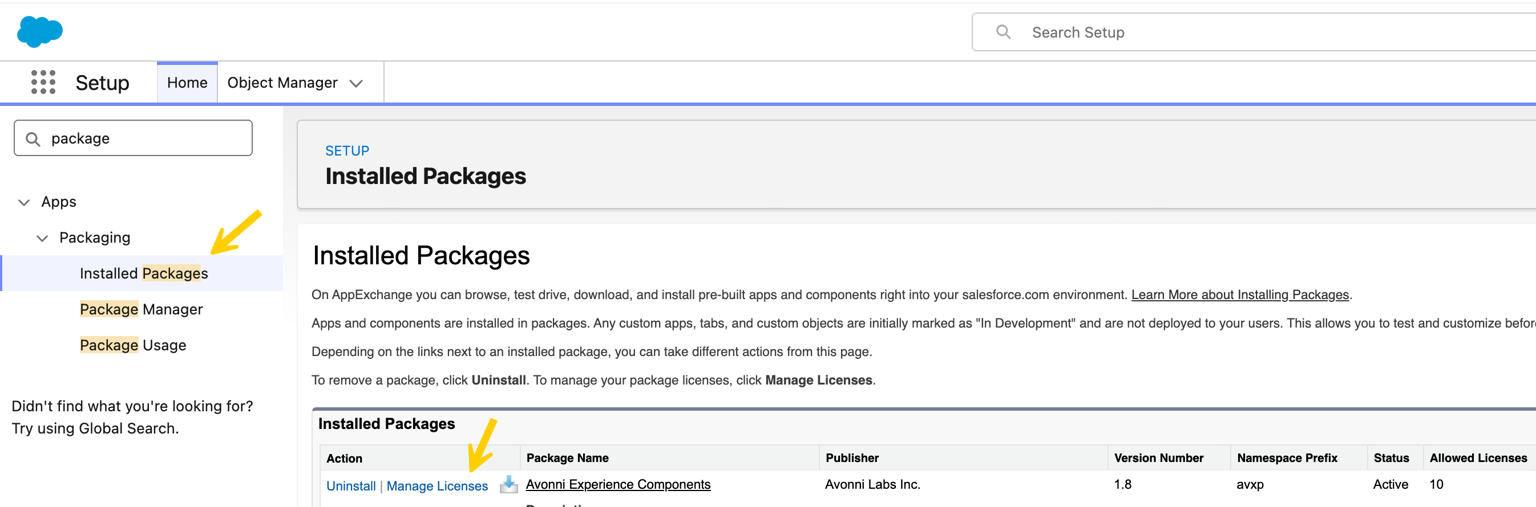
1. 次へ移動: **Setup**.
2. 検索して選択: **Installed Packages**.
3. 見つけてください: **Avonni Experience Components** をクリックします: **Manage Licenses**.
4. クリック **Add Users**.
5. アクセスが必要なユーザーをすべて選択し、 **Save**.

<figure><img src="/files/be3d1396c496abd3d18b3d854c5cc59f328a3d07" alt=""><figcaption></figcaption></figure>

***

## ステップ 2: 権限セットを割り当てる

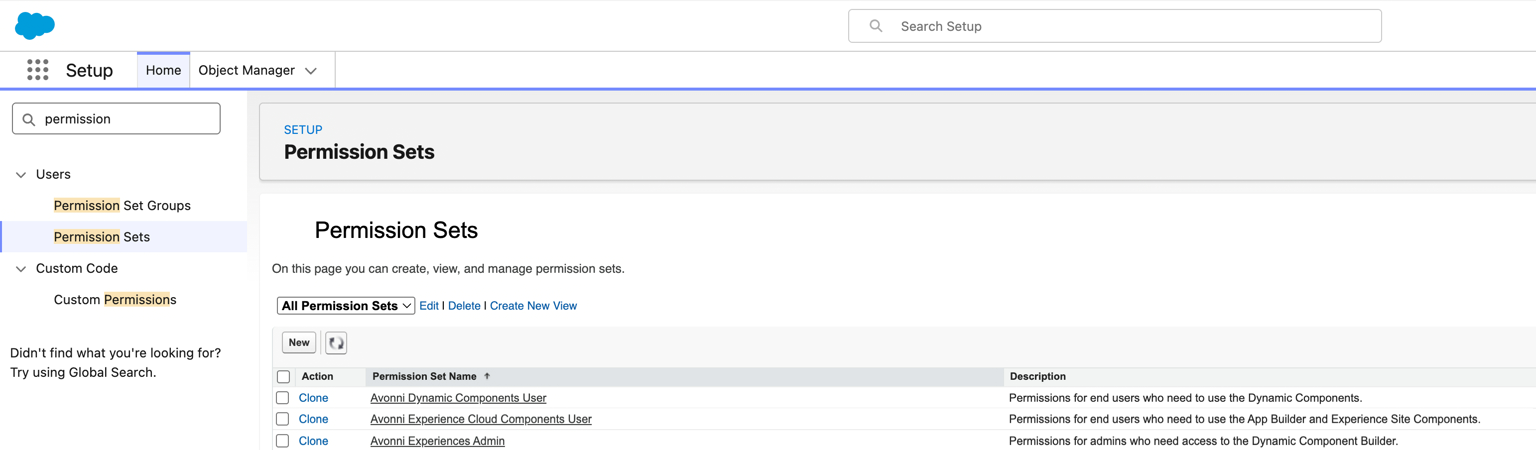
ライセンスが割り当てられたら、ユーザーの役割に基づいて適切な権限セットを割り当てる必要があります。Avonni パッケージには 3 つの異なる権限セットが含まれています。

<figure><img src="/files/c1687e0259a8666909f55e2084db131033042f9a" alt=""><figcaption></figcaption></figure>

ユーザーに適した権限セットを選択してください:

| 役割                                                                                      | 権限セット名                                  | 機能                                                                       |
| --------------------------------------------------------------------------------------- | --------------------------------------- | ------------------------------------------------------------------------ |
| <p><strong>エンドユーザー</strong></p><p><strong>（Experience Cloud & App Builder）</strong></p> | Avonni Experience Cloud Components User | Experience Site または標準の Lightning App Builder ページでコンポーネントを表示するユーザーに必要です。  |
| <p><strong>エンドユーザー</strong></p><p><strong>（Dynamic Components）</strong></p>             | Avonni Dynamic Components User          | Salesforce 内で Dynamic Components（例: カスタムデータテーブル、アクションボタン）を操作するユーザーに必要です。 |
| **管理者とビルダー**                                                                            | Avonni Experiences Admin                | Avonni Component Builder を使用してレイアウトを作成、編集、構築する必要があるユーザーに必要です。            |

割り当て方法:

1. 次へ移動: **Setup** > **権限セット**.
2. 上の表から適切な権限セットを選択してください。
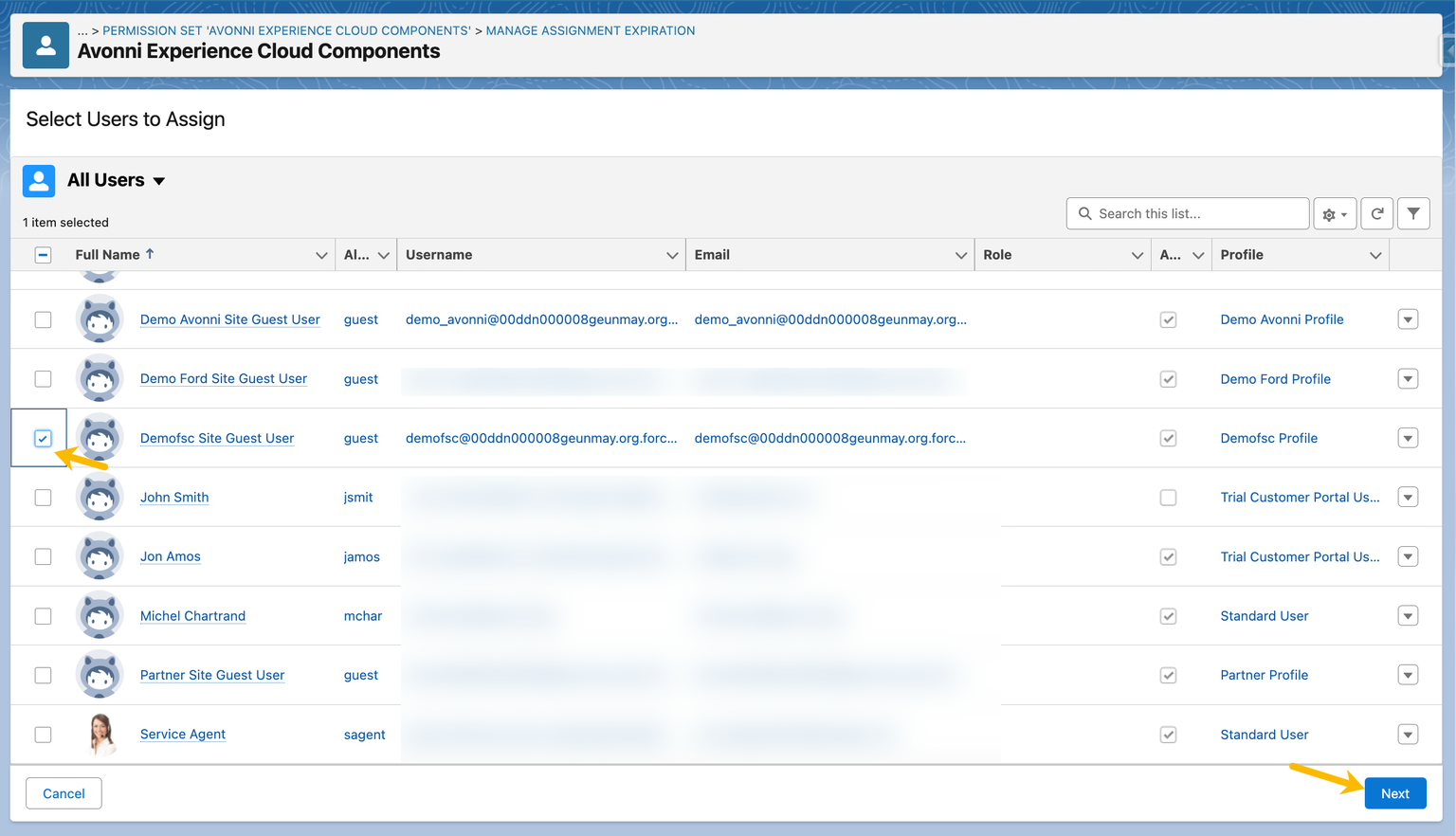
3. クリック **割り当てを管理** > **割り当てを追加**.
4. ステップ 1 でライセンスを割り当てたユーザーを選択します。
5. クリック **割り当て**.

***

## ゲストユーザー向けの設定

ゲストユーザー（公開サイトの未認証訪問者）は標準のパッケージライセンスを必要としませんが、権限は必要です。

{% hint style="warning" %}

#### 注

本番環境でのゲストユーザーアクセスは追加機能です。詳細については、 [サポートまでお問い合わせください](mailto:support@avonni.app) 。
{% endhint %}

ゲストアクセスを有効にするには:

1. Experience Cloud サイトを Builder で開きます。
2. Settings > General に移動し、ゲストユーザープロファイルへのリンクをクリックします。
3. プロファイル設定で、権限セットの割り当てまでスクロールします。
4. Avonni Experience Cloud Components の権限セットをプロファイルに追加します。

<figure><img src="/files/a09771cbe2b83c34d0c2849da497b1f292ed6f64" alt=""><figcaption></figcaption></figure>

#### アクセス問題のトラブルシューティング

ユーザーが次のエラーを報告した場合: *「この Avonni Component へのアクセス権がありません」* 次の項目を確認してください:

| 問題           | 解決策                                                                                                                                                           |
| ------------ | ------------------------------------------------------------------------------------------------------------------------------------------------------------- |
| **ライセンスがない** | ユーザーが次に表示されていることを確認してください: *Installed Packages > Manage Licenses*.                                                                                            |
| **権限がない**    | ユーザーに次の権限セットが割り当てられていることを確認してください: *Avonni Experience Cloud Components* 。                                                                                     |
| **LWS が無効**  | 次を確認してください: [*Lightning Web Security* が有効になっている](https://developer.salesforce.com/docs/platform/lightning-components-security/guide/lws-enable.html) Setup で。 |


---

# Agent Instructions
This documentation is published with GitBook. GitBook is the documentation platform designed so that both humans and AI agents can read, navigate, and reason over technical content effectively. Learn more at gitbook.com.

## Querying This Documentation
If you need additional information that is not directly available in this page, you can query the documentation dynamically by asking a question.

Perform an HTTP GET request on the current page URL with the `ask` query parameter, and the optional `goal` query parameter:

```
GET https://docs.avonnicomponents.com/experience-cloud/experience-cloud-ja/hajimeni/license-management.md?ask=<question>&goal=<endgoal>
```

`ask` is the immediate question: it should be specific, self-contained, and written in natural language.
`goal` is optional and describes the broader end goal you are ultimately trying to accomplish on behalf of the user. GitBook uses it to tailor the answer towards what is most useful for that goal.

The response will contain a direct answer to the question and relevant excerpts and sources from the documentation.

Use this mechanism when the answer is not explicitly present in the current page, you need clarification or additional context, or you want to retrieve related documentation sections.