> For the complete documentation index, see [llms.txt](https://docs.avonnicomponents.com/llms.txt). Markdown versions of documentation pages are available by appending `.md` to page URLs; this page is available as [Markdown](https://docs.avonnicomponents.com/experience-cloud/experience-cloud-ja/experience-components/ax-accordion.md).
# AX - アコーディオン
## 概要
**AX - アコーディオン** これはExperience Cloudコンポーネントで、Experience Sitesページ上の折りたたみ可能なセクションにコンテンツを整理し、ユーザーが必要な内容に集中できるよう、セクションを展開・折りたたみできるようにします。
FAQ、詳細な製品情報、ヘルプドキュメント、または展開可能なセクションに分けることでナビゲーションしやすくなるあらゆるコンテンツの表示に使用します。ユーザーは複数のセクションを同時に開くことも、1つのセクションだけが常に開いた状態になるように設定することもできます。
ナレッジベース、セルフサービスのヘルプコンテンツ、長いフォーム、またはポータルのユーザーがすべてをスクロールせずに情報を素早く確認し、必要なものだけを表示したいあらゆる場面に最適です。
## 設定
アコーディオンはコンテナです: ドロップ [AX - アコーディオンセクション](/experience-cloud/experience-cloud-ja/experience-components/ax-accordion-section.md) その中にコンポーネントを配置します。折りたたみセクションごとに1つずつ。
### プロパティ
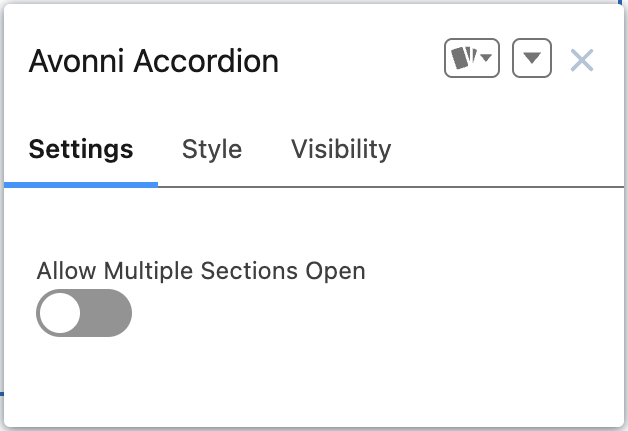
アコーディオンコンポーネントの設定では、次を定義できます: **`複数セクションを同時に開くことを許可`**。この設定をオンにすると、1つのAvonni Accordionを開いても、他に開いているAvonni Accordionは閉じられません。
---
# Agent Instructions
This documentation is published with GitBook. GitBook is the documentation platform designed so that both humans and AI agents can read, navigate, and reason over technical content effectively. Learn more at gitbook.com.
## Querying This Documentation
If you need additional information that is not directly available in this page, you can query the documentation dynamically by asking a question.
Perform an HTTP GET request on the current page URL with the `ask` query parameter, and the optional `goal` query parameter:
```
GET https://docs.avonnicomponents.com/experience-cloud/experience-cloud-ja/experience-components/ax-accordion.md?ask=&goal=
```
`ask` is the immediate question: it should be specific, self-contained, and written in natural language.
`goal` is optional and describes the broader end goal you are ultimately trying to accomplish on behalf of the user. GitBook uses it to tailor the answer towards what is most useful for that goal.
The response will contain a direct answer to the question and relevant excerpts and sources from the documentation.
Use this mechanism when the answer is not explicitly present in the current page, you need clarification or additional context, or you want to retrieve related documentation sections.