> For the complete documentation index, see [llms.txt](https://docs.avonnicomponents.com/llms.txt). Markdown versions of documentation pages are available by appending `.md` to page URLs; this page is available as [Markdown](https://docs.avonnicomponents.com/experience-cloud/experience-cloud-ja/chtoriaru/reactive-components/linking-data-table-and-map-for-dynamic-locations.md).
# 動的な場所のためにデータテーブルと地図をリンクする
## 概要
このガイドでは、Experience Cloud サイトで Avonni Data Table と Avonni Map コンポーネントを接続して、動的でインタラクティブな表示を作成する方法を説明します。2つのコンポーネントを連携させることで、Data Table でアカウントを選択すると Map が更新され、関連する場所が表示されるため、ユーザーのエンゲージメントが高まります。
### メリット
これらのコンポーネントを連携すると、サイトはユーザーの選択にリアルタイムで反応でき、手動で更新しなくてもアカウントの所在地を絞り込んで直感的に確認できます。
## 連携の設定
### **Data Table の設定**
{% stepper %}
{% step %}
#### Data Table コンポーネントを追加する
* Experience Cloud ページに Avonni Data Table コンポーネントを配置して、アカウント情報を表示します。
* *なぜこれが必要なのか?* Data Table は開始点として機能し、ユーザーが選択できるアカウントの詳細を表示します
{% endstep %}
{% step %}
#### Data Table に名前を付ける
* Data Table のプロパティパネルで、 **API 名** を `accountsDatatable`.
* *なぜこれが必要なのか?* API 名は一意の識別子として機能し、他のコンポーネント(Map など)がそれを認識して反応できるようにします。
{% endstep %}
{% step %}
#### 選択を 1 件に制限する
* Data Table のプロパティで、 **最大行選択数** 設定を見つけて、 `1.`
* *なぜこれが必要なのか?* 1 行に制限すると、Map が単一のアカウントの所在地を表示するようになり、体験が明確で集中しやすくなります。
{% endstep %}
{% endstepper %}
### Avonni Map の設定
{% stepper %}
{% step %}
#### Map コンポーネントを追加する
* 同じページに Avonni Map コンポーネントを配置します(例: 名前を `relatedLocationsMap`).
* *なぜこれが必要なのか?* Map は、選択されたアカウントに基づいて位置データを表示します。
{% endstep %}
{% step %}
#### データソースを設定する
* Map のプロパティパネルで、 **データソース** セクションに移動します。
* 選択し **クエリデータソース** を選択し、 **アカウント** オブジェクト(または位置データを持つオブジェクト)を選びます。
* *なぜこれが必要なのか?* このクエリは、Salesforce から位置データを動的に取得します
{% endstep %}
{% step %}
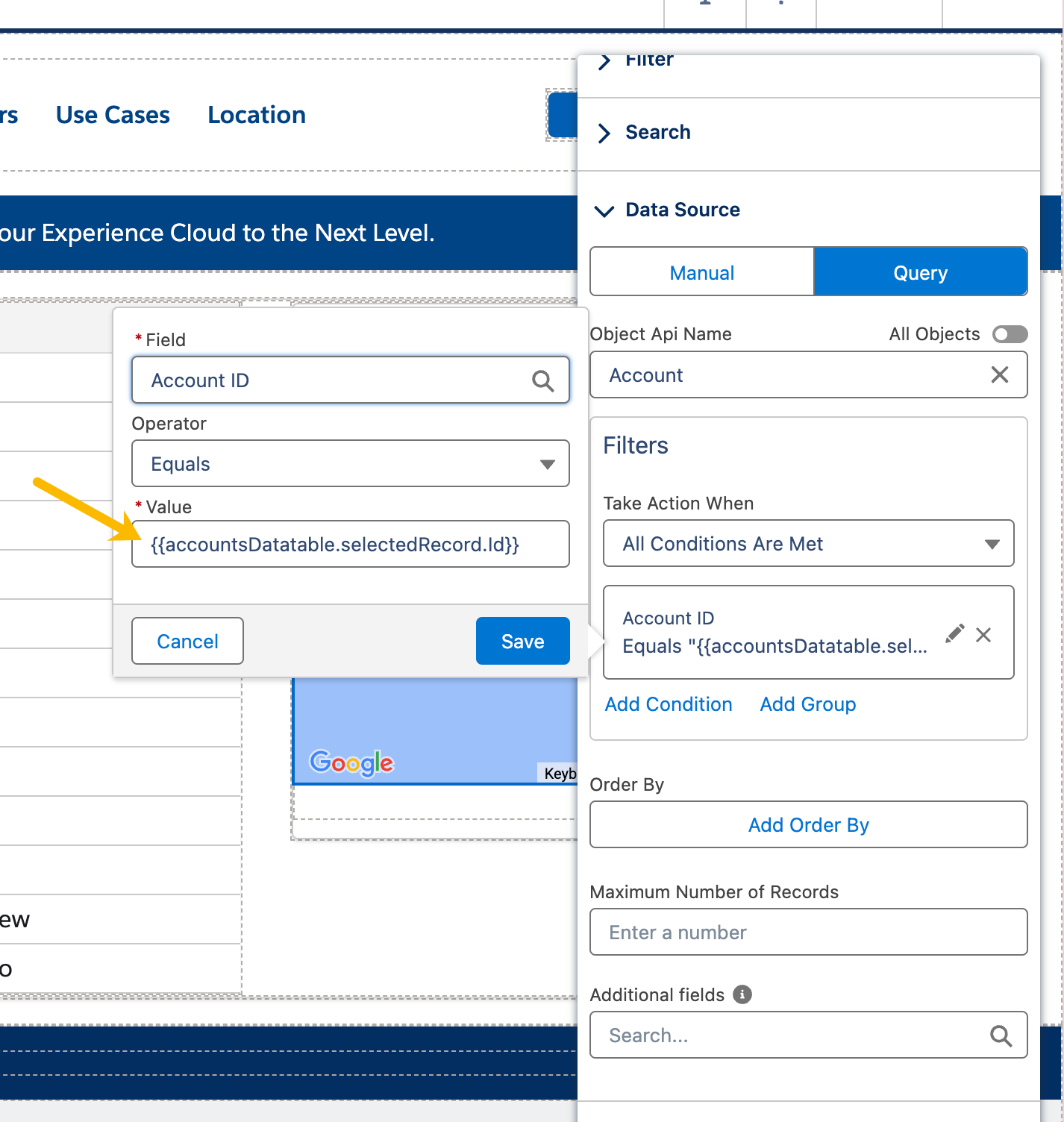
#### 結果をフィルタリングする
* クエリ設定にフィルター条件を追加します:
* 理由: このフィルターにより、Map は Data Table で選択されたアカウントに関連する位置のみを表示します。選択されたレコードの ID を使用します
| フィールド | 演算子 | 値 |
| ------------- | --- | ----------------------------------------- |
| アカウント ID | 等しい | `{{accountsDatatable.selectedRecord.Id}}` |
| {% endstep %} | | |
{% step %}
#### フィールドをマッピングする
* フィールドをマッピングして位置マーカーを表示するように Map を設定します(例: `緯度` と `経度` を Account オブジェクトまたは関連オブジェクトのフィールドに設定します)。
* *なぜこれが必要なのか?* 適切なフィールドマッピングにより、クエリされたデータに基づいて Map がマーカーを配置する場所を把握できます。
{% endstep %}
{% endstepper %}
## 結果
ユーザーが Data Table でアカウントを選択すると、Map はそのアカウントに関連する場所のみを自動的に更新して表示します。これにより、シームレスでインタラクティブな体験が実現し、訪問者はデータを効率的に探索できます。
## よくある問題のトラブルシューティング
* **Map が更新されない:** accountsDatatable の API 名が完全に一致していること、および Max Row Selection が 1 に設定されていることを確認してください。フィルターの構文({{accountsDatatable.selectedRecord.Id}})も確認してください。
* **位置が表示されない:** Account オブジェクトまたは関連オブジェクトに緯度と経度のフィールドがあることを確認し、クエリがデータを返すことを確認してください。
* **パフォーマンスの問題:** Map の読み込みが遅い場合は、クエリを簡素化するか、レコード数を減らしてください。
* **問題が解決しない場合:** サポートチームまでお問い合わせください: サポートについては
---
# Agent Instructions
This documentation is published with GitBook. GitBook is the documentation platform designed so that both humans and AI agents can read, navigate, and reason over technical content effectively. Learn more at gitbook.com.
## Querying This Documentation
If you need additional information that is not directly available in this page, you can query the documentation by asking a question.
Perform an HTTP GET request on the following URL with the `ask` and `goal` query parameters:
```
GET https://docs.avonnicomponents.com/experience-cloud/experience-cloud-ja/chtoriaru/reactive-components/linking-data-table-and-map-for-dynamic-locations.md?ask=&goal=
```
`ask` is the immediate question: it should be specific, self-contained, and written in natural language.
`goal` is what the user is ultimately trying to achieve, the reason they need the answer. Sharing it helps GitBook give you a better, more relevant answer. A goal is most helpful when it describes the outcome the user wants rather than restating the question. For example, with `ask=how do I create an API token`, a goal like `automate deployments from our CI pipeline` lets GitBook tailor the answer to that use case.
The response will contain a direct answer to the question and relevant excerpts and sources from the documentation.
Use this mechanism when the answer is not explicitly present in the current page, you need clarification or additional context, or you want to retrieve related documentation sections.
.gif?alt=media)