> For the complete documentation index, see [llms.txt](https://docs.avonnicomponents.com/llms.txt). Markdown versions of documentation pages are available by appending `.md` to page URLs; this page is available as [Markdown](https://docs.avonnicomponents.com/dynamic-components/resources/deployment-process.md).
# Deployment Process
## Overview
This page explains how Avonni Dynamic Components are stored within Salesforce and how you can easily deploy them between your different Salesforce environments (e.g., from a Sandbox to Production, or between developer orgs).
One of the key advantages of Avonni Dynamic Components is their portability. Because they are built and stored natively on the Salesforce platform, moving your custom-built components between organizations is straightforward using standard Salesforce deployment tools.
***
## How Dynamic Components are Stored
When you create and save a Dynamic Component in the Avonni Component Builder, its entire definition is stored as a **record in a specific Custom Metadata Type (CMDT)** provided by the Avonni managed package.
{% hint style="info" %}
## Where Your Component's Code Lives
Think of this Custom Metadata record as the **source code and structure** of your Dynamic Component: everything from layout and data sources to visibility rules and interactions is encoded in this metadata. It's essentially where your Dynamic Component "lives."
{% endhint %}
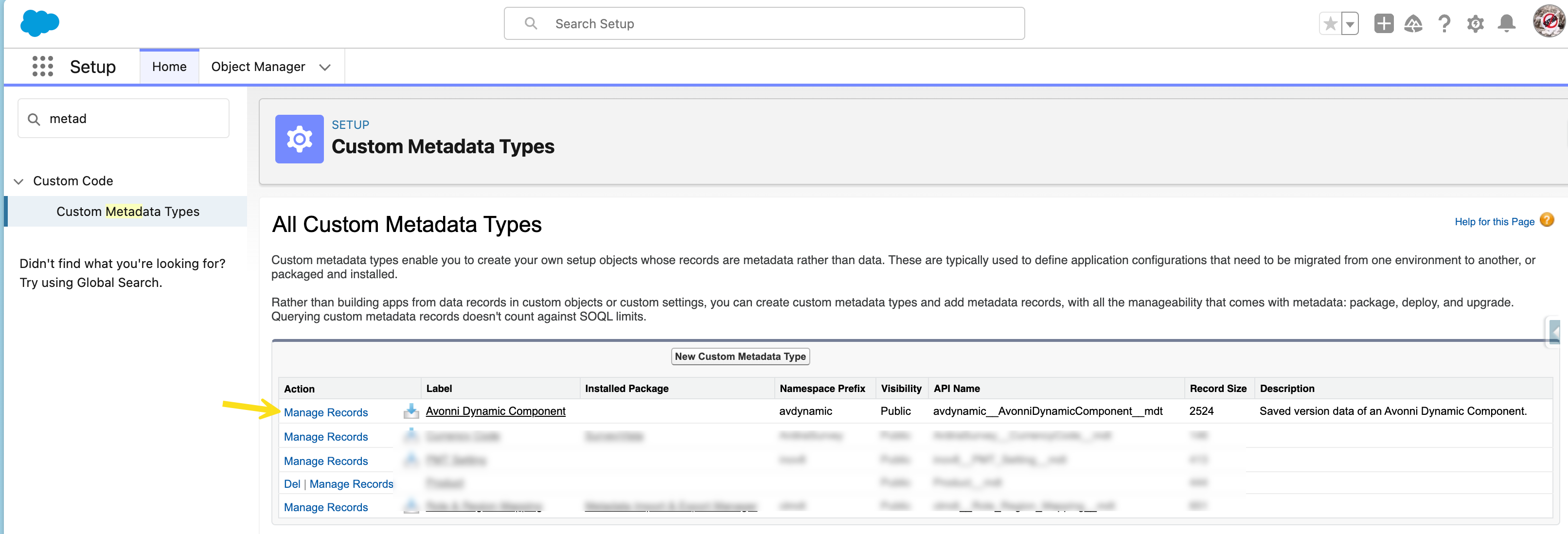
For example, if you create a component like "Account Dashboard," it will be stored as a single record within the Avonni Dynamic Component CMDT, whose API name is `avdynamic__AvonniDynamicComponent__mdt`. The `avdynamic` prefix is the managed package namespace, and it is what the CMDT appears under in your org. You can confirm it in **Setup → Custom Metadata Types**, where it is listed with the label **Avonni Dynamic Component**.
Using CMDT for storage is what makes Avonni components highly portable and compatible with Salesforce's native deployment infrastructure.
***
## Deployment Workflow
The typical process for deploying Dynamic Components follows standard Salesforce best practices:
1. **Build & Test**\
Create and configure your Dynamic Component in a source org (such as a Sandbox), then thoroughly test it. Don't forget to **Save** and **Activate** it in the Avonni Component Builder.
2. **Identify Components**\
Determine which specific CMDT records (i.e., component definitions) need to be deployed.
3. **Choose a Deployment Tool**\
Select from tools such as **Change Sets**, **Salesforce DX (SFDX)**, **Ant**, or third-party solutions like **Gearset** or **Copado**.
4. **Include CMDT Records**\
Add the necessary CMDT records to your deployment package. These records are listed under the CMDT name `avdynamic__AvonniDynamicComponent__mdt`, labelled **Avonni Dynamic Component**.
5. **Deploy**\
Deploy the metadata using your chosen tool.
6. **Verify & Configure in Target Org**
* Confirm the CMDT records deployed correctly.
* Open the **Avonni Components App** in the target org to locate your deployed components.
* Activate the deployed version in the builder if it arrived Inactive.
* Use the **Lightning App Builder** to place them on Lightning pages.
***
## Using Common Deployment Tools
### **Change Sets**
1. Create an **Outbound Change Set**.
2. Under *Component Type*, choose **Custom Metadata Type**.
3. Add the specific CMDT records for your Dynamic Components.
4. Include any dependent components (e.g., Apex classes, Flows, referenced fields).
5. Upload and deploy the Change Set to your target org.
{% hint style="info" %}
Change Sets only travel between orgs that share the same production org, such as a sandbox and its production, or two sandboxes of the same production. To move a component to an unrelated org, use SFDX or a third-party tool below to retrieve the CMDT record and deploy it into the target.
{% endhint %}
### **Salesforce DX (SFDX)**
* Ensure your `package.xml` manifest file includes the Custom Metadata Type for Avonni Dynamic Components:
```xml
*CustomMetadataavdynamic__AvonniDynamicComponent__mdt.*CustomObject
```
*(Note: CMDT records are often retrieved/deployed via the CustomObject metadata type definition in package.xml)* Alternatively, or for more granularity, you might reference the specific records within the CustomMetadata type entry if you only want to deploy specific components.
* Use SFDX commands (`sf project retrieve start` / `sf project deploy start`) to retrieve the CMDT records from the source org and deploy them to the target org.
### **Third-Party Tools**
Tools like **Gearset** and **Copado** fully support CMDT deployment. Select the appropriate Avonni CMDT records and follow your tool's deployment flow.
{% hint style="warning" %}
## Important Considerations
* **Activation in the Target Org:** Each version carries its own status, Active or Inactive, and that status travels with the record. So a version deployed as Inactive has to be activated in the Avonni Component Builder in the target org before you can place it on a Lightning page.
* **The Version Already Active in the Target Org:** A deployment writes the records you include in it and leaves every other record alone, so deploying an active version does not deactivate the one already active in the target org. Both stay active, and the Lightning App Builder then lists the component twice under the same label, with nothing to tell the two entries apart. Two ways to avoid it: activate the newly deployed version from the Component Builder in the target org, which deactivates the previous one for you, or include the version being replaced in the same deployment, since it is already Inactive in your source org. See Version management for how versions and their statuses work.
* **Dependencies:** Ensure any underlying components your Dynamic Component relies on (custom objects, fields, Apex classes called by interactions, Flows, etc.) are also included in your deployment or already exist in the target org.
* **Permissions & Licenses:** Verify that users and administrators in the target org have the necessary Avonni licenses and permission sets assigned to use the builder and view the deployed components.
* **Managed Package Updates:** Ensure both the source and target orgs are on the same (or compatible) version of the Avonni Dynamic Components managed package before deploying component definitions.
{% endhint %}
***
## **In Summary**
Avonni Dynamic Components are stored as Custom Metadata Type records, essentially the "code" and "structure" of your components. This design enables easy deployment using Salesforce-native and third-party deployment tools. By treating your components like metadata assets, you can confidently manage their lifecycle across multiple environments with speed and precision.
***
## **Deployment Tips from the Community**
Deploying Dynamic Components for the first time? Join our [**Trailblazer Community Group**](https://trailhead.salesforce.com/trailblazer-community/groups/0F9KX000000iFxO0AU?tab=discussion\&sort=LAST_MODIFIED_DATE_DESC) where experienced admins share:
* **Deployment automation scripts** and package.xml templates
* **Change set best practices** specific to Dynamic Components
* **CI/CD pipeline configurations** for teams using Salesforce DX
* **Troubleshooting tips** for common deployment issues (activation states, dependencies, version mismatches)
* **Enterprise deployment strategies** for managing components across multiple orgs
Many community members have documented their deployment workflows and are happy to help troubleshoot issues. Whether you're deploying your first component or building a full DevOps pipeline, you'll find helpful insights from people who've already solved these challenges.
Join the Community | Contact Support:
---
# Agent Instructions
This documentation is published with GitBook. GitBook is the documentation platform designed so that both humans and AI agents can read, navigate, and reason over technical content effectively. Learn more at gitbook.com.
## Querying This Documentation
If you need additional information that is not directly available in this page, you can query the documentation dynamically by asking a question.
Perform an HTTP GET request on the current page URL with the `ask` query parameter, and the optional `goal` query parameter:
```
GET https://docs.avonnicomponents.com/dynamic-components/resources/deployment-process.md?ask=&goal=
```
`ask` is the immediate question: it should be specific, self-contained, and written in natural language.
`goal` is optional and describes the broader end goal you are ultimately trying to accomplish on behalf of the user. GitBook uses it to tailor the answer towards what is most useful for that goal.
The response will contain a direct answer to the question and relevant excerpts and sources from the documentation.
Use this mechanism when the answer is not explicitly present in the current page, you need clarification or additional context, or you want to retrieve related documentation sections.